
Ik ga er vanuit dat je een kale Ubuntu 6.06 Server installatie hebt afgerond. Vervolgens moet je de /etc/apt/sources.list aanpassen zodat alle soureces op enabled staan.
Met de onderstaande commando’s installeer je Cacti met de bijbehorende tools MRTG, NetSNMP, Apache2 en Mysql.
sudo apt-get update
sudo apt-get install mysql-server
sudo apt-get install cacti
Leave the question “Password of your database’s administrative user:” blank and hit “Forward”.
Leave the question “MySQL application password for Cacti” blank and hit “Forward”.
Note: The system will create a random password for you, so you don’t need to enter one
On the “Webserver type” question, select “Apache2” and then click “Forward”
Setup Cacti
Visit the website of your Cacti server, should be similar to “[WWW] http://server.ip.address/cacti/”
This should automatically initiate the “Cacti Installation Guide” in your web-browser
Click “Next”, “Next”, and “Finish” to complete this guide
Login to Cacti with the default username and password of “admin” and “admin”
You will be forced to change the “admin” password to something new
Cacti is now successfully installed!
Bron: https://help.ubuntu.com
Een Cacti overview:
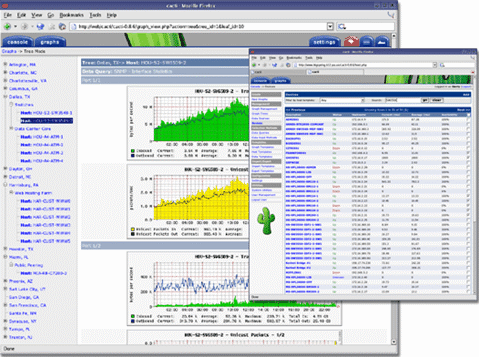
Nu dient de ESX server te worden geconfigureerd.
Log in op het Service Console en voer het onderstaande commando uit:
snmpsetup.sh default
This script sets up a new snmpd.conf file which allows you to see VMware ESX Server MIB items.
Stopping agents.Stopping snmpd: [FAILED]
Stopping vmware-snmpd: [FAILED]
Checking for main agent.Setting up basic config file.
Do you want to enable SNMP traps for virtual machine events? (y/n) y
Default trapsink is localhost.
You can modify /etc/snmp/snmpd.conf to set up a different trap destination.
Setup finished.Restarting agents.Starting snmpd: [ OK ]
Waiting for master agent to start.
Starting vmware-snmpd as subagent:
You could then enable the Master SNMP Agent for required run-levels with
chkconfig snmpd on
Then enable the VMware SNMP SubAgent for required run-levels with
chkconfig vmware-snmpd on
Then we can start both SNMP daemons with
service snmpd start
service vmware-snmpd start
/etc/snmp/snmp.conf
This is the configuration file for the Master SNMP Agent.
The following is the default contents of this file after ESX has been installed.
syscontact root@localhost (edit /etc/snmp/snmpd.conf)
syslocation room1 (edit /etc/snmp/snmpd.conf)
rocommunity
publictrapcommunity
publictrapsink localhost
Bron: http://www.b2v.co.uk
De laatste stap is het toevoegen van de VMwareESX graph templates en scripts.
Deze kun je hier downloaden: cacti forums en vmware_esx_cacti_0.8.6d-050522.zip
De resource scripts plaats je in de directory /usr/share/cacti/resource/script_queries
De Graph templates plaats je in de directory /usr/share/cacti/site/scripts

 ICT-Freak.nl