One of my blog sponsors PHD Virtual asked me to do a short review of a new product called:

So what is PHD Virtual Monitor. Well, let’s start with a quote from the PHD Virtual website:
Complete End-to-End Virtual & Physical Infrastructure Monitoring
Today, IT administrators are faced with a challenge when it comes to monitoring their virtual servers. Legacy technologies, architected decades ago, are difficult to deploy and expensive to maintain. Inexpensive or free technologies, though easier to deploy and use, lack enterprise functionality and scalability. Virtualization specific products only monitor the hypervisor, limiting their overall effectiveness. Effective virtual infrastructure monitoring requires a complete view across your entire infrastructure so you can not only monitor the virtualization hypervisor and host but also the VM’s, applications, physical servers and network devices that are critical components to ensuring application availability. A better solution is now here.
PHD Virtual Monitor is a comprehensive virtualization monitoring solution that gives you complete visibility across your entire virtual IT infrastructure at all levels including virtual, physical and application. Only with a complete view can you effectively ensure application availability.
PHD Virtual Monitor Delivers Unique Value
Comprehensive Virtual Monitoring
- Hypervisor, VM’s, Apps & Physical Infrastructure
Robust Yet Easy To Deploy and Use- Pre-configured monitoring watches and auto-discovery
- Simple customization; no coding or scripting
Intelligent Agent Technology- Agent and Agent-less monitoring
- Extremely lightweight, small footprint
XenCenter and vCenter Integration- Monitor directly from Citrix XenCenter and VMware vCenter consoles
Cost Effective- Enterprise-class monitoring and scalability at a fraction of the cost
From the user guide I copied the key features list:
- Complete & Robust Agent Based Physical & Virtual Server & Network Monitoring: PHDVM is a complete, comprehensive and extensible real-time monitoring tool for physical & virtual Windows servers and workstations, Linux/Unix servers and network devices providing detailed server/workstation monitoring including Services, Processes, Performance Counters, Event Logs, Files, Registry, CPU, Disks, Memory, and other resources; and detailed network device monitoring with SNMP & Syslog. Easy to use ‘Watch’ templates for creating monitoring rules by simply specifying the key criteria to be monitored and the alert actions to be taken.
- “Agentless” Virtual Environment Monitoring: Monitor VMware and Citrix virtual environments via the individual virtual hosts or through vCenter and the XenServer Pool Master, respectively. Install a PHDVM Virtual Monitoring Collector on a Windows physical or virtual machine and collect and monitor the virtual inventory, basic Host and VM performance metrics.
- “Agentless” Server/Workstation Monitoring: Monitor thousands of servers and workstations from one or more distributed Agents via “agentless” monitoring for interactive User Logon/Logoff status. Run a simple and complete User Logon/Logoff status report. Frustrated with trying to determine User Logon/Logoff activity from the Event Logs? Try PHDVM’s direct “agentless” server/workstation approach.
- Consolidated Dashboard Status Display and Reporting: From a single central monitoring server, PHDVM scales to monitor over 2,000 local and remote physical and virtual servers/devices offering network managers a consolidated, dynamic status view on a single dashboard display. Users can access PHDVM anytime, from anywhere, using an Internet Explorer Web browser to view real-time monitoring data and dynamic dashboard displays, generate reports and perform administration tasks.
- Extensible Monitoring Programming Platform: With the CustomWatch monitoring option, PHDVM provides a user the ability to extend and enhance monitoring with Windows scripting, and scheduled execution of any Windows executable including in-house developed or third party programs. Script very detailed monitors for Exchange Server, Active Directory, SQL Server, IIS, and other Windows server based systems. Various sample scripts are included with PHDVM.
- Automated Remediation and Recovery Actions: PHDVM provides alert action options to have a designated Program run under a specified security context based on Username/Password credentials, with an optional Working Start Directory for the Program, and an option to Show Window for the Program’s Window GUI. The Program can be any Windows Batch, Script such as VBS & WMI, COM, and EXE.
- Comprehensive LOG Monitoring and Management: PHDVM’s real-time EventLog and Syslog alert Monitoring and long term Archiving enable organizations to react quickly to issues and meet requirements for Sarbanes-Oxley issues, HIPAA and other IT compliance requirements for managing Event Logs and Syslogs.
- Multi-Tenant Platform: PHDVM supports managing multiple-tenants. With optional security settings, view all tenants, or view a partitioned set of one or more tenants.
— For MSPs, support multiple clients in a single, scalable central PHDVM Server, with optional separate security settings based on client login and limited to viewing only the clients’ servers, workstations, and devices and associated Watches on the various console displays.
— For Medium-Enterprise Businesses, support multiple administrators and analysts, with optional security settings based on their Windows login and limited to viewing only their responsible servers, workstations, devices and associated Watches on the various console displays.
So what does PHD Virtual Monitor can monitor for you:
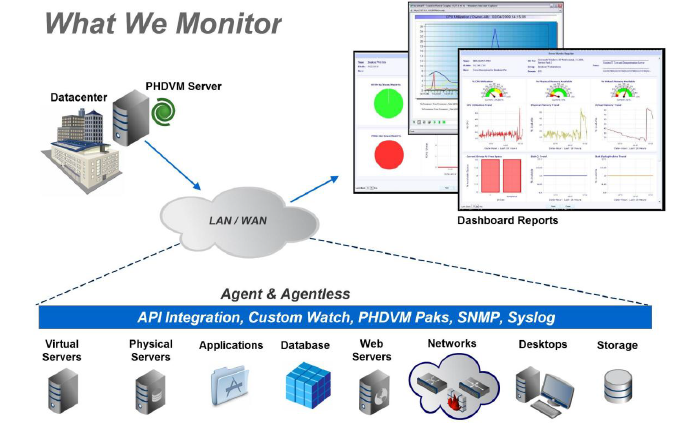
Okay enough of the marketing bla bla  Let’s start with the installation.
 ICT-Freak.nl