Citrix: Load Evaluator settings.


Op de blog http://digipulse.nl/ kwam ik de volgende Load Evaluator settings tegen:

When you create a custom load evaluator create one with with the following parameters.

Users > Max users on Citrix server + 25% so if you would allow a max of 25 users it will be 32

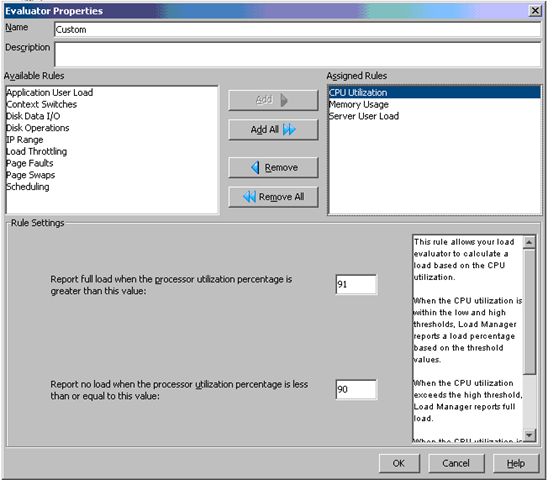
CPU load > Low treshhold = 90% High treshold = 91%

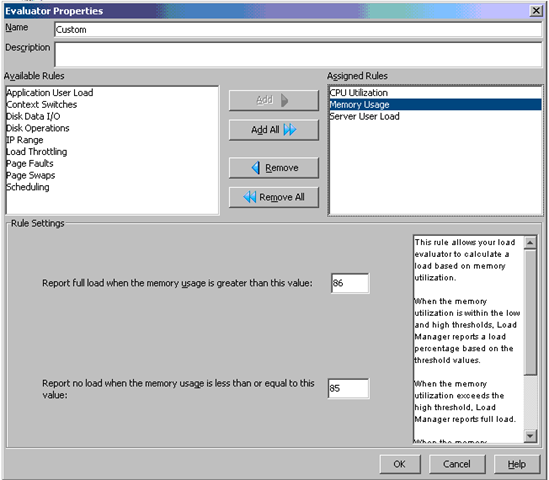
Memory load > Low treshold = 85% High treshold = 86%

When a server then peaks at a 10000 load it will automaticly redirect new users to another server and it will also leave some resources free for admins to manage the server.

Maak een nieuwe Load Evaluator aan in het Citrix Management Console (het oude console). Geef deze bijvoorbeeld de naam “Custom”.

Voeg nu de CPU Utilization rule toe met de waarden High treshold 91% en Low treshold 90%.
image

Daarna voeg je de rule Memory Usage toe. Hierbij geef je de volgende waarden op: High treshold 86% en Low treshold 85%.
image

Als laatste voeg je de rule Server User Load toe. Voor deze waarde geld: maximum aantal gebruikers plus 25%. Ik wil maximaal 30 gebruikers op mijn terminal server kwijt. Dit is dus 30 * 0.25 = 7.5 afgerond 8. Zo kom ik dus op de waarde 38.
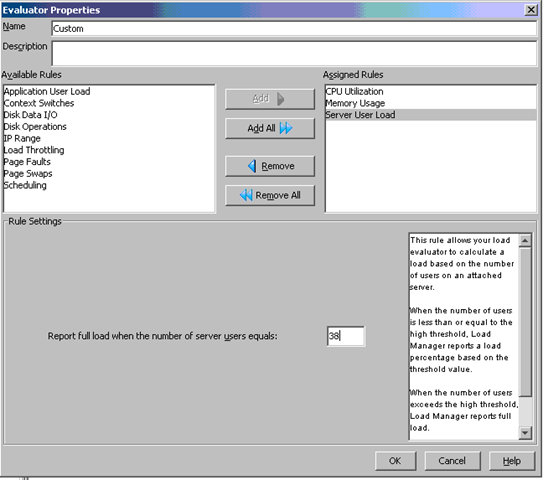
image

Wat rest is het activeren van deze load evaluator en het monitoren van deze evaluator.

bron: http://digipulse.nl/?p=53

Windows: Network Shell (Netsh) Technical Reference


The Windows Server® 2008 Network Shell (Netsh) Technical Reference provides a comprehensive command reference for networking technologies such as Dynamic Host Configuration Protocol (DHCP), Network Policy Server (NPS), Network Access Protection (NAP), and Routing and Remote Access Services (RRAS), among many other technologies for which there are netsh commands. Netsh commands offer an alternative to configuring network technologies using the Windows interface. You can run netsh commands in batch files and scripts, and you can run them from the netsh prompt by manually typing commands. You can use netsh commands to configure both local and remote computers.

Je kunt het hier downloaden: http://www.microsoft.com/downloads/


Bron: http://blogs.technet.com/seanearp/archive/2008/03/14/network-shell-netsh-technical-reference-released.aspx

Citrix: How Policies Impact Citrix PS Environments


There are numerous ways to apply a configuration or security setting onto a group of servers within a Presentation Server environment. Because policies are so unique, diverse and customizable, there is no single, correct method toward policy design. However, this document will give the key areas to consider when deciding on the appropriate approach to implementing a setting using a policy. This design consideration will look at the following types of policies and the common practices associated with them:

  • Citrix Presentation Server policies: These policies are defined within the management console on Presentation Server and only apply to connections using the Citrix ICA protocol but not the Microsoft RDP protocol. Presentation Server policies also allow for the configuration of Presentation Server-specific options like Session Printers and Progressive Display. The power of these policies is that they have the ability to be filtered based on users, location and even the method for launching the published applications. Many of these filters are only available within Presentation Server.

  • Active Director y policies: These policies are configured within Active Directory. They are applied to organizational units (folders), domains, sites, etc. within the Active Directory structure. A single Active Director y policy can consist of a computer policy and a user policy. A computer policy consists of settings that affect the physical computer and impact all users logging onto the computer while a user policy affects the user and is applied on all system s the user logs on to. Local server policies and custom policies are type s of Active Director y policies and are described as:

  • Local Server Policies and Settings: Local Server policies are similar to Active Directory policies, except they are managed on a server-by-server basis and configured locally on that specific server, where Active Directory policies are managed centrally and can impact hundreds or thousands of users or computers with a single application of a policy.

  • Custom Active Directory Policy Templates: Custom ADM templates, like the Citrix icaclient.adm template, are Active Directory or Local Server policies used to make configuration settings. They can be custom registry settings or simply standard policies re-organized as two examples. The concept of custom templates is supported, but depending on the author of the custom template, supportability by either Citrix or Microsoft might not be available. Organizations will have to verify the supportability of custom ADM templates. Also, any custom template used might already have settings configured, potentially causing issues with the environment. It is highly recommended to test custom policies in a test environment before implementing in production.

The following five areas are the basis f or the design decisions for an enterprise deployment of Presentation Server. These types of policies will be impacted by the following design areas:

  • Policy Type

  • Policy Integration

  • Policy Filters Policy Prioritization

  • Policy Precedence

Download hier de pdf: How_Policies_Impact_Presentation_Server_Environments_JS.pdf


Bron: http://www.dabcc.com/downloadfile.aspx?id=531

Printers: Slow Print Spooling


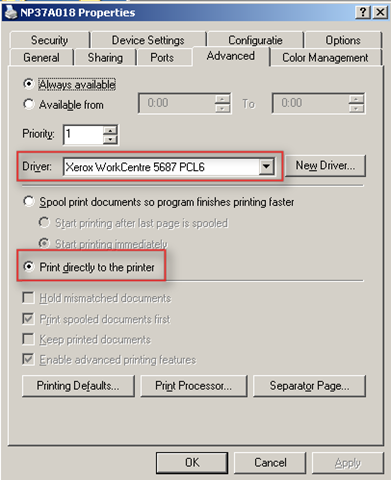
image Tijdens het afdrukken van een bulkopdracht (3000 pagina’s) ging de printserver onderuit. Dit kwam omdat de printerdriver ingesteld stond op spool print documents so program finishes printing faster. Deze optie zorgde ervoor dat een printjob van 1000 pagina’s een spoolfile genereerde van 2,17GB, zo’n 2MB per pagina.

Verder was er het probleem dat de PCL5 driver niet  goed met gekleurde plaatjes overweg kon. Zodra er een brief met een gekleurd logo afgedrukt werd, was de kwaliteit van het logo om te huilen.

Beide problemen heb ik opgelost door als eerste de PCL6 driver te laden. Dit loste het plaatjes probleem op. Daarna ook nog de optie: Print directly to the printer aangezet. Dit resulteerde in een spoolfile van 19,3MB i.pv. 2,17GB. Het spoolen van een opdracht duurde nu nog geen 10 minuten.

Xerox_Bulprinter_slow

Meer informatie over PCL in het algemeen vind je hier: http://nl.wikipedia.org/wiki/PCL en http://en.wikipedia.org/wiki/Page_description_language.

Meer informatie over PCL5 & PCL6: http://en.wikipedia.org/wiki/Printer_Command_Language

VMware: Microsoft NLB and VMware ESX 3.x.x


Mocht je gaan werken met Microsoft NLB binnen een VMware ESX 3.x.x omgeving, dan is handig om de volgende twee artikelen te lezen:

Ik ben bezig met een test opstelling voor een Citrix Webinterface NLB opstelling. Zodra ik dit klaar heb zal ik mijn ervaringen posten.


Petje bedankt voor het posten in het vmug forum.

VMware: After cloning a SLES VM the Network interface is dead


Rick Toet mailde mij een document over hoe je het volgende probleem op kan lossen:

Omschrijving:

Na het clonen van een SLES VM is de netwerkkaart niet te connecteren met het netwerk.

Ook niet bij het aanmaken van een nieuwe Nic.

Bij een IFCONFIG –a is de netwerkkaart wel te zien maar heeft geen IP adres of subnetmask.

Maar wel een macadres

Oorzaak:

SLES kent een verkeerd macadres/name toe aan de virtuele netwerkkaart

Donwload hier de pdf: nicvirtualsuselinuxserverwerktniet.pdf

Rick melde mij dat alle credits uitgaan naar Michael Hayes van de firma Plusine

Symantec: Backup Exec and an error with Shadow Copy Components


De onderstaande foutmelding kreeg ik toen ik een SQL server wilde toevoegen in mijn backup list van Symantec Backup Exec 10d.

SQLServer_Shadow_copies_error

Meer informatie over deze foutmelding vind je hier: http://seer.entsupport.symantec.com/docs/291014.htm


Deze foutmelding kun je oplossen door de volgende dll opnieuw te registreren ole32.dll

Dit doe je als volgt: Start – Run – regsrv32 ole32.dll {Enter}


De oplossing kwam uit een post van Zhu [MSFT] welke je hier kunt vinden: http://forums.techarena.in/showthread.php?t=498777