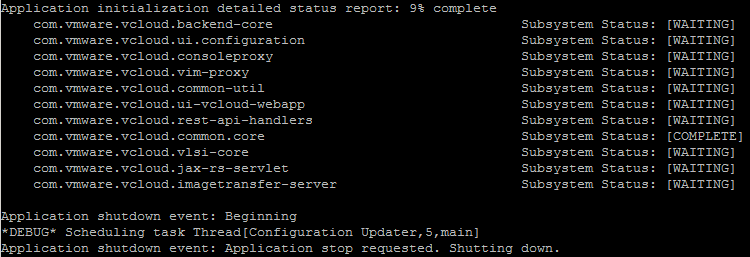
vCloud: Application initialization detailed status report: 9% complete


After installing vCloud Director in my lab, I couldn’t start the cell. So I looked in the log file: /opt/vmware/cloud-director/logs/cell.log and saw the following subsystem status report:

image

More info about the vCloud log files can be found in this blog post: http://www.virtual-blog.com written by David Hill.

Continue reading “vCloud: Application initialization detailed status report: 9% complete”

Rescan VMFS results in a deadlock of vCenter Server 4.x


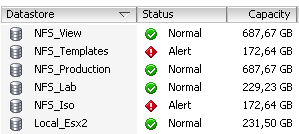
When you’re using different types of storage in your vSphere environment, you might need to use different kind of alarms. So I thought to be smart and create a lot of folders and assign different alarms to these folders.  When the folders and alarms where ready, I moved the Datastores into the folders. Everything looks perfect so far. I was able to add different alarms for each type of Datastores. This scenario is also described by Jeremy Waldrop. The setup looks like this:

image

So far so good.

But… when I added a new Datastore and started a rescan on a cluster ……. vCenter freezes with a deadlock!

Continue reading “Rescan VMFS results in a deadlock of vCenter Server 4.x”

vCenter Update Manager PowerCLI: Error 1722 Windows Installer


Today I was building a new Windows 7 View Desktop in my home lab. PowerCLI and vCenter Update Manager cmdlets where of course the first things I wanted to install. But during the setup of vCenter Update Manager PowerCLI I received the following error:

image

I was trying to install VMware-UpdateManager-Pscli-4.0.0-233997.exe after downloading the new version: VMware-UpdateManager-Pscli-4.1.0-266648.exe I was able to install the vCenter Update Manager cmdlets again. So if you’re running Windows 7 and want to use the vCenter Update Manager PowerCLI cmdlets, just install the latest version and you don’t get the this error.


Source http://communities.vmware.com/thread/257870

PowerCLI: Update-VMHost Function


Since the release of the vCenter Update Manager PowerCLI cmdlets back in march last year. I was hoping to find some time to play with it. Now this weekend I had some spare time to finally play with these new cmdlets. So I downloaded the setup file from http://communities.vmware.com and installed it on my PC. Then I started to Google and searched for existing scripts. I a couple of good posts. One by @alanrenouf with a short introduction video and a post about staging the patches via the vCenter Update Manager PowerCLI cmdlets by Damian Karlson. But there are no copy-past-run scripts available to update a vSphere host. So I fired up PowerGUI script editor and started working on a function called Update-VMHost. This function performs the following steps during the update process of a vSphere host:

  • Look for a baseline and attach it if necessary.
  • Perform a scan of the host.
  • Check for compliancy.
  • If not compliant enter Maintenance mode.
  • Show missing patches
  • When the host is in Maintenance mode, start the remediation process.
  • After the reboot of the host, exit Maintenance mode.
  • That’s pretty much it. If you want to use this function, you can copy it from the end of this post and paste it inside the PowerCLI screen.

Continue reading “PowerCLI: Update-VMHost Function”

PowerCLI: Easy NFS datastore setup


It’s a new year so let’s start with a new PowerCLI post. This post is inspired by the blog post of @alanrenouf: PowerCLI easy vswitch portgroup setup. I love the whole idea of taking a good working config from a vSphere host and use it on a fresh installed vSphere host to make sure it’s compliant.  In this post I will show you how to perform the same trick with NFS datastores like Alan did with the vSwithes and Portgroups.

My home lab contains two HP ml110 g5 and a simple P4 box with some hard disks to add shared storage to the lab. It’s running Debian linux and is capable of presenting iSCSI targets, NFS and SAMBA shares .I use NFS as shared storage for my vSphere lab.

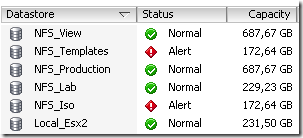
On esx2.ict-freak.local I use the following NFS datastores:
image

But I messed up the configuration of the other vSphere host in my lab called esx1.ict-freak.local. So I had to reset the network settings and lost all the NFS datastores:

image

So I needed to add the five NFS shares. This is a nice task for PowerCLI and the New-Datastore cmdlet:

Update: I had to remove the last / from the Path variable. If you do not remove the last / the script will mount the NFS share but with a new UUID. See Damian Karlson his post about this subject here.

Continue reading “PowerCLI: Easy NFS datastore setup”