Tool: NIRCMD


image

Nirsoft heeft met de tool NirCmd een handig stukje software uitgebracht. Dit staat er op hun website:

NirCmd is a small command-line utility that allows you to do some useful tasks without displaying any user interface. By running NirCmd with simple command-line option, you can write and delete values and keys in the Registry, write values into INI file, dial to your internet account or connect to a VPN network, restart windows or shut down the computer, create shortcut to a file, change the created/modified date of a file, change your display settings, turn off your monitor, open the door of your CD-ROM drive, and more…


Hieronder vind je wat voorbeelden:

Hide the start button on the system tray
nircmd.exe win child class “Shell_TrayWnd” hide class “button”

Show the start button on the system tray
nircmd.exe win child class “Shell_TrayWnd” show class “button”

Hide the clock on the system tray
nircmd.exe win child class “Shell_TrayWnd” hide class “TrayClockWClass”

Show the clock on the system tray
nircmd.exe win child class “Shell_TrayWnd” show class “TrayClockWClass”

Kill (terminate) all instance of Internet Explorer processes
nircmd.exe killprocess iexplore.exe

Set the display mode to 800x600x24bit colors
nircmd.exe setdisplay 800 600 24

Change the date/time of the specified filename (creation time and modified time)
nircmd.exe setfiletime “c:\temp\myfile.txt” “24-06-2003 17:57:11” “22-11-2005 10:21:56”

Empty the recycle bin in all drives.
nircmd.exe emptybin


Meer informatie over NirCmd kun je hier vinden: http://www.nirsoft.net/utils/nircmd.html

Windows: Network Access Protection (NAP)


In deze post vind je allerlei informatie over Network Access Protection.


De Product website: http://www.microsoft.com/windowsserver2008/en/us/nap-product-home.aspx

De NAP Blog: http://blogs.technet.com/nap/default.aspx


Introduction to Network Access Protection

Network Access Protection (NAP) is one of the most desired and highly anticipated features of Windows Server 2008. NAP is a new platform and solution that controls access to network resources based on a client computer’s identity and compliance with corporate governance policy. NAP allows network administrators to define granular levels of network access based on who a client is, the groups to which the client belongs, and the degree to which that client is compliant with corporate governance policy. If a client is not compliant, NAP provides a mechanism to automatically bring the client back into compliance and then dynamically increase its level of network access.

NAP includes an application programming interface (API) for developers and vendors to create complete solutions for health state validation, limitation of network access or communication, and ongoing compliance. This paper describes the scenarios for NAP, the components of NAP, and how NAP works for the different enforcement methods included with Windows Server 2008, Windows Vista, and Windows XP Service Pack 3.

Included in This Document

•Introduction

•Components of NAP

•How NAP Works

Meer informatie en de whitepaper vind je hier:  http://www.microsoft.com/technet/network/nap/napoverview.mspx


Network Access Protection Platform Architecture

Network Access Protection (NAP) is a new platform and solution that controls access to network resources based on a client computer’s identity and compliance with corporate governance policy. NAP allows third-party software vendors and system integrators to create complete solutions for validating and enforcing system health requirements for network access or communication.

This white paper describes the architecture of the NAP platform and the details of how NAP works for enforcement methods that are provided with Windows Server 2008, Windows Vista, and Windows XP Service Pack 3.

Included in This Document

• Introduction

•NAP Platform Architecture

•NAP Client Architecture

•NAP Server-side Architecture

•How NAP Works

Meer informatie en de whitepaper vind je hier: http://www.microsoft.com/technet/network/nap/naparch.mspx


Step by Step Guides for creating demo / test labs

Step-by-Step Guide: Demonstrate IPsec NAP Enforcement in a Test Lab

Step By Step Guide: Demonstrate 802.1X NAP Enforcement in a Test Lab

Step-by-Step Guide: Demonstrate VPN NAP Enforcement in a Test Lab

Step-by-Step Guide: Demonstrate DHCP NAP Enforcement in a Test Lab

RTM: Microsoft SQL Server 2008


image 

Keith Combs schrijft het volgende op zijn blog:

Transparent Data Encryption – Enable encryption of an entire database, data files, or log files, without the need for application changes. Benefits of this include: Search encrypted data using both range and fuzzy searches, search secure data from unauthorized users, and data encryption without any required changes in existing applications.

Auditing – Create and manage auditing via DDL, while simplifying compliance by providing more comprehensive data auditing. This enables organizations to answer common questions, such as, “What data was retrieved?”

Enhanced Database Mirroring – SQL Server 2008 builds on SQL Server 2005 by providing a more reliable platform that has enhanced database mirroring, including automatic page repair, improved performance, and enhanced supportability.

Automatic Recovery of Data Pages – SQL Server 2008 enables the principal and mirror machines to transparently recover from 823/824 types of data page errors by requesting a fresh copy of the suspect page from the mirroring partner transparently to end users and applications.

Hot Add CPU – Dynamically scale a database on demand by allowing CPU resources to be added to SQL Server 2008 on supported hardware platforms without forcing any downtime on applications. Note that SQL Server already supports the ability to add memory resources online.

Meer informatie vind je hier: SQL Server 2008


Bron: http://blogs.technet.com/keithcombs/archive/2008/08/06/microsoft-sql-server-2008-rtm-s.aspx

XtraVirt: VI3.5 in a box


image

De jongens van XtraVirt  hebben hun guide over VI in a Box bijgewerkt.

In 2007, like others in the global VMware community, Xtravirt developed a common methodology to install and run VMware ESX 3.x on VMware Workstation 6 together with a shared storage solution based upon an iSCSI software target. We called it ‘VI3 in a box’.

This allowed users and professionals in the IT community to create simple and cost effective VI3 infrastructures to test, learn about and demonstrate these environments.

Upon the release of VMware ESX 3.5 we found that this methodology did not continue to hold true. Although still possible to install ESX 3.5, when attempting to start a nested Virtual Machine on the ESX VM, the ESX VM panics, and a stop message appears.

However, with the release of VMware Workstation 6.5, build release 99530, a revised solution now exists.

This white paper documents the process to install and configure ‘VI3.5 in a box’.


Download de guide hier: ESXonWKS65beta99530.pdf

VMware: Windows 2008 Guest Customization


Helaas werkt de Guest Customization van een Windows 2008 VM / Template nog steeds niet out of the box in VirtualCenter 2.5.u2.

GuestCustomization20081

Gelukkig heeft Jasemccarty de oplossing in de VMware Communities geplaatst:

If you have a Windows 2008 guest that you wish to customize, it is fairly easy to do in VirtualCenter.

The sysprep.xml file is automatically generated by VirtualCenter, and does not require any additional tools from Microsoft, as they got smart, and included it in the base build of Windows Vista/2008.

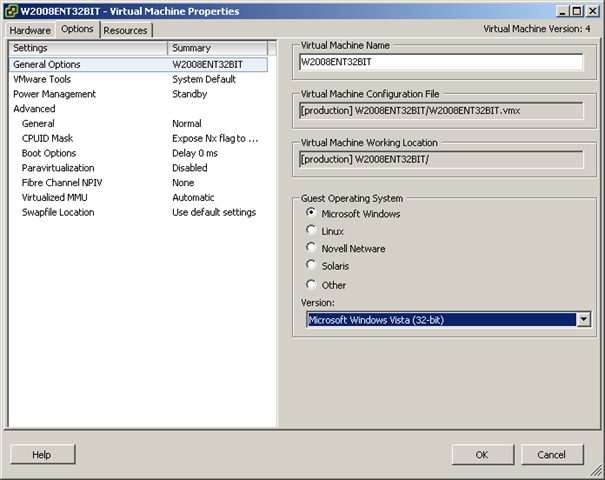
Unfortunately, VC won’t customize a Windows 2008 guest… But it will customize a Windows Vista guest. Because they are a similar architecture (if not almost identical), changing the guest type to Vista, will allow you to customize a Windows 2008 guest.

All you have to do, is change the guest you wish to clone, or the template, to be configured as a Windows Vista guest.

You can then customize the guest (2008) the same way you would Windows Vista. When you are done deploying the guest, before you power it on, change it to be configured as a Windows 2008 guest.


Converteer je Windows 2008 template weer terug naar een VM en stel de VM daarna in op Microsoft Windows Vista als Guest Operation System Version.

GuestCustomization2008

Daarna converteer je de VM weer terug naar een templat. Vanaf nu kun je de Windows 2008 template ook customizen.

Screenshot - 5-8-2008 , 18_15_55

VMware: Create script for VC & VUM Databases


Voor het installeren van VirtualCenter 2.5 heb je een twee tal databases nodig. Een voor VC en een voor VUM. Ik werd gek van dat geklik binnen de SQL Server Management Studio. Voor dit proces heb ik nu een SQL script gemaakt. Dit script heb ik getest in SQL 2005.

Het onderstaande script maakt het volgende aan:

  • Database met de naam VC
  • Database met de naam VUM
  • User met de naam VCUSER, wachtwoord vmware
  • User met de naam VUMUSER, wachtwoord vmware
  • De beide Users krijgen de db_owner role en de sysadmin role.

CREATE DATABASE VC;
GO
CREATE LOGIN [VCUSER] WITH PASSWORD=’vmware’, DEFAULT_DATABASE=[VC], CHECK_EXPIRATION=OFF, CHECK_POLICY=OFF
GO

USE VC
GO
EXEC sp_grantdbaccess ‘VCUSER’
GO
EXEC sp_addrolemember ‘db_owner’, ‘VCUSER’
GO
EXEC sp_addsrvrolemember ‘VCUSER’, ‘sysadmin’
GO

CREATE DATABASE VUM;
GO
CREATE LOGIN [VUMUSER] WITH PASSWORD=’vmware’, DEFAULT_DATABASE=[VUM], CHECK_EXPIRATION=OFF, CHECK_POLICY=OFF
GO

USE VUM
GO
EXEC sp_grantdbaccess ‘VUMUSER’
GO
EXEC sp_addrolemember ‘db_owner’, ‘VUMUSER’
GO
EXEC sp_addsrvrolemember ‘VUMUSER’, ‘sysadmin’
GO

[/code]

Dit script kun je binnen de SQL Server Management Studio uitvoeren en na een F5 voor een refresh zie je de nieuwe databases en de nieuwe users.

Installing VMWare ESX 3.5 u2 on a HP ML110G5


Ik was bezig met het installeren van ESX 3.5 u2 op de HP ML 110G5. Tijdens de installatie kon ik alleen geen VMKCORE en VMFS parities aanmaken. Gelukkig waren er al een paar mensen mij voor gegaan met het installeren van ESX op de HP. Bijvoorbeeld Aleks Nikolić van http://www.virtualistic.nl

Aleks heeft de oplossing gepost op het VMUG forum:

Toen ik de eerste keer de cd erin stopte van 3.5 werd de originele disk herkend als een IDE disk en wilde ESX alles EXT 3 maken. Ik dacht uit m’n hoofd dat de SATA controller toen in de BIOS aangevinkt stond als AUTO. Ik heb toen deze optie omgezet naar SATA. CD opnieuw erin en installatie gestart, de HD werd nu herkend als SCSI disk en zo werd het mogelijk om een VMFS aan te maken.


Bron: http://www.vmug.nl/modules.php?name=Forums


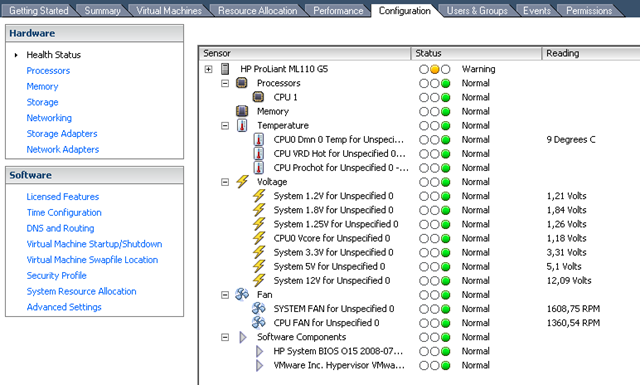
Na de installatie vond ik dit wel een leuk screenshotje om te showen:

image

Hardware: HP ML110 G5 X3065


hpweb_1-2_topnav_hp_logo

Sinds afgelopen vrijdag heb ik deze server in mijn bezig en tot nu toe ben ik er uitermate tevreden over. Ik heb deze server gelijk voorzien van 8GB RAM en een extra 750GB harddisk.

image

Producteigenschappen van HP ProLiant ML110G5 X3065:

Processor, besturingssysteem en geheugen:
Processor/type: Intelr Xeonr 3065 dual-core Processor 2,33 GHz
Processorsnelheid: 2,33 GHz
Aantal processoren: 1 processor
Beschikbare processorcore: Dual
Systeembus: 1333-MHz front-side bus
Intern cache: 1 x 4 MB Level 2 cache
Standaard geheugen: 1 GB (1 x 1 GB) geheugen standaard
Type geheugen: PC2-6400 ongebufferd DDR2 ECC 800-MHz
Geheugenslots: 4 DIMM-slots
Interne drives:
Interne vaste schijf: 250-GB SATA niet hot-plug 3,5-inch vaste schijf
Snelheid vaste schijf: 7200-rpm
Vaste schijfcontroller: HP geïntegreerde zes-poorts SATA-controller met geïntegreerd RAID.
Interne schijfposities: Vier 3,5-inch niet hot-plug SATA
Optische drives: Dvd-rw
Interne massaopslag: Max 2 TB (4 X 500 GB) SATA
Systeemeigenschappen:
Type behuizing: Micro ATX tower
Chipset: Intel 3200 chipset
Netwerkinterface: Geïntegreerde NC105i PCIe Gigabit serveradapter
Type voedingsmodule: 365-Watt voeding
Voeding: 90 tot 132 V, 180 tot 264 V; 47 tot 63 Hz
Afmetingen (b x d x h): 17,5 x 42,6 x 36,7 cm
Gewicht: 10,8 kg
Beveiligingsbeheer: Wachtwoord bij opstarten; Instelwachtwoord
Beheerkenmerken: Embedded Lights Out 100 IPMI 2.0 standaard rapportage.

Upgrades:

Memory:

2x Kinston Dimm 2x2GB DDR2 PC2-6400 800MHZ ECC

Harddisk:

Samsung SpinPoint F1 750GB, 7200rpm,32MB SATAII

Meer informatie over de HP vind je hier: HP ML110G5

VMware: VI Compatibility Matrixes


ESX Server, VirtualCenter, and Virtual Infrastructure Client Compatibility

The ESX Server, VirtualCenter, and Virtual Infrastructure Client Compatibility Matrixes guide provides details on the compatibility of current and previous versions of VMware Infrastructure 3 components, including ESX Server, VirtualCenter, and the VI Client.

Download de pdf hier: http://www.vmware.com/pdf/vi3_35/esx_3/r35/vi3_35_25_compat_matrix.pdf

VMware: DRS Performance and Best Practices Paper Posted


VMware Infrastructure 3 provides a set of distributed infrastructure services that make the entire IT environment more serviceable, available, and efficient. Working with VMware ESX 3, VMware VirtualCenter 2, and VMware VMotion, VMware Distributed Resource Scheduler (DRS) dynamically allocates resources to enforce resource management policies while balancing resource usage across multiple ESX hosts. This performance study focuses on understanding the effectiveness and scalability of DRS algorithms. It identifies various scenarios in which you can benefit from DRS and explains how to configure your environment to take best advantage of DRS.

Download de pdf hier: http://www.vmware.com/files/pdf/drs_performance_best_practices_wp.pdf