VMware: VirtualCenter Database Performance for Microsoft SQL Server 2005


VMware® VirtualCenter uses a database to store metadata on the state of a VMware Infrastructure
environment. Performance statistics and their associated stored procedure operations constitute the largest
and the most resource‐intensive component of the VirtualCenter database. Hence the performance of your
VirtualCenter database depends upon the frequency at which you collect performance statistics and the level
of detail of the statistics you store. VirtualCenter 2.5 features a number of enhancements that are aimed at
greatly improving the performance and scalability of the performance statistics operations in the
VirtualCenter database. The purpose of this study is to present the performance results of tests we conducted
to validate these performance enhancements and to provide best practices information for configuring a
VirtualCenter database. The study also provides information for sizing the server you use to host the
VirtualCenter database based on these performance results. Although the new features in VirtualCenter 2.5
benefit users with any of the supported databases, the examples and performance data presented in this study
are specific to Microsoft SQL Server and the paper assumes that you have a working knowledge of SQL Server.

This study covers the following topics:

  • “VirtualCenter 2.5 Database Overview” on page 2

  • “Performance Statistics Collection in VirtualCenter” on page 2

  • “Performance Statistics Database Operations and Their Effects on Performance” on page 3

  • “Performance Enhancement in VirtualCenter 2.5” on page 3

  • “Performance Tests” on page 4

  • “Performance Results” on page 5

  • “Sizing the VirtualCenter Database Server” on page 7

  • “Performance Best Practices” on page 8

  • “References” on page 9

  • “Appendix A: Configuring Performance Statistics Levels and Rollups with VirtualCenter” on page 10

  • “Appendix B: Configuring Memory Size for SQL Server” on page 11

  • “Appendix C: Monitoring

  • Je kunt de whitepaper hier downloaden: http://www.vmware.com/files/pdf/vc_database_performance.pdf

    Event: VMUG meeting at NetAPP


    Netapp_Logo

    Tijdens het VMUG Event 2007 afgelopen December is aangekondigd dat er gedurende 2008 een aantal kleinere sessies georganiseerd gaan worden. Inmiddels is het zover. De VMUG heeft NetApp bereid gevonden deze bijeenkomst te sponsoren en te organiseren. Jullie zijn op donderdag 5 juni uitgenodigd op de lokatie van NetApp op Schiphol. De meeting begint rond 16:00 en zal eindigen om 19:00.

    Let op: Om bij deze meeting aanwezig te zijn moet je je inschrijven!

    Klik hier voor meer informatie


    Ik ben erbij, dus tot dan 😉

    VMware: Fusion 2 Beta


    The VMware Fusion team is proud to announce VMware Fusion 2.0 Beta 1

    This public beta, a free download, boasts a handful of industry firsts for Mac virtualization, including true multi-display support for virtual machines and experimental DirectX 9.0 Shader Model 2 3D acceleration.

    The team is also extremely happy to announce that VMware Fusion 2.0, when released, will be a free downloadable upgrade for all VMware Fusion 1.x customers, as a sincere thank you to our early supporters.

    Now, on to the features!

    In het onderstaande filmpje kun je zien tot wat de beta1 in staat is:

    VMware: What VMware products support which VM OS?


    Rich Brambley van vmetc.com heeft een tabel gemaakt over welk VMware product welk OS ondersteund. 

    There are sections of installation instructions for every past and present operating system that is supported. What I am posting from this document is a very helpful table that is a quick reference of what VMware products support which VM operating systems. This table has been copied from the online version of the guide.

    This table makes it very easy to answer questions like: 

    • Is a VM running Server 2008 supported on ESX?
    • Is Vista supported in VMware ACE?
    • Does VMware support running Solaris on VMware Server?
    • Can I run Windows ME or Windows 98 in an ESX guest?
    • Is Netware supported in VMware Workstation?

    The answers to these questions along with every possible supported OS and VMware product combination can be found in this table:

    http://vmetc.com/2008/05/05/what-vmware-products-support-which-vm-os/

    SUN: VirtualBox 1.6


    virtual-box-new

    VirtualBox 1.6 is a major update, incorporating over 2000 improvements. Among the highlights:

    • The new Sun livery
    • Solaris and Mac versions no longer in beta
    • Guest Additions for Solaris
    • Seamless windowing for Solaris and Linux guests
    • SATA support for up to 32 hard disks per VM (first product in the industry to do SATA!)
    • PAE support for guests (memory model required by some server OSes)
    • Web Services API for remote management
    • Significant improvements to scalability

    Zie de UserManual.pdf voor meer informatie.

    VirtualBox 1.6 kun je via de site downloaden: https://cds.sun.com/

    Citrix: RSS Feeds for Citrix Hotfixes


    Gus Pinto heeft een post geplaatst op BrianMadden.com over de nieuwe RSS feeds van de Citrix Support site.

    Via deze RSS feeds kun je  eenvoudig op de hoogte blijven over de laatste hotfixes voor de verschillende Citrix producten.

    Zie hier een overzicht van de feeds:


    Bron: http://www.brianmadden.com/news/2289

    VMware: Unable to open network mapping libary


    De onderstaande foutmelding kan optreden als je een VM die aangemaakt is in VMware Server 2.0 Beta2 wilt gebruiken in VMware Workstation 6.x.

    Ws_error

    Dit kun je als volgt oplossen:

    Open het VMX bestand en verwijder de volgende twee regeles:

    ethernet0.features = “1”
    ethernet0.networkName = “Bridged”


    Bron voor deze oplossing is een post van jensent1 in het VMware forum: http://communities.vmware.com/thread/127124

    Citrix: Script for logging off disconnected users


    Ik kwam het volgende script tegen in een post van Joe Shonk op het forum van Brianmadden.com.

    On Error Resume Next

    Const wbemFlagReturnImmediately = &h10
    Const wbemFlagForwardOnly = &h20
    Const cActive = 0
    Const cDisconnected = 4
    Const strComputer = “.”

    Set objWMIService = GetObject(“winmgmts:\\” & strComputer & “\root\Citrix”)
    Set colItems = objWMIService.ExecQuery(“Select * from Metaframe_Session Where sessionstate = ” & cDisconnected)

    For Each objItem In colItems
    if (objItem.SessionID > 0) and (objItem.SessionID < 65530) then
    objItem.Logoff
    end if
    Next

    Set objWMIService = Nothing

    Dit script zorgt er voor dat alle Sessions die nog op Disconnected staan, netjes worden afgesloten. Dit script is handig om te draaien voor dat een Citrix server opnieuw wordt opgestart.

    Citrix: How to use WMI Providers


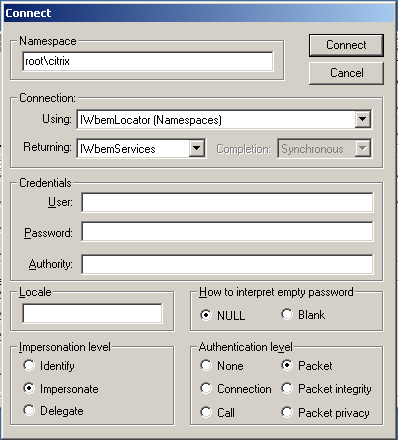
    In deze post schrijf ik mijn eerste ervaring met WMI. De tool waar ik gebruik van maakte was ‘wbemtest.exe’. Deze start je als volgt op: Start – Run – wbemtest.exe

    Het onderstaande scherm verschijnt.

    image

    Druk op connect en vul bij de Namespace het volgende in: ‘root\citrix’ en druk op connect.

    image

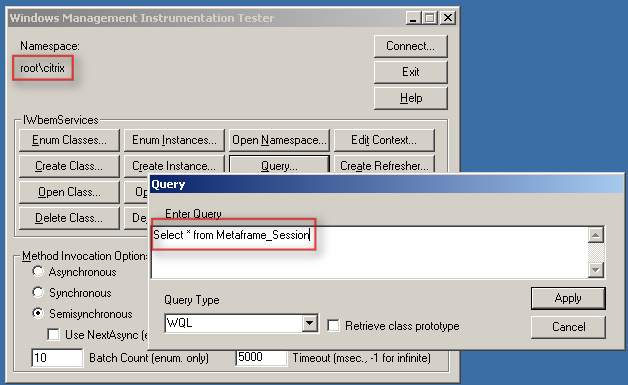
    Nu kun je via ‘Query..’ een test uitvoeren. Bijvoorbeeld: ‘Select * from Metaframe_Session’.

    image

    De volgende output wordt gegenereerd. Dit zijn de active sessions op deze Terminal / Citrix server.

    image

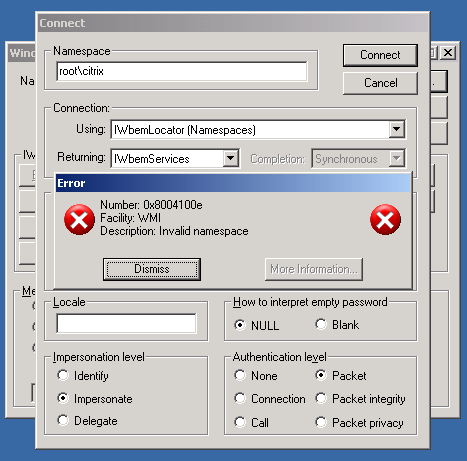
    Het kan ook voorkomen dat je een foutmelding krijgt bij het connecten naar de ‘root\citrix’ Namespace.  Deze foutmelding treed op als je de WMI Providers niet hebt geïnstalleerd tijdens de installatie van Citrix Presentation Server (XenApp).

    image

    Dit kun je oplossen door in je service window de WMI Providers als nog te installeren. Dit kan alleen als er geen gebruikers ingelogt zijn.

    image

    Meer informatie vind je hier: CTX108365

    Microsoft: Windows XP Service pack 3


    Ik kwam een post tegen op http://www.msminded.nl waarop de release dates staan van Windows XP SP3.

    Hier een quote van de post:

    14 april 2008: Support is beschikbaar voor de RTM versie van Service Pack 3 voor Windows XP

    21 april 2008: Original Equipment Manufacturers, Volume License, Connect, MSDN en TechNet subscribers

    29 april 2008: Microsoft Update, Windows Update, Download Center

    10 juni 2008: Automatic Updates


    Update: Service Pack 3 kun je nu officieel downloaden vanaf hier: http://download.windowsupdate.com/

    Ik ging vandaag even kijken en ik kon inderdaad Service Pack 3 downloaden. Ik heb deze gelijk geïnstalleerd. Dit ging als volgt:

    Windows_XP_SP3_1

    Even opnieuw opstarten.

    Windows_XP_SP3_2

    En voila Service Pack 3 staat geïnstalleerd.

    Windows_XP_SP3_3

    Voor de releasenotes kun je hier terecht: http://download.microsoft.com/download/c/d/8/cd8cc719-7d5a-40d3-a802-e4057aa8c631/relnotes.htm