
Je kunt de nieuwe versie hier downloaden: http://www.vmware.com
De release notes zijn nog niet online maar deze komen hier te staan: releasenotes_vc202u3.html
Je kunt de nieuwe versie hier downloaden: http://www.vmware.com
De release notes zijn nog niet online maar deze komen hier te staan: releasenotes_vc202u3.html

Frane Borozan een student van de FESB (Faculty of Electrical Engineering, Mechanical Engineering and Naval Architecture) aan de universiteit van Split in Kroatie. Hij heeft een guide geschreven over hoe je in een aantal stappen automatisch een P2V backup kan maken van een fysieke server naar een virtuele server.
Zijn guide bevat de volgende hoofdstukken.
Chapters
I will divide this HOWTO in few chapters:
1. Planned network infrastructure
2. Making copy of physical server into virtual using VMware converter GUI
3. Making copy of physical server into virtual with command line p2vtool and preparing XML file needed for vmware p2vtool
4. Batch script for automation of vmware converter import process
5. Customizing VMware configuration file
6. Running and testing virtual server using cold and hot methods
7. Restoring network configuration to virtual network adapters
8. Automating vmware server take over process
9. Restoring virtual newly created data to new physical servers
De volgende hoofdstukken vond ik zelf heel nuttig om te lezen en hier gaan we zeker mee aan de slag.
Chapters
3. Making copy of physical server into virtual with command line p2vtool and preparing XML file needed for vmware p2vtool
4. Bat script for automation of vmware converter import process
5. Customizing VMware configuration file
7. Restoring network configuration to virtual network adapters
8. Automating vmware server take over process
9. Restoring virtual newly created data to new physical servers
De guide vindt je hier: http://www.p2vbackup.com/p2vbtutorial.asp
Elias Khnaser is bezig met de release van de CBT over VMware ESX Server 3.5. Hij heeft op youtube alvast een preview gezet. En die ziet er strak uit al zeg ik het zelf.
In deze post plaats ik een aantal links over performance monitoring en context switches.
Microsoft
Citrix
Overige sites
De volgende quote komt uit het document van de Intel site.
Counter (Parent Object)
Recommended Range% CPU Time (System)
0-90% ( > 90% indicates potential processor bottleneck; may also indicate thread contention problem; investigate Context Switches/sec and System Calls/sec for potential thread issues)% Privileged Time (System)
0-40% ( > 40% indicates excessive system activity; correlate with System Calls/sec)Context Switches/sec (System)
0-10,000 ( > 10,000 may indicate too many threads contending for resources; correlate with System Calls/sec and threads counter in Windows Task Manager to identify process responsible)File Control Operations/sec (System)
Ratio dependent (The combined rate of file system operations that are neither reads nor writes [file control/manipulation only, non-data related]. Inverse of File Data Operations/sec)File Data Operations/sec (System)
Ratio dependent (Combined rate of all read/write operations for all logical drives. Inverse of File Control Operations/sec)System Calls/sec (System)
0-20,000 ( > 20,000 indicates potentially excessive Windows system activity; correlate with Context Switches/sec and threads counter in Windows Task Manager to identify process responsible)Interrupts/sec (System)
0-5000 (> 5000 indicates possible excessive hardware interrupts; justification is dependent on device activity)Pages/sec (Memory)
0-200 ( > 200 warrants investigation into memory subsystem; define reads (pages in) versus writes (pages out); check for proper paging file and resident disk configuration; May indicate application memory allocation problems, heap management issues)Average Disk Queue Length (Logical Disk)
0-2 ( > 2 indicates potential disk I/O bottleneck due to I/O subsystem request queue growing; correlate with Average Disk sec/Transfer)Average Disk sec/Transfer (Logical Disk)
0-.020 ( > .020 seconds indicates excessive request transfer latency and potential disk I/O bottleneck; define reads/sec versus writes/sec; correlate with Average Disk Queue Length)Bytes Total/sec (Network Interface)
Depends upon interface type (10baseT, 100baseT) A potential network I/O bottleneck exists when throughput approaches theoretical maximum for interface type. (For example, 10baseT theoretical maximum = 10 x 1,000,000 bits = 100 Mbits/sec divided by 8 = 12.5 Mbytes/sec)Packets/sec (Network Interface)
Depends upon interface type (10baseT, 100baseT)
Aleks van http://www.virtualistic.nl/ heeft een script geschreven voor het installeren van Printer drivers op een Terminal / Citrix server. Ik was de gelukkige betá tester (zonder problemen) en alles werkte out of the box.
Hieronder een quote van de website van Aleks:
Prerequisites:
– You have to be able to install printdrivers (duh!)
– You have to be able to connect to your printerserver (test this through typing \\yourprintserver you should see your shared printers)
What is inside the zip file?
– The script of course!
– Addprinters.txt this is the input file for the script. Place your printers in this .txt file (eg: \\yourprintserver\printer1)
The default location of the addprinters.txt is C:\ You can change this but make sure you edit the script to reflect the new location.
Zodra je het Addprinters.txt hebt gevuld, start je het script en dan verschijnt het onderstaande scherm.
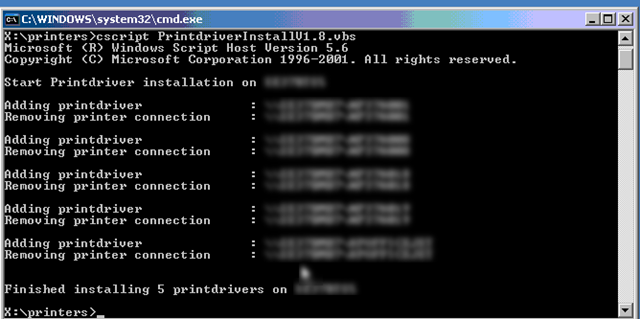
Nu ben je natuurlijk benieuwd wat het script gedaan heeft. Dat laat ik zien in de onderstaande tekening:
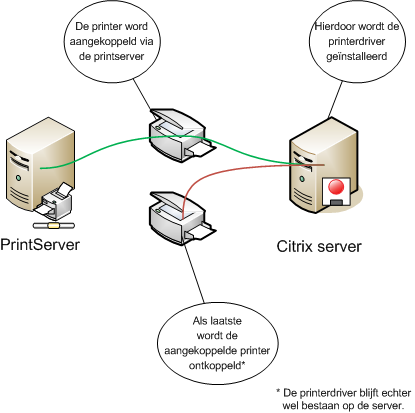
Meer informatie en de download vindt je hier: http://www.virtualistic.nl/

De volgende melding kun je tegenkomen in je application log op een Citrix Server.
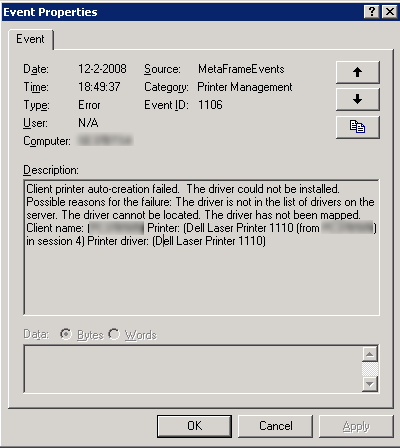
Dit kun je oplossen door de volgende registry key te importeren:
Windows Registry Editor Version 5.00
[HKEY_LOCAL_MACHINE\SOFTWARE\Citrix\Print]
“DefaultPrnFlags”=dword:80000000
Deze oplossing geld alleen voor Presentation Server 4 en hoger.
Voor meer informatie zie: CTX488760
Sinds kort heeft VMware een nieuwe service. De Patch/Maintenance Alerts Subscription.
Dit werkt als volgt: je geeft je e-mail adress op de volgende pagina: subscription
Daarna krijg je een e-mail met een bevestiging link. Zodra je deze aanklikt krijg je het onderstaande scherm. Hier selecteer je de producten waarvan je de ‘alerts’wilt ontvangen.

Ik bereken hoeveel ik kan besparen bij het virtualiseren van 500 servers.

Na een paar seconden verschijnt het onderstaande scherm. Hier zie je wat je aan CO2 kunt besparen:
Verder bespaar je op de hardware, stroomkosten, arbeidsuren en rackspace.

De calculator kun je hier vinden: http://www.aint-that-the-truth.com/
Aleks van http://www.virtualistic.nl liet me de onderstaande comic zien. Deze wilde ik jullie niet laten missen 😉

Voor een nieuwe folderstructuur op ons netwerk, moest ik een groot aantal nieuwe Domain Local Security Groups aanmaken. Dit doe je natuurlijk niet met de hand maar via een script. Ik wist toevallig dat Bouke Groenescheij van www.jume.nl hier al een script voor had gemaak. Het script kun je hier vinden: http://www.jume.nl/index.php?option=com_content&task=view&id=73&Itemid=1
Zijn script heb ik een klein beetje aangepast zodat het Domain Local Security Groups aanmaakt i.p.v Global Security Groups.
Ik heb de volgende regels eruit gehaald:
Const ADS_GROUP_TYPE_DOMAIN_LOCAL_GROUP = 4
Const ADS_GROUP_TYPE_GLOBAL_GROUP = 2
Const ADS_GROUP_TYPE_LOCAL_GROUP = 4
Const ADS_GROUP_TYPE_SECURITY_ENABLED = -2147483648
Const ADS_GROUP_TYPE_UNIVERSAL_GROUP = 8
en vervangen voor:
Const ADS_GROUP_TYPE_GLOBAL_GROUP = &h4
Const ADS_GROUP_TYPE_SECURITY_ENABLED = &h80000000
Meer informatie over de Const ADS_GROUP_TYPE vindt je in dit document: 63_65_scripting_guy.pdf
Daarna moet je nog een regel aanpassen in het script:
‘ ################################################################
‘ CreateGroups.vbs – Create a lot of groups based on a text file
‘ Written by Bouke Groenescheij – Jume B.V.: http://www.jume.nl
‘ Version 1.0
‘ ################################################################‘ You will need to supply this info:
strGroupParentDN = “ou=Bulkimport,dc=ctx45,dc=lab”
In het dik gedrukte gedeelte vul je de ou naam in en je domain. bijvoorbeel ctx45.lab
Nadat je dit gedaan hebt, moet je nog een textfile aanmaken. In deze tekstfile plaats je de naam van de groep en de description. Dit ziet er als volgt uit:
ctx_test1,testgroep1
ctx_test2,testgroep2
ctx_test3,testgroep3
ctx_test4,testgroep4
ctx_test5,testgroep5
ctx_test6,testgroep6
ctx_test7,testgroep7
ctx_test8,testgroep8
ctx_test9,testgroep9
Als laatste voer je het script als volgt uit:
cscript CreateGroups.vbs groups.txt
binnen enkele seconden zijn alle groepen aangemaakt.
Bouke bedankt voor het delen van dit handige script!
 ICT-Freak.nl