How To: Install MGE Network Shutdown Module V3 within the Service Console of ESX 3.0.x


Deze post is ook als pdf geplaatst op www.vmug.nl

De software die je nodig hebt is de Network Shutdown Module Linux x86 Console.

Download de software hier: http://www.mgeups.com/.

Verder vindt je hier een Whitepaper: http://www.mgeups.com.

Zodra alle Software binnen is kunnen we beginnen.

Continue reading “How To: Install MGE Network Shutdown Module V3 within the Service Console of ESX 3.0.x”

VMware: Cron job from the Service Console


Voorheen in ESX 2.5.x kon je een cronjobnaam.sh in de map /etc/cron.d plaatsen en dan werd deze uitgevoerd. Binnen ESX 3.0.x werkt dit niet meer en moet je gebruik maken van het commando crontab.

Op de volgende website vindt je meer info over het commando crontab: http://blicbox.be/node/292

Zo doe er je voordeel mee Hot

DS4300: Logical Drive Not On Preferred Path


Na het aanmaken van een aantal nieuwe Lun’s op de DS4300 kregen we de onderstaande melding. 

drivenotonpreferredpath

Dit kun je eenvoudig oplossen maar doe dit wel binnen je Maintenance Window want er kan een korte pauze optreden tussen het SAN en de servers die er gebruik van maken. Om deze melding weg te krijgen log je in op de Storage Manager. Vervolgens klik je op Advanced – Recovery – Redistribute Logical Drives.

drivenotonpreferredpath1

Deze taak was op ons SAN binnen de minuut uitgevoerd. Dit hangt er natuurlijk vanaf hoeveel Lun’s je aanbied en over hoeveel paden deze worden aangeboden.

EventID 50: TermDD


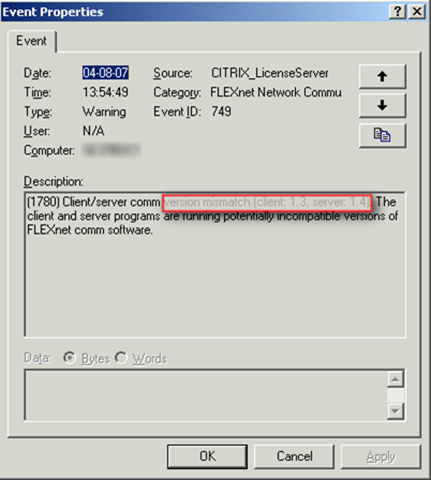
Het kan gebeuren dat als je via de Remote Desktop Client een verbinding wilt maken naar een Windows Server, de volgende event id optreedt op de desbetreffende server.

Op het onderstaande plaatje zie je de foutmelding.

eventid50

De oplossing die ik gevonden heb staat beschreven in KB323497.

Open regedit op de server blader naar de key: HKEY_LOCAL_MACHINE\System\CurrentControlSet\Services\TermService\Parameters. en verwijder hier de volgende waarden:

  • Certificate
  • X509 Certificate
  • X509 Certificate ID

Daarna dient de server opnieuw opgestart te worden.

UDA: Ghost image deploymend through PXE


Een post van tsyko in het udaforum: http://www.ultimatedeployment.org/forum/ vondt ik hoe eenvoudig het was:

  1. You need to use a program called WINIMAGE to modify ghost.dsk so that it thinks it is a 2.8mb disk.
  2. I ssh into the UDA machine and edit /var/public/tftproot/pxelinux.cfg/default
    and add
    label ghost
    kernel GHOST\kernels\memdisk
    append initrd=GHOST\images\ghost.dsk

  3. then you need to edit /var/public/tftproot/messages.txt
    and add
    ghost Norton Ghost PXE Boot
  4. Download this zip file
    http://www.lhsc.vic.edu.au/Downloads/pxeghost/PXEGhost.zip
    and extract the contents into /var/public/tftproot/GHOST
  5. place the modified ghost.dsk into the /var/public/tftproot/GHOST/images folder

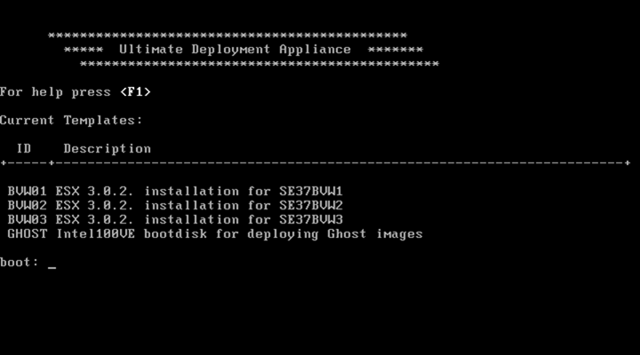
Zodra je nu een PC opstart via PXE, krijg je het onderstaande menu.

udascreen

VMware: Handy Service Console Commando’s for VI3


In deze post som ik een paar commando’s op die je kunt gebruiken in het Service Console van ESX 3.0.x.

HOSTD HOSTD is de vervanger van de vmware-serverd daemon.
Met het volgende commando herstart je de daemon service mgmt-vmware restart
VPXA VPXA is de vervanger van de vmware-ccagent daemon.
Met het volgende commando herstart je de daemon service vmware-vpxa restart
ESXCFG-NICS ESXCFG-NICS is de vervanger van de mii-tool, mui (esx 2.5.x) en de modules.cfg
Met het volgende commando kun je het e.e.a. configureren. esxcfg-nics <options> [nic]
-s|–speed <speed>
Set the speed of this NIC to one of 10/100/1000/10000. Requires a NIC parameter.
-d|–duplex <duplex> Set the duplex of this NIC to one of ‘full’ or ‘half’. Requires a NIC parameter.
-a|–auto Set speed and duplexity automatically. Requires a NIC parameter.
-l|–list Print the list of NICs and their settings.
-r|–restore Restore the nics configured speed/duplex settings (INTERNAL ONLY)
-h|–help Display this message.
ESXCFG-FIREWALL ESXCFG-FIREWALL is nieuw sinds ESX 3.0 en kun je gebruiken om de Firewall van ESX te configureren
Met het volgende commando kun je het e.e.a. configureren. esxcfg-firewall -l start (load) de firewall

esxcfg-firewall -u stopt (unload) de firewall

esxcfg-firewall -q kun je zien welke services ingeschakeld zijn.

esxcfg-firewall -s kun je de volgende services inschakellen.

nfsClient
ftpServer
ntpClient
dellom
nisClient
vncServer
tmpLicenseClient
swISCSIClient
CIMHttpsServer
sshClient
snmpd
tmpAAMClient
vpxHeartbeats
smbClient
hpim
tmpHostVmdbServer
tmpHostdSOAPServer
ftpClient
sshServer
ibmdirector
CIMHttpServer
telnetClient

Let op! deze service benamingen zijn cAsE sEnSiTiVe.

esxcfg-firewall -e kun je een specifieke service inschakellen.

esxcfg-firewall -d kun je een specifieke service uitschakellen.

ESXCFG-RESGRP ESXCFG-RESGRP is nieuw binnen VMware ESX 3.0.x. Hiermee kun je Resource groups beheren.
Met het volgende commando kun je het e.e.a. configureren. esxcfg-resgrp [options] [resgrp path]
-a, –add rgname
Add a new group under the path
-d, –delete Delete the resource group
-l, –list List all the resource groups
Or stats about a specific resource group
–restore Restore all resource groups from configuration
file (FOR INTERNAL USE ONLY).
-h, –help Show this message
ESXCFG-NAS ESXCFG-NAS is nieuw binnen VMware ESX 3.0.x. Hiermee kun je een NAS aankopellen en beheren.
Met het volgende commando kun je het e.e.a. configureren. esxcfg-nas <options> [<label>]
-a|–add
Add a new NAS filesystem to /vmfs volumes. Requires –host and –share options.
-o|–host <host> Set the host name or ip address for a NAS mount.
-s|–share <share> Set the name of the NAS share on the remote system.
-d|–delete Unmount and delete a filesystem.
-l|–list List the currently mounted NAS file systems.
-r|–restore Restore all NAS mounts from the configuration file. (FOR INTERNAL USE ONLY).
-h|–help Show this message.
ESXCFG-ROUTE ESXCFG-ROUTE is nieuw binnen VMware ESX 3.0.x. Hiermee kun je default route instellen voor de vmkernel.
Met het volgende commando kun je het e.e.a. configureren. esxcfg-route [ip-address] stelt de default gateway in voor de vmkernel.

esxcfg-route
VMkernel default gateway is 10.0.0.254

ESXCFG-VMKNIC ESXCFG-VMKNIC is nieuw binnen VMware ESX 3.0.x. Hiermee kun je het ip address instellen voor de vmkernel.
Met het volgende commando kun je het e.e.a. configureren. esxcfg-vmknic <options> [[<portgroup>]]
-a|–add
Add a VMkernel NIC to the system,
requires IP parameters and portgroup name.
-d|–del Delete VMkernel NIC on given portgroup.
-e|–enable Enable the given NIC if disabled.
-D|–disable Disable the given NIC if enabled.
-l|–list List VMkernel NICs.
-i|–ip <X.X.X.X> The IP address for this VMkernel NIC.
Setting an IP address requires that the
–netmask option be given in same command.

-n|–netmask <X.X.X.X> The IP netmask for this VMkernel NIC.
Setting the IP netmask requires that the –ip
option be given in the same command.
-r|–restore Restore VMkernel TCP/IP interfaces from
Configuration file (FOR INTERNAL USE ONLY).
-h|–help Show this message.

ESXCFG-SWISCSI ESXCFG-SWISCSI is nieuw binnen VMware ESX 3.0.x. Hiermee kun je de iSCSI Software Initiator configureren.
Met het volgende commando kun je het e.e.a. configureren. esxcfg-swiscsi options
-e, –enable
Enable sw iscsi
-d, –disable Disable sw iscsi
-q, –query Check if sw iscsi is on/off
-s, –scan Scan for disk available through sw iscsi interface
-k, –kill Try to forcibly remove iscsi sw stack
-r, –restore Restore sw iscsi configuration from file
(FOR INTERNAL USE ONLY)
-h, –help Show this message

Release: VMware ESX 3.0.2 and VCB 1.0.3


Ten days after release of its companion VirtualCenter 2.0.2, VMware finally releases ESX Server 3.0.2.

While this version should be aimed at bugfixes only, it brings in some extended support for:

  • New guest operating systems including:
    • Microsoft Windows Server 2003 SP2
    • Red Hat Enterprise Linux (RHEL) 5 (without paravirtualization)
    • Red Hat Enterprise Linux (RHEL) 4.5
    • Novell Netware 6.5 SP6
    • Sun Solaris 10 Update 3
  • Additional backup software from third-party vendors including:
    • CA BrightStor ArcServe 11.5 SP1
    • CommVault Galaxy version 6.1 SP4
    • IBM TSM Storage Agent version 5.3.3
    • Legato NetWorker 7.3.2 Jumbo Update 1
    • Symantec Backup Exec version 11d
    • Veritas NetBackup Exec version 6.0
  • New versions of management agents including:
    • Dell Open Manage 5.2
    • HP Insight Manager Agents 7.8
  • New hardware including:
    • Dell Poweredge 2970
    • HP P800 SA controller

VMware also updated its Consolidated Backup module (VCB) to version 1.0.3, introducing several major features like:

  • Support for iSCSI Storage
  • New Backup Software Support
    • Legato Networker version 7.3.2 Jumbo Update 1
    • Veritas NetBackup version 6.0
    • Symantec Backup Exec version 11d
    • Tivoli TSM Storage Agent version 5.3.3
  • New VCB Proxy Operating System Support
    • Windows 2003 SP2
    • Windows 2003 R2 SP2

Download both ESX Server 3.0.2 and VCB 1.0.3 here.

Bron: http://www.virtualization.info/2007/08/release-vmware-esx-server-302-vcb-103.html

VMware: VMname_1 after deleting VMname


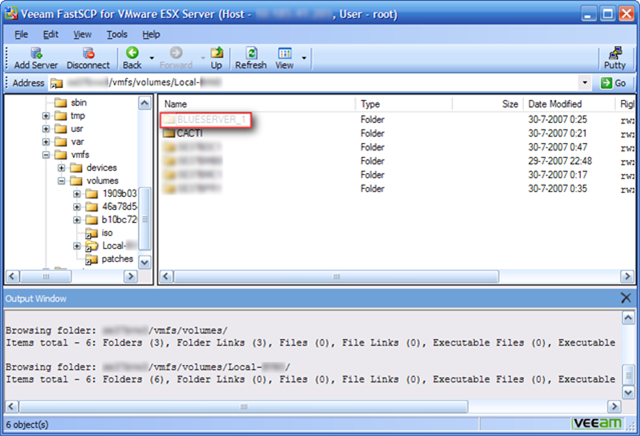
Je kent het wel, je hebt een VM verwijderd en je wilt daarna een nieuwe aanmaken met dezelfde naam, dan krijg je een VM met als naam VMname_1.

vmnaam_1

In het volgende topic op vmug post petje een work around.

Dit wordt veroorzaakt door soort caching van Virtual Center…
Op te lossen door na de delete from disk de VC service te restarten…..
Of langer te wachten.. hoeveel langer.. geen idee..
Wink

Doe er je voordeel mee!

Tool: Wink 2.0


winklogo

Wink is een gratis software voor het creeëren van tutorials en presentaties.

wink

Hieronder vindt je een featurelist .

Features:

  • Freeware: Distributed as freeware for business or personal use. However if you want to redistribute Wink, you need to get permission from the author.
  • Cross-Platform: Available for all flavours of Windows and various versions of Linux (x86 only).
  • Audio: Record voice as you create the tutorial for explaining better.
  • Input formats: Capture screenshots from your PC, or use images in BMP/JPG/PNG/TIFF/GIF formats.
  • Output formats: Macromedia Flash, Standalone EXE, PDF, PostScript, HTML or any of the above image formats. Use Flash/html for the web, EXE for distributing to PC users and PDF for printable manuals.
  • Multilingual support: Works in English, French, German, Italian, Danish, Spanish, Serbian, Japanese, Brazilian Portuguese and Simplified/Traditional Chinese.
  • Smart Capture Tools: Capture screenshots automatically as you use your PC, based on mouse and keyboard input (great time saver and generates professional captures).
  • Performance/Quality: Creates highly compressed Flash presentations (few kbs to few hundreds of kbs, much smaller than competing commercial products) ideal for using on the web.

  • Tools:
    • Navigation buttons to move to next/previous/random frames in the presentation, you can use custom bitmaps for these buttons (full transparency/alpha channel support).
    • Callouts and shapes for displaying text explanations. The inbuilt Callout Editor is used to create custom shaped callouts as you want.
    • Intuitive drag-n-drop editing of the frame, callout, cursor, navigation buttons and the title elements.
    • Advanced features like templates, cursor editing, palettes, background images, control bars & preloaders for the flash output etc.
    • Completely PC and Web ready with exports to PDF, HTML, SWF and EXE formats.
    • Innovative compression techniques applied to reduce filesize of output Flash file. Generated flash file plays in Flash players from version 3 and above, giving you widest array of target audience.
    • Uncompressed output to allow you import the output of Wink into other Flash editors.

Download de tool hier: http://www.debugmode.com/wink/download.php