How To: Install iSCSI Enterprise Target (IET) on FC5 (UDA VA)


In deze how to lees je hoe je de iSCSI Enterprise target installeerd op Fedora Core 5 wat als basis dient voor de UDA 1.4 virtual appliance.

Als eerste moet de kernel bijgewerkt worden. Dit doe je als volgt

uname -a

yum update kernel kernel-devel

reboot -n

Vervolgens dien je gcc en openssl-devel te installeren. Deze twee pakketjes zijn nodig voor de installatie van iSCSI Enterprise Target. Doe je dit niet dat loopt de installatie vast met een foutmelding.

yum install gcc

yum install openssl-devel wget

Als laatste stap in de voorbereiding download en pak je de iSCSI Enterprise target uit.

http://belnet.dl.sourceforge.net/sourceforge/iscsitarget/iscsitarget-0.4.15.tar.gz

tar xvfz iscsitarget-0.4.15.tar.gz

Nu beginnen we met de installatie


cd iscsitarget-0.4.15
export KERNELSRC=/usr/src/kernels/2.6.20-1.2320_FC5-i686
make && make install

cp etc/ietd.conf /etc

Voeg een extra VMDK toe aan de UDA VM.
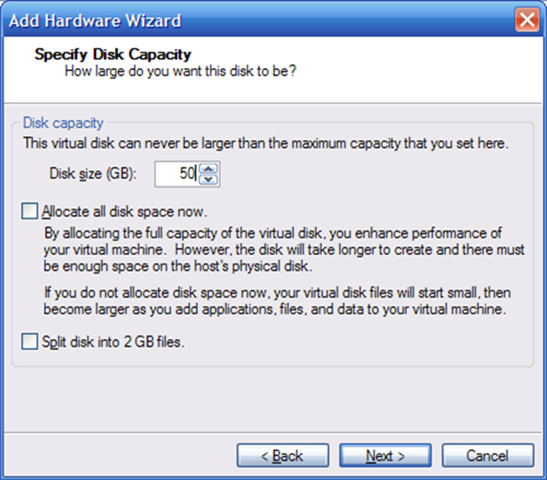
image

edit de ietd.conf file en voeg de onderstaande tekst toe om zo de derde vmdk beschikbaar te stellen als iscsi target.

nano /etc/ietd.conf

Target iqn.2007-07.local.uda:storage.disk1
Lun 0 Path=/dev/sdc

Alias iSCSI

MaxConnections 8
InitialR2T Yes

De iSCSI service herstarten

/etc/init.d/iscsi-target start

De iSCSI service zo configureren dat deze automatisch start bij het starten van de VM.

chkconfig iscsi-target on

Vanaf nu kun je de iscsi target benaderen via de Windows client of via VI3.

Tool: EsxHealthCheck


In een opsom topic op www.vmug.nl/ over verschillende tools welke het gebruik van VMware Software nog completer maken, kwam duncanepping met leuke tool genaamd esxhealtcheck.

Dit is eigenlijk een script in plaats van een tool. Maar het is zeker de moeite waard om dit nader te bekijken.

Hieronder vindt je de readme met de installatie handleiding:

How to quick install:

* 1. Get smtp_send.pl from http://www.vmguru.com/files/10/scripts/entry102.aspx

Put the file in the same folder as health_check.sh.
Please read in smtp_send.pl about prerequesites (MIME::Lite) installation.

* 2. Get MIME::Lite from http://search.cpan.org/~yves/MIME-Lite-3.01/lib/MIME/Lite.pm

I had to create the MIME folder and copy file to /usr/lib/perl5/5.8.0/MIME/Lite.pm on my test system.

# mkdir /usr/lib/perl5/5.8.0/MIME
# cp MIME-Lite-3.01/lib/MIME/Lite.pm /usr/lib/perl5/5.8.0/MIME/Lite.pm

* 3. Copy health_check.conf.example to health_check.conf

# cp health_check.conf.example health_check.conf

* 4. Edit health_check.conf with maildata (set mailoutput=0 if you do not want to use email) and other adjustments

* 5. Make sure to open firewall port 25 out

# esxcfg-firewall -o 25,tcp,out,smtp_out

* 6. Make sure that health_check.sh and smtp_send.pl scripts has the right execute permissions

# chmod 744 health_check.sh
# chmod 744 smtp_send.pl


Good luck documenting your Elastic Sky X environment!
Danish VMware User Group
http://vmug.dk

Helaas ligt de website van vmguru eruit en kun je smtp_send.pl niet downloaden. Ik hoop dat iemand een mirror heeft. Dan kan ik met dit script aan de gang 😉

VMware: Convert VHD with Workstation 6 Converter


In de vorige post How to convert Microsoft Virtual Machine (VHD) to VMware standards vertelde ik hoe je VJD bestanden om kunt zetten naar VMware standards door middel van VMware Importer. Inmiddels zit er in VMware Workstation 6 ook de optie Import functie. Dit is een volledig werkende versie van VMware Converter 3.0 waarmee je ook direct kan converteren naar een VI3 omgeving.

In deze post laat ik jullie zien hoe de Import functie werkt.

Ga naar File – Import

vmwareconvertervhd

Selecteer de optie Standalone virtual machine.

vmwareconvertervhd1

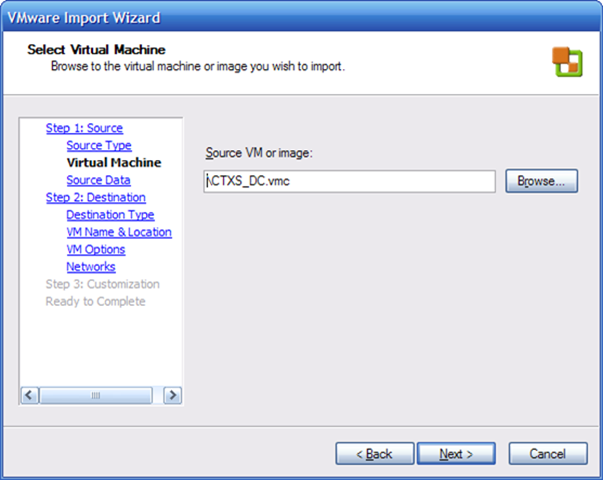
Blader naar de Source VM en selecteer het VMC bestand.

vmwareconvertervhd2 

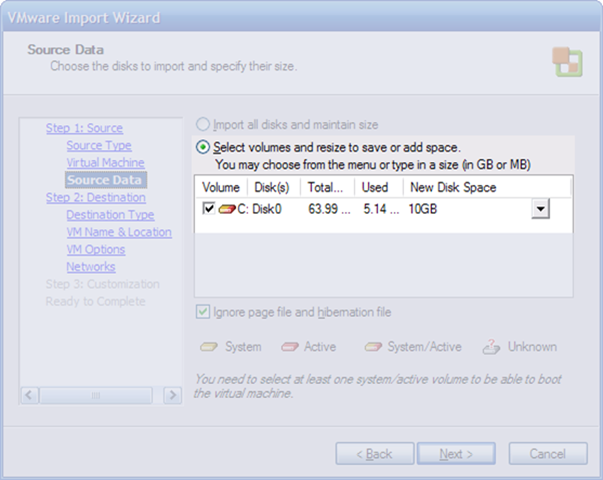
Ik vondt de harddisk space te groot en laat deze daarom verkleinen naar 10GB.

vmwareconvertervhd3

Ik importeer de VM als VMware standalone virtual machine mocht je de VM direct naar VI3 willen importen dan kies je de optie VMware ESX server or VirtualCenter virtual machine.

vmwareconvertervhd4

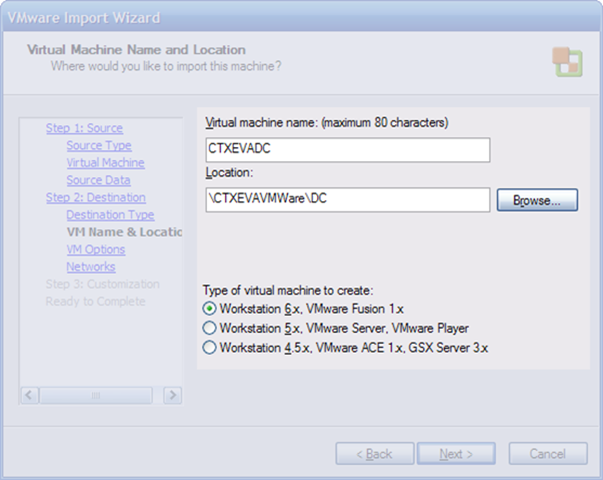
Geef de VM een naam en een locatie. Omdat ik met VMware Workstation 6 werk kier ik als virtual machine type de optie Workstation 6.x, VMware Fusion 1.x.

vmwareconvertervhd5

Omdat deze VM gebruikt wordt als test en daardoor performance niet noodzakelijk is kies ik voor de optie Allow virtual disk files to grow. Deze optie komt ook van pas mocht je niet zoveel beschikbare ruimte meer vrij zijn.

vmwareconvertervhd6

De netwerk kaarten laat ik op 2 staan. Verder kies ik de optie HostOnly. Dit doe ik omdat ik later een “team” ga maken van verschillende VM’s en dan maak ik een private lan aan.

vmwareconvertervhd7

Omdat het een clone is van een VHD installeer ik alleen de VMware Tools. Customize the indentity is niet nodig omdat de VM’s niet samen opgestart worden.

vmwareconvertervhd8

Het Import proces

vmwareconvertervhd9

Zoals je ziet is het tamelijk eenvoudig om een Microsoft VM (VHD, VMC) om te zetten naar een VMware VM (VMDK, VMX).

VMware: ESX Server-AD Integration


Although much of the administration of servers running VMware ESX Server 3.0 will occur in the Windows-based Virtual Infrastructure client connected to a VirtualCenter server, there are times when it is quicker or easier to perform an administrative task directly on the ESX Server itself—either via the command-line interface (CLI) or via the VI client authenticating directly against the ESX Server.  The problem with this is that, by default, administrators will have to use different credentials when connecting the VI client to ESX Server directly.  In addition, these credentials must be managed separately from Active Directory, and separately on each individual ESX Server.  As the number of ESX Servers in a farm grows, this can quickly become an administrative nightmare.

Read the complete article here: http://blog.scottlowe.org/

Tool: Active Directory Explorer v1.0


Introduction

Active Directory Explorer (AD Explorer) is an advanced Active Directory (AD) viewer and editor. You can use AD Explorer to easily navigate an AD database, define favorite locations, view object properties and attributes without having to open dialog boxes, edit permissions, view an object’s schema, and execute sophisticated searches that you can save and re-execute.

AD Explorer also includes the ability to save snapshots of an AD database for off-line viewing and comparisons. When you load a saved snapshot, you can navigate and explorer it as you would a live database. If you have two snapshots of an AD database you can use AD Explorer’s comparison functionality to see what objects, attributes and security permissions changed between them.

AD Explorer works on Windows 2000 and higher.

Download the tool here: http://www.microsoft.com/technet/sysinternals/

You should also take a look at AdRestore v1.1

Whitepaper: Installing ESX 3.0.x without isolating the SAN


Do you find detaching SAN cables or organising LUN masking a hassle each time you build or rebuild a VMware ESX Server?  This paper shows you how to streamline the process by not loading HBA drivers during the initial installation process.

For any suggestions or corrections please contact Dinny at dinny.davies@googlemail.com

Download the whitepaper here: http://www.xtravirt.com/

Mocht je met deze whitepaper aan de slag gaan, lees dan heel erg goed. Dat bespaard je een hoop tijd 😉

Tool: Veeam Configurator


Veeam Configurator is a Windows application that handles multiple ESX Servers simultaneously. It reports on and allows you to configure the following subsystems:
– Remote root access
– Time synchronization (NTP)
– Patch level (reporting only in this version)
In addition, it allows you to:
– Perform diagnostics
– Run a custom script
on multiple ESX Servers (e.g. all servers in a cluster).

Download de tool hier: http://www.veeam.com/

VMWare: Three new patches


Patch ESX-1000073 for VMware ESX Server 3.0.1

Security Issues

This patch provides updates to the Kerberos network authentication packages provided in the VMware ESX Server Service Console. Possible vulnerabilities have been found with the krb5 telnet daemon, the Kerberos KDC, and kadmin. Although these features are not enabled in the Service Console by default, VMware recommends that all users apply this patch.

The Common Vulnerabilities and Exposures project (cve.mitre.org) assigned the names CVE-2007-0956, CVE-2007-0957, and CVE-2007-1216 to this issue.

Download the patch here: http://www.vmware.com/

Patch ESX-1000070 for VMware ESX Server 3.0.1

Resolved Issues

This patch provides the following:

  • This patch resolves time loss issue in Microsoft Windows 2000 SMP (multi-processor) virtual machines running applications that use the Windows Multimedia Timer service. Java applications typically fall into the category of applications that experience the time loss without this patch. The fix does not affect single-processor virtual machines.
  • A fix for an issue where using the 32-bit version of VMware tools in a 64-bit Solaris 10 virtual machine causes high CPU usage. Users of this patch on ESX Server hosts with Solaris 10 virtual machines with 64-bit VMware tools will still experience an error stating “vmware-toolbox-gtk: 1816): Gtk-WARNING **” since no 64-bit GTK is available, but will not experience the high CPU usage. Please refer to http://bugs.sun.com/bugdatabase/view_bug.do?bug_id=6456279 for more information on Solaris 10 and the GTK for 64-bit applications.
  • Pre-built modules (PBMs) to enable VMware tools to be installed in Red Hat Enterprise Linux (RHEL) 3 AS 64-bit virtual machines. Without this patch, the error “None of the pre-built vmmemctl modules for VMwaretools are suitable for your running kernel.” is seen when attmempting to install VMware tools in RHEL 3 AS 64-bit virtual machines.
  • Pre-built modules (PBMs) to enable VMware tools to be installed in Suse Linux Enterprise Server (SLES) 8 Kernel v2.4.21-306 and higher virtual machines.

Download the patch here: http://www.vmware.com/

Patch ESX-1000039 for VMware ESX Server 3.0.1

Resolved Issues

This patch provides the following:

  • Fixes an issue where ESX server fails to boot on HP servers, if a drive fails from the logical volume that’s not a part of the ESX boot environment.
  • Fixes an issue where extraneous warnings are logged in /var/log/messages of ESX Server hosts running HP Insight Manager version 7.7. The warning message is the following: vmkernel: 0:00:10:43.873 cpu0:1024)VMNIX: VmkDev 3293: dev=vmnic2 cmd=0x8946 ifr=dedc1eb4 status=0x2bacffa1.
  • Fixes an issue where some ESX Server hosts stop responding for between two and five minutes during a rescan operation and on occasion, the host will completely stop responding. The diagnosis of this issue is described in detail in KB 10229. Please refer to that knowledgebase article for more information on the diagnosis of the problem and for workarounds if you do not plan to apply this patch to fix the issue.
  • Fixes an issue where NetApp’s sanlun utility fails to get the required information from NetApp filers.
  • Fixes an issue found on HP Proliant DL 380 G5 systems where valid I/O requests were marked as attempts to overwrite the partition table. This caused the file system to become “read-only” while the ext3 file-system is configured on block devices that have extended partitions.

Download the patch here: http://www.vmware.com/

Template: VI3 Security Risk Assessment


De mannen van Xtravirt hebben een Word template gemaakt genaamd VI3 Security Risk Assessment.

This MS Word document template is designed to:

· Provide detail of around security measures designed into each major component of VI3

· Provide a ‘best practice’ security framework for VI3 designs that can be repeated again and again

· Detail real world scenario’s that IT Security personnel can relate to their environment, including built-in countermeasures and additional configuration options.

· Significantly reduce the time and stress involved with gaining design approvals.

The idea is to take your own VI3 design and apply it to each of the major VI3 components in this template:

· ESX Server – Service Console

· ESX Server – Kernel

· ESX Server – Virtual Networking Layer

· Virtual Machines

· Virtual Storage

· VirtualCenter

Download de template hier: http://www.xtravirt.com/