Skip to content

ICT-Freak.nl

  • Home
  • About / Contact
  • Certificates
  • Automation
  • VMware

Category: Fusion

October 10, 2017 afokkema Fusion

Fusion: Cannot find a valid peer process to connect to


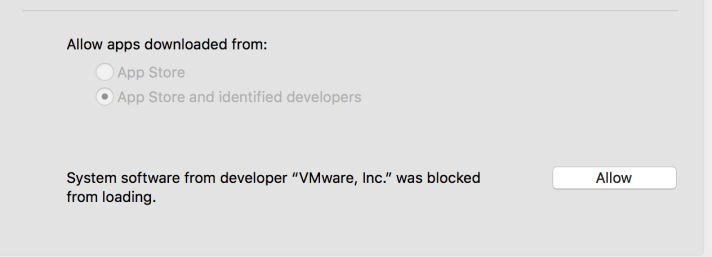
After installing Fusion 10 on my MacBook and creating a new Windows 10 VM. I was unable to poweron the new VM. I received the error “Cannot find a valid peer process to connect to”

The fix was easy. Go to: “System Preferences > Security & Privacy” and press “Allow”.
  

Search

Disclaimer

The opinions expressed here are my personal opinions. Content published here does not necessarily reflect the views and opinions of my employer.

Social

  • View afokkema’s profile on Twitter
  • View afokkema’s profile on LinkedIn

Archives

Latest Trance mixes

Enter your email address to follow this blog and receive notifications of new posts by email.

Join 75 other subscribers

License

Creative Commons License
ICT-Freak.nl by http://ICT-Freak.nl is licensed under a Creative Commons Attribution-Noncommercial-No Derivative Works 3.0 Netherlands License.
Based on a work at ICT-Freak.nl.

Categories

Active Directory Antivirus Automation Backup Book Citrix Hardware Hyper-V Linux Microsoft Powershell Random Scripts SRM Storage Symantec Ubuntu VCB vCenter Veeam VI Client Virtualization VI Toolkit VMUG VMware VMware Server Whitepaper Windows Workstation XenApp
Create a website or blog at WordPress.com
Privacy & Cookies: This site uses cookies. By continuing to use this website, you agree to their use.
To find out more, including how to control cookies, see here: Cookie Policy
  • Subscribe Subscribed
    • ICT-Freak.nl
    • Join 75 other subscribers
    • Already have a WordPress.com account? Log in now.
    • ICT-Freak.nl
    • Subscribe Subscribed
    • Sign up
    • Log in
    • Report this content
    • View site in Reader
    • Manage subscriptions
    • Collapse this bar
 

Loading Comments...