Aleks van http://www.virtualistic.nl liet me de onderstaande comic zien. Deze wilde ik jullie niet laten missen 😉

Aleks van http://www.virtualistic.nl liet me de onderstaande comic zien. Deze wilde ik jullie niet laten missen 😉
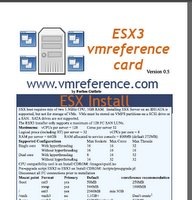
Nadat op 3 februari de versie 1 release was uitgekomen zag ik en samen met mij nog een aantal mensen dat er nog een paar kleine foutjes in stonden. Deze heeft Forbes inmiddels gefixed.
- Correction to partition types (thanks to Arne Fokkema)
- Addition of SQL express with VC 2.5 (thanks to Peter Vroomen)
- Added check license site
- added PROD_VC_EXPRESS
- Random tidying
Download de laatste versie hier: vmreferencecard

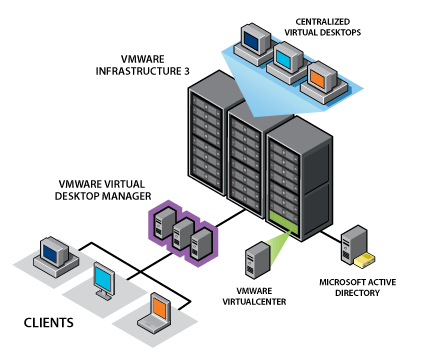
Vanaf vandaag kun je de VDI oplossing van VMware aanschaffen. In deze post vindt alvast wat links naar nuttige informatie.
Deliver Desktops from the Data Center
Tighten control of corporate assets and simplify desktop management with VMware Virtual Desktop Infrastructure (VDI). This comprehensive desktop virtualization solution lets you replace traditional PCs with virtual machines that you can manage from the data center in order to:
- Extend powerful VMware Infrastructure 3 capabilities such as business continuity and disaster recovery to your desktops.
- Streamline desktop management to reduce operating costs and increase control.
- Deliver complete desktop environments with greater application compatibility.
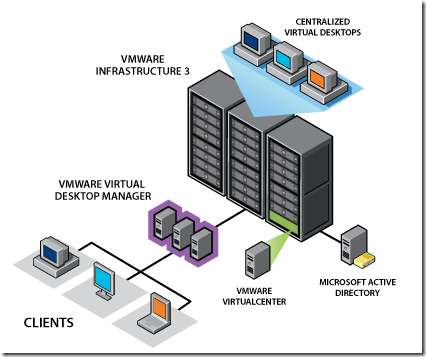
Hier een overzicht van de beschikbare whitepapers
The Security Center is a one-stop shop for security related issues involving VMware products. Check this resource center to stay up-to-date on all current security issues, and to understand considerations related to securing your virtual infrastructure.
Bekijk de website hier: http://www.vmware.com/security/

Richard Garsthagen van de website http://www.run-virtual.com/ heeft alvast wat sneakpreview filmpjes gemaakt over VMware World Europe 2008 in Cannes.
Bekijk de video’s hier: http://www.run-virtual.com/?page_id=213
In deze post zie je hoe ik mijn ESX 3.5 test server update via de VMware Update Manager. Ik ga er vanuit dat je de VUM al hebt geïnstalleerd en dat je de updates al gedownload hebt. Zo niet dan lees je hier hoe je dat kunt doen.
Selecteer de host die je wilt gaan updaten. In dit voorbeeld gaat het om esx3srv1.ictfreak.local. Daarna klik je op Attach Baseline….

Nu selecteer je de baseline die je wilt gaan gebruiken of je maakt er zelf een aan via Create New Baseline…

Klik nu nogmaals op de host en op het tabblad Update Manager. Klik daarna op het Scan icoon (tweede vanaf rechts).

Klik Yes om de host te gaan scannen

Nu worden de firewall porten open gezet en de host word gescanned.

Nadat de scan klaar is krijg je het onderstaande scherm te zien.

Klik nu nogmaals op de host en dan op Remediate (eerste icoontje vanaf rechts).

Selecteer vervolgens de baselines.

Bij het tabblad Updates kun je zien welke updates er geïnstalleerd worden. Hier kun je eventueel ook Updates uitschakelen.

Opmerking: in eerste instantie kreeg ik hier een error en kon ik niet verdergaan. Na een herstart van de VirtualCenter service en de Update Manager service, kon ik wel gebruik maken van de Remediate optie.
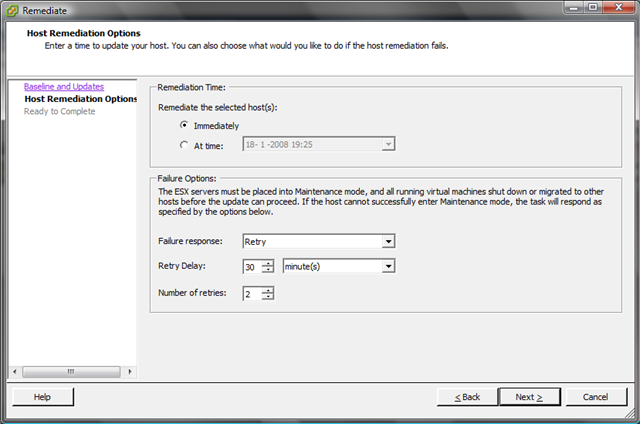
Ik wil de updates gelijk installeren dus kies ik voor de optie Immediately. Het is ook mogelijk om er een job voor te schedulen. Verder kun je hier instellen wat er moet worden gedaan, mocht er een update mis gaan. Ik heb dit op Default laten staan.
Nog even een overzicht van wat er gepatched gaat worden.

De ESX Server word in Maintenance mode geplaatst

En de updates worden stuk voor stuk geïnstalleerd.

Nadat de updates klaar zijn, word de ESX Server opnieuw opgestart en hoeft deze alleen nog maar uit de maintenance mode gehaald te worden.

Zoals je ziet is het build nummer bijgewerkt naar 70356. De updates zijn geïnstalleerd. Nu kijken of al mijn VM’s nog willen starten 😉
De Lone Sysadmin heeft een update geplaatst op zijn weblog over dit hele verhaal: http://lonesysadmin.net/2008/01/18/update-manager-vmotion-and-me/
De Lone Sysadmin maakte er al melding van op zijn blog http://lonesysadmin.net/ maar er schijnt dus een groot probleem te zijn met de nieuwe patches van VMWare ESX 3.5.
Nadat je de patches hebt geïnstalleerd raakt je VMotion switch corrupt. Door de VMotion Switch te verwijderen en weer opnieuw aan te maken, wordt het probleem opgelost. Meer informatie vind je in document: SR#1101801771
Bron: http://lonesysadmin.net/2008/01/18/update-manager-loss-of-vmotion-capabilities/
Voordat je met de VUM aan de gang kunt gaan, moet je eerst de VUM Plugin installeren. Dit spreek denk ik wel voor zich.
Nadat je de Update Manager Plugin hebt geïnstalleerd, kun je via het menu Plugins – Update Manager – Schedule Update Download…. een job aanmaken voor het downloaden van de updates.
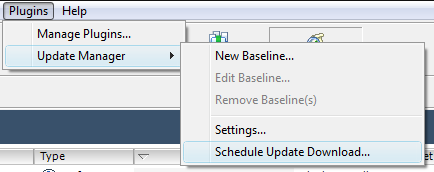
In deze post downloaden we alleen de ESX Server Updates

Ik wil dat de updates nu worden gedownload
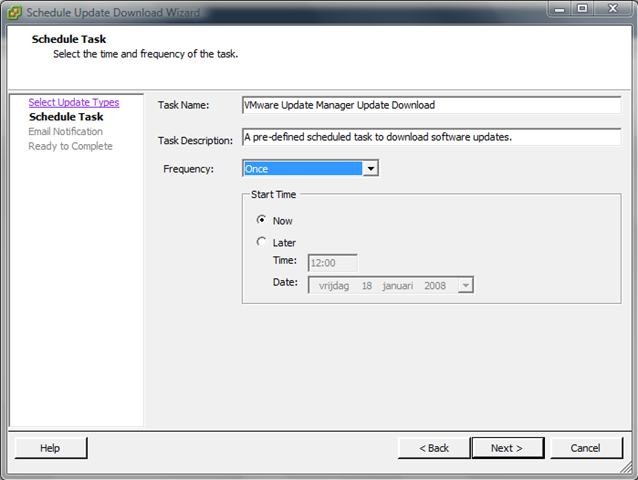
De updates worden gedownload.

Zoals duncan al melde op zijn blog: www.yellow-bricks.com de eerste patches voor ESX 3.5 en ESX3i zijn uit.
Kunnen we mooi eens met de VMware Update Manager (VUM) testen 😉
Mocht je het op de oude manier willen doen, dan kun je hier terecht om de patches downloaden:

Hieronder een quote van het persbericht:
“Delivering software applications to an organization’s workforce is the single largest cost of desktop administration today,” said Jeff Jennings, vice president of desktop products and solutions at VMware. “Thinstall’s third generation solution offers the best technological approach in the market for application virtualization, providing faster, easier and more secure delivery of software applications to desktop-based workforces. The addition of Thinstall to our desktop virtualization portfolio will help us to better deliver cost-effective and more flexible tools for quickly and securely provisioning desktops.”
Thinstall decouples applications from underlying operating systems, improving isolation and portability for applications across desktop environments. Thinstall’s unique, agentless approach to application virtualization enables the rapid, secure and cost effective delivery of software applications to desktops. Agentless application virtualization, pioneered by Thinstall, requires no pre-installed software on physical or virtual PC’s and no new deployment infrastructure or management tools. Thinstall’s architecture integrates into existing application management systems to deliver virtualized applications across a variety of operating system versions (NT, 2000, XP, Vista) and enables applications to move with users as needed. Thinstall significantly decreases the time to value of a software application and reduces the overhead of costly integrations. For example, a large federal agency turned to Thinstall to completely eliminate software installation conflicts that previously ran as high as 20%. The same customer used Thinstall to cut regression testing by 70% as applications no longer had to be tested in every environment or with every other application.
Founded in 1999, Thinstall is used by more than 600 customers in government and commercial industries. Thinstall customers have deployed thousands of virtualized applications to over a million desktops around the world. For more information about Thinstall please visit www.vmware.com/go/Thinstall.
Lees hier het hele persbericht: http://www.vmware.com/company/news/releases/thinstall.html
Hier vind je meer informatie over Thinstall met demo’s en podcasts: http://www.vmware.com/whatsnew/thinstall.html
 ICT-Freak.nl