Script: RemoveHBA.sh (Update for ESX 3.5)


Na de reslease van ESX 3.5 kon natuurlijk het Removehba.sh script van Bouke niet achterblijven. Deze is nu bijgewerkt en ondersteund ESX3.5

This script removes the HBA drivers from an ESX ISO. This is only during installation of ESX. The RPMs are still installed so after the first reboot your server will get HBA drivers, thus FC/SAN support.

This latest version supports the ESX 3.5 CD! Many thanks for this one!

Download het script hier: removehba.sh

VMware: VirtualCenter 2.0.x and SQL 2005


Na een verse installatie van Windows 2003 SP2, SQL 2005 SP2 en VC 202 patch1 krijg ik de onderstaande foutmelding zodra ik de VC service wil starten.

vc2service_error

Dit kun je oplossen door de volgende stappen uit te voeren:

If the VirtualCenter Server service installs but does not start and logs the following error, this is a symptom that the SQL Server 2005 SP1 database is not configured correctly:

Failed to init tableDef: Column VER_ID does not exist in table VPX_VERSION. Database version may be incompatible.

This condition can occur if VirtualCenter Server was installed using a database login mapped to a user other than dbo. When the VirtualCenter login is the owner of the database, the login automatically maps to the dbo user.
There are two ways to achieve the correct configuration:

  • Configure a fresh installation.
  • Repair a fresh installation that does not start.

To configure a fresh installation:

  1. Connect to your SQL Server 2005 server with SQL Server Management Studio.
  2. Create a database login (*vclogin*) for VirtualCenter Server to use.
  3. Create a new database (*VCDB*) and change the owner from <default> to vclogin.
  4. Observe that vclogin maps to the dbo database user for VCDB.
  5. Change the default database for vclogin from master to VCDB.
  6. Install VirtualCenter Server according to the product documentation.

To repair a fresh installation that does not start:
If the database has already been created and VirtualCenter Server has already been installed, it is possible to modify the owner of the database with a system stored procedure. In the steps below, substitute <vcuser> and <vclogin> with your appropriate account names.

  1. Connect to your SQL Server 2005 server with SQL Server Management Studio.
  2. Go to the db_owner schema properties and change the owner from <vcuser> to dbo.
  3. Delete the <vcuser> database user (not the <vclogin> database login that maps to it).
  4. Open a new query window for the VirtualCenter database.
  5. Execute this command:
    EXEC sp_changedbowner @loginame = ‘<vclogin>’, @map = ‘true’
  6. Start the VirtualCenter Server service.

Reference the VirtualCenter Server Release Notes at http://www.vmware.com/support/pubs/vi_pubs.html for details on supported databases and client driver versions. For information how to identify your SQL Server version and edition, reference the Microsoft Knowlege Base article 321185 at http://support.microsoft.com/kb/321185.

De bovenstaande tekst komt van het volgende document: http://kb.vmware.com

Bij mij was dit niet de oplossing. Ik heb er uiteindelijk voor gekozen om geen gebruik te maken van een SQL account maar van een Windows (AD) account welke rechten had op VC database. Daarna starte de VirtualCenter Service gewoon op.

Virtualization: witch Hypervisor is your VM running At?


Dit kun je nagaan door naar het mac adres van de virtuele nic te kijken.

Via het volgende lijstje kun je zien welk mac-adres bij welke hypervisor hoort:

  • Microsoft: 00-03-FF
  • SWsoft: 00-18-51
  • Virtual Iron: 00-0F-4B
  • VMware: 00-0C-29 and 00-50-56
  • XenSource: 00-16-3E

Bron: http://www.techlog.nl/archive/2007/11/28/hey_vm_whats_your_hypervisor

VMware: Virtual Machine is Already a Member of a Team Error.


Ik was bezig met het aanmaken van verschillende teams binnen VMware Workstation 6. Daarbij kopieerde ik een VM verschillende keren over de verschillende teams. De VM is mijn M0nowall Router die een statisch configuratie heeft. Nadat ik deze had gekopieerd wilde ik deze toevoegen aan een nieuw team.

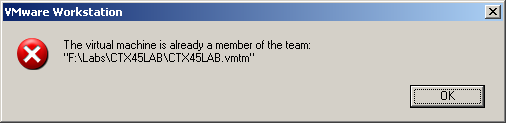
Dit lukte echter niet want ik kreeg de onderstaande error.

ws6teamerror

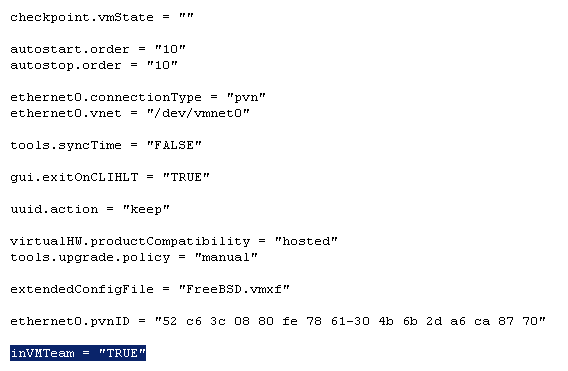
Dit kun je echter simpel oplossen. Open het VMX bestand van de gekopieerde VM en pas de waarde inVMTeam = “TRUE” aan naar “FALSE”.


ws6teamerror1

Nu kun je de VM wel toevoegen aan de andere teams.

VMware: VMTS Patchmanager (build 2878)


De VMTS Patchmanager is een leuk, gratis en veelzijdig product.

Met de volgende pluspunten:

  • Centrale plaats voor het downloaden van de ESX Patches.
  • VirtualCenter support.
  • Een console voor het patch proces.

Er zijn helaas ook minpunten:

  • Geen support voor patch rollups (patch1).
  • Geen upgrade support (esx 3.0.1 naar esx 3.0.2). Patrick wees me er op dat deze optie er wel in zit.

Donwload de tool hier: http://www.vmts.net/VMTSPatchManager.htm

Hier vind je de quickstart: http://www.vmts.net/VMTSPatchManagerQuickStart.htm

En als laatste de manual: http://www.vmts.net/VPMSampleManual.asp

In de rest van de post zie je hoe eenvoudig het is om met deze tool een esx server te updaten.

Continue reading “VMware: VMTS Patchmanager (build 2878)”

VMware: Virtualize SQL Server?


Op deze vraag heeft VMware een antwoord namelijk de volgende whitepaper: SQLServerWorkloads.pdf.

De bovenstaande whitepaper is een performance study van VMware en HP over hoe je een  SQL server wel of niet moet Virtualiseren.

Dit is de conclusie van de performance study:

The performance results we describe in this paper support the conclusion that running Microsoft SQL Server 2005 inside VMware virtual machines can provide an effective production-ready platform for running transaction-processing workloads.
Your IT organization can leverage the sizing data we present in this white paper to deploy Microsoft SQL Server successfully using VMware Infrastructure 3. By comparing effective workload throughput and resource utilization for your datacenter with the results presented in this paper, you can design and size your virtualized environment to meet your SLA targets.
The number of actual users and transactions you can support in a production environment will, of course, depend on the specific applications used and the intensity of user activity. The results of
Conclusions 12 VMware SQL Server Performance in a VMware Infrastructure 3 Environment
our tests clearly demonstrate that in a VMware Infrastructure 3 environment, the transaction throughput scales almost linearly even as the number of clients increases, for every configuration we tested. Our results show that the throughput rate of UP virtual machine is comparable for 32-bit and 64-bit environments. However, for SMP virtual machines, the throughput rate is slightly higher in a 64-bit environment compared to a 32-bit environment. Further, SMP virtual machines can service a higher number of users. One disadvantage of SMP virtual machines is that they have higher CPU costs per transaction than UP virtual machines. From a performance perspective, we recommend using SMP virtual machines rather than UP virtual machines for Microsoft SQL Server, and if possible, a 64-bit environment if your application stack supports it.