
Eric Sloof heeft de tijd genomen om een lijst te publiceren van software wat te gebruiken is binnen een VMware omgeving.
Je kun de site hier vinden: http://vm4all.com/
Eric Sloof heeft de tijd genomen om een lijst te publiceren van software wat te gebruiken is binnen een VMware omgeving.
Je kun de site hier vinden: http://vm4all.com/
Een van de schrijvers (Ron Oglesby) heeft een aantal sample chapters vrijgegeven van het nieuwe boek.
quote van de website:
This is a 3 chapter preview of the VMware Infrastructure 3: Advanced Technical Design Guide. This was given away at VMworld 2007 to several hundred attendees. The cost of this book contains no royalties or profit. It is simply a preview that you pay to print.
De sample chapters kun je hier downloaden: http://www.lulu.com/content/1115401

Vandaag is mijn korte installatie handleiding over het installeren van de MGE Network Shutdown Module V3 gepubliceerd op www.vmug.nl. Je kun het hier downloaden: http://www.vmug.nl/modules.php?name=Downloads&d_op=viewdownload&cid=6.
Viktor bedankt voor het publiceren.

Bouke Groenescheij van jume.nl heeft een script gemaakt waarmee je de hba drivers uit de ESX 3.0.x cd kan halen. Dit script is geinspireerd op de whitepaper van Dinny Davies (http://www.xtravirt.com/).
Zie hier het script in actie

Lees de rest van het artikel en download het script hier http://www.jume.nl/

In deze how to laat ik zien hoe je vanaf een Windows machine een commando kunt uitvoeren op het service console van VMware ESX. Dit werkt echter ook op de verschillende linux distributies.
Lees hier wat je allemaal met plink kunt doen.
Als eerste moet de putty installer gedownload en geïnstalleerd worden.
Vervolgens kun je via het onderstaande commando vdf -h weergeven in een cmd box.
plink.exe -l root -pw password esxserver vdf -h
-l staat voor user in dit geval root.
-pw staat voor password in dit geval password.
esxserver is de esxserver die benaderd word.
Dit is echter geen veilige oplossing voor het gebruik binnen scripts omdat de username en password kaal in het script staat.
Om dit alles te beveiligen gaan we gebruik maken van Private Key authentication. Klik hier voor meer informatie.
Om dit alles voor elkaar te krijgen moet je op de ESX Servers een public key genereren en de sshd_config aanpassen. Vervolgens dien je de key over te halen naar de Windows machine om deze vervolgens te converteren naar een ppk file die weer binnen putty of plink te gebruiken is.
Dit kun je als volgt voor elkaar krijgen.
RSAAuthentication yes
PubkeyAuthentication yes
AuthorizedKeysFile .ssh/authorized_keys
cp id_rsa.pub /root/.ssh/authorized_keys
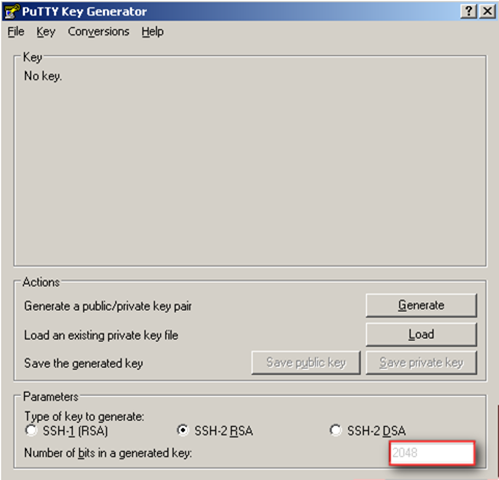
Stel eerst het aantal bits in op 2048
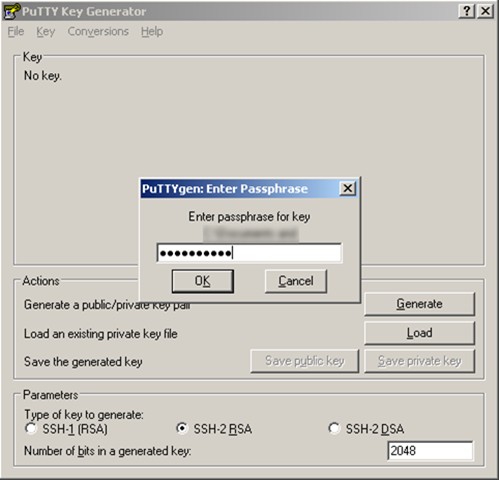
Klik op Conversions en open het id_rsa bestand.
Er wordt gevraagd naar de passphrase die je ingevoerd hebt in stap 2 van de ESX Server. Nadat je op Ok hebt geklikt verschijnt het onderstaande scherm
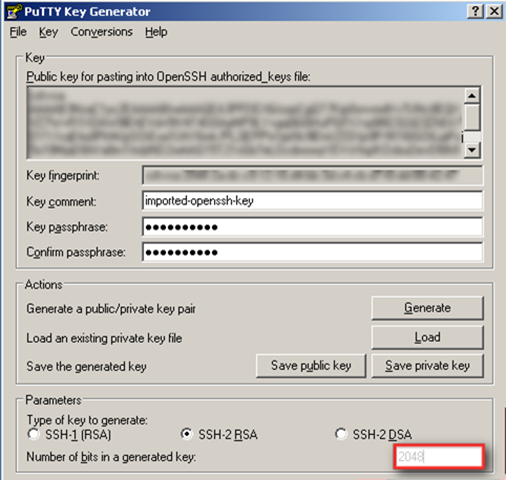
Nu kun je de private key opslaan als bijvoorbeeld C:\esx1.ppk. Dit bestand hebben we in de volgende stap nodig.
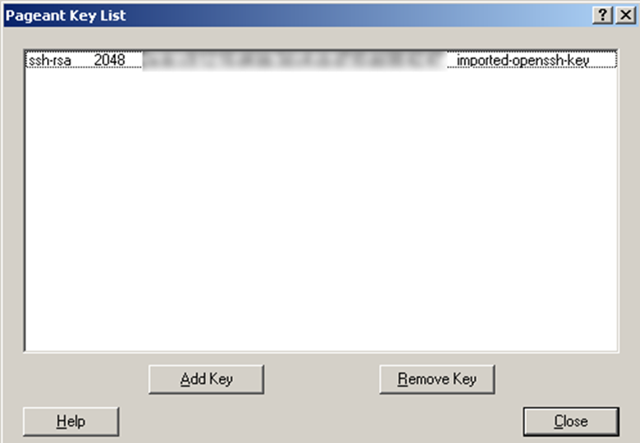
Zoals je ziet is de key succesvol geïmporteerd. Doe dit ook voor al je andere ESX Servers.
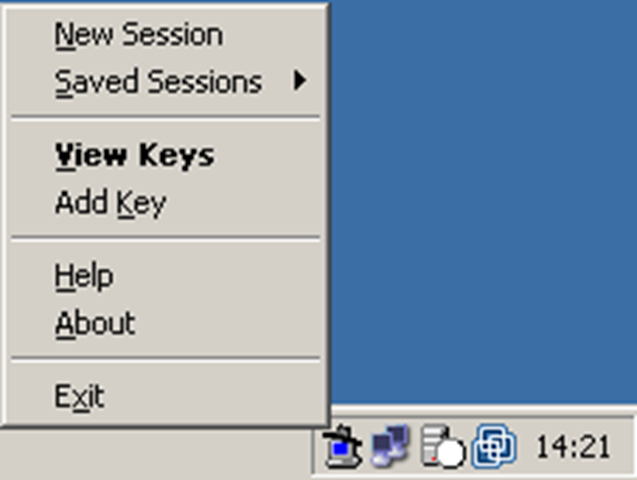
Nu kun je een een command prompt openen en met het volgende commando iets uitvoeren op de ESX Server
plink -agent root@esxserver commando
-agent kijkt in de pageant of er een public key geregistreerd staat. Is dit het geval dan kan er geautenticeerd worden.
-root@esxserver is de gebruiker root op de esxserver.
commando is het commando wat je wilt uitvoeren.
Als je nu vanuit de commandprompt het volgende commando uitvoert
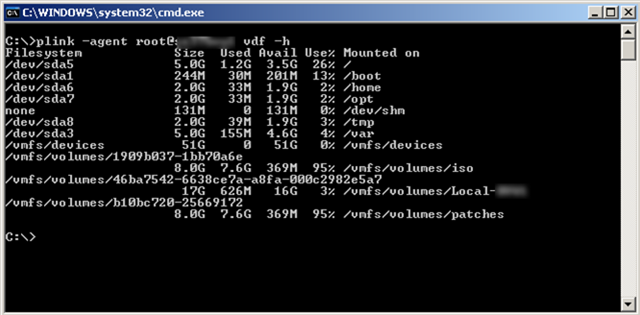
plink -agent root@esxserver vdf -h
krijg je de onderstaande output
Alessandro Perilli van virtualization.info heeft een lijst gepubliceerd met daarin de features die beschikbaar komen in ESX 3.1.0 en VC 2.1.0.
Hieronder vind je alvast een aantal punten
DMotion
Unofficially introduced with ESX Server 3.0.1, in its first version DMotion is a special VMotion operation only capable of moving running virtual machines from an ESX Server 2.5.x host to a new ESX Server 3.x., without shared SAN LUN mandatory requirement.
In ESX Server 3.1 this capability will be extended, allowing hot migration of running virtual machines between ESX 3.1 hosts through the Ethernet cable.Patch management system for host and virtual machines (UpdateManager)
ESX Server 3.1 will finally introduce an automated patch management system called UpdateManager. This solution will be able to update both host itself and virtual machines (both Microsoft Windows and Red Hat Enterprise Linux).
UpdateManager will feature security backup before patching and automated rollback if something goes wrong.VMware Consolidate Backup (VCB) and VMware Converter integration
VirtualCenter 2.1 will now allow restoring VCB images with an integrated version of VMware Converter.Server consolidation advisor
VirtualCenter 2.1 will expose a server consolidation assistant able to analyze which physical machines should be converted in virtual ones, and where to move existing VMs among available hosts.
(note that with this feature VMware is further extending competition with PlateSpin, covering both features with PowerRecon and PowerConvert)Guest OS disaster recovery capability
VirtualCenter 2.1 will be able to recognize a failure inside a virtual machine and restart it through VMware HA module.Power saving capability (Distributed Power Management)
VirtualCenter 2.1 will introduce a new resources utilization analysis feature, able to verify when a physical host can be powered off, VMotion-ing its virtual machines on other hosts without impacting performances.
Lees de rest van het artikel hier: http://www.virtualization.info/

Deze post is ook als pdf geplaatst op www.vmug.nl
De software die je nodig hebt is de Network Shutdown Module Linux x86 Console.
Download de software hier: http://www.mgeups.com/.
Verder vindt je hier een Whitepaper: http://www.mgeups.com.
Zodra alle Software binnen is kunnen we beginnen.
Voorheen in ESX 2.5.x kon je een cronjobnaam.sh in de map /etc/cron.d plaatsen en dan werd deze uitgevoerd. Binnen ESX 3.0.x werkt dit niet meer en moet je gebruik maken van het commando crontab.
Op de volgende website vindt je meer info over het commando crontab: http://blicbox.be/node/292
Zo doe er je voordeel mee 
In deze post som ik een paar commando’s op die je kunt gebruiken in het Service Console van ESX 3.0.x.
| HOSTD | HOSTD is de vervanger van de vmware-serverd daemon. |
| Met het volgende commando herstart je de daemon | service mgmt-vmware restart |
| VPXA | VPXA is de vervanger van de vmware-ccagent daemon. |
| Met het volgende commando herstart je de daemon | service vmware-vpxa restart |
| ESXCFG-NICS | ESXCFG-NICS is de vervanger van de mii-tool, mui (esx 2.5.x) en de modules.cfg |
| Met het volgende commando kun je het e.e.a. configureren. | esxcfg-nics <options> [nic] -s|–speed <speed> Set the speed of this NIC to one of 10/100/1000/10000. Requires a NIC parameter. -d|–duplex <duplex> Set the duplex of this NIC to one of ‘full’ or ‘half’. Requires a NIC parameter. -a|–auto Set speed and duplexity automatically. Requires a NIC parameter. -l|–list Print the list of NICs and their settings. -r|–restore Restore the nics configured speed/duplex settings (INTERNAL ONLY) -h|–help Display this message. |
| ESXCFG-FIREWALL | ESXCFG-FIREWALL is nieuw sinds ESX 3.0 en kun je gebruiken om de Firewall van ESX te configureren |
| Met het volgende commando kun je het e.e.a. configureren. | esxcfg-firewall -l start (load) de firewall
esxcfg-firewall -u stopt (unload) de firewall esxcfg-firewall -q kun je zien welke services ingeschakeld zijn. esxcfg-firewall -s kun je de volgende services inschakellen. nfsClient
Let op! deze service benamingen zijn cAsE sEnSiTiVe.
esxcfg-firewall -e kun je een specifieke service inschakellen. esxcfg-firewall -d kun je een specifieke service uitschakellen. |
| ESXCFG-RESGRP | ESXCFG-RESGRP is nieuw binnen VMware ESX 3.0.x. Hiermee kun je Resource groups beheren. |
| Met het volgende commando kun je het e.e.a. configureren. | esxcfg-resgrp [options] [resgrp path] -a, –add rgname Add a new group under the path -d, –delete Delete the resource group -l, –list List all the resource groups Or stats about a specific resource group –restore Restore all resource groups from configuration file (FOR INTERNAL USE ONLY). -h, –help Show this message |
| ESXCFG-NAS | ESXCFG-NAS is nieuw binnen VMware ESX 3.0.x. Hiermee kun je een NAS aankopellen en beheren. |
| Met het volgende commando kun je het e.e.a. configureren. | esxcfg-nas <options> [<label>] -a|–add Add a new NAS filesystem to /vmfs volumes. Requires –host and –share options. -o|–host <host> Set the host name or ip address for a NAS mount. -s|–share <share> Set the name of the NAS share on the remote system. -d|–delete Unmount and delete a filesystem. -l|–list List the currently mounted NAS file systems. -r|–restore Restore all NAS mounts from the configuration file. (FOR INTERNAL USE ONLY). -h|–help Show this message. |
| ESXCFG-ROUTE | ESXCFG-ROUTE is nieuw binnen VMware ESX 3.0.x. Hiermee kun je default route instellen voor de vmkernel. |
| Met het volgende commando kun je het e.e.a. configureren. | esxcfg-route [ip-address] stelt de default gateway in voor de vmkernel.
esxcfg-route |
| ESXCFG-VMKNIC | ESXCFG-VMKNIC is nieuw binnen VMware ESX 3.0.x. Hiermee kun je het ip address instellen voor de vmkernel. |
| Met het volgende commando kun je het e.e.a. configureren. | esxcfg-vmknic <options> [[<portgroup>]] -a|–add Add a VMkernel NIC to the system, requires IP parameters and portgroup name. -d|–del Delete VMkernel NIC on given portgroup. -e|–enable Enable the given NIC if disabled. -D|–disable Disable the given NIC if enabled. -l|–list List VMkernel NICs. -i|–ip <X.X.X.X> The IP address for this VMkernel NIC. Setting an IP address requires that the –netmask option be given in same command. -n|–netmask <X.X.X.X> The IP netmask for this VMkernel NIC. |
| ESXCFG-SWISCSI | ESXCFG-SWISCSI is nieuw binnen VMware ESX 3.0.x. Hiermee kun je de iSCSI Software Initiator configureren. |
| Met het volgende commando kun je het e.e.a. configureren. | esxcfg-swiscsi options -e, –enable Enable sw iscsi -d, –disable Disable sw iscsi -q, –query Check if sw iscsi is on/off -s, –scan Scan for disk available through sw iscsi interface -k, –kill Try to forcibly remove iscsi sw stack -r, –restore Restore sw iscsi configuration from file (FOR INTERNAL USE ONLY) -h, –help Show this message |
Ten days after release of its companion VirtualCenter 2.0.2, VMware finally releases ESX Server 3.0.2.
While this version should be aimed at bugfixes only, it brings in some extended support for:
VMware also updated its Consolidated Backup module (VCB) to version 1.0.3, introducing several major features like:
Download both ESX Server 3.0.2 and VCB 1.0.3 here.
Bron: http://www.virtualization.info/2007/08/release-vmware-esx-server-302-vcb-103.html

 ICT-Freak.nl