
On a fresh installed Windows Server 2008 X64 VM, a received the following error when I want to search for new Windows Updates:
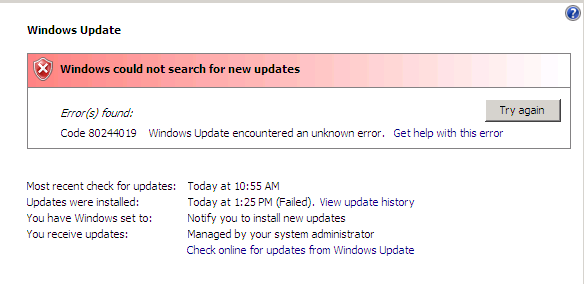
The solution in my case was to delete the following registry key:
HKEY_LOCAL_MACHINE\Software\Policies\Microsoft\Windows\WindowsUpdate

 ICT-Freak.nl
This works perfectly, thank you!
‘hey I tried all the solutions and it didn’t work… any other ideas’
Use Microsoft’s Windows Update Troubleshooter.
So BITS and Windows Update service both are running but still the same error bugs you. This Shows that there must be issue with these services. Thankfully Microsoft has their very own Troubleshooter that may come to the rescue. Just Follow these steps:
Download Windows Update Troubleshooter. here https://support.microsoft.com/en-us/gp/windows-update-issues/en-us
Double Click on WindowsUpdateDiagnostic file you just downloaded.
Now Click on Next and let it do its work.
After completing these steps, try to check for a Windows Update again. In case the problem persists, proceed to this website
https://www.errorsolutions.tech/error/windows-update-error-code-80244019/