Frank Denneman posted today about disallowing multiple VM console session in a high-secure virtual infrastructure design: http://frankdenneman.nl/2010/11/disallowing-multiple-vm-console-sessions
The first thing popped up in my mind was why not automate this setting with PowerCLI. So I created a function called Set-MaxMKSConnections:
Function Set-MaxMKSConnections{
param(
    [parameter(Mandatory = $true)]
    [string[]]$vmName,
    $Sessions
)
    $vmConfigSpec = New-Object VMware.Vim.VirtualMachineConfigSpec

       $extra = New-Object VMware.Vim.optionvalue
    $extra.Key="RemoteDisplay.maxConnections"
    $extra.Value="$Sessions"
    $vmConfigSpec.extraconfig += $extra

        $vm = Get-VM $vmName | Get-View
        $vm.ReconfigVM($vmConfigSpec)
}
You can run this function by copying the code into the PowerCLI window. To run it on a single VM, you can use the following line:
Set-MaxMKSConnections -vmName Thinapp -Sessions 1
To run it on all your VM’s, you can use the following foreach loop:
$vms = Get-VM
foreach($vm in $vms){
    Set-MaxMKSConnections -vmName $vm -Sessions 1
}
The configuration is changed even on Virtual Machines that are powered on (you need to restart the VM to activate the new setting):
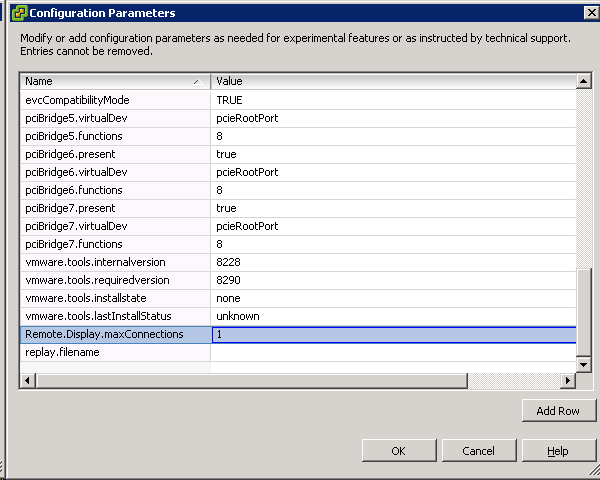
If you want to raise the maxConnections value back to 2 or another value, you can change the –Sessions parameter with the correct value and run the script again.

 ICT-Freak.nl
Great post Arne.
Note that this setting (and others) is also mentioned in the vSphere 4.0 Security Hardening Guide as recommendation VMX02.
My Security – Hardening – Part 1 – Virtual Machines shows another method to apply these recommendations.
Hi Arne,
Nice site, great conent.
One corection, according to the hardening guide the .vmx setting is “RemoteDisplay.maxConnections” without a dot between Remote and Display.
My testing confirms that having the dot does not result in the required security.
Al.
Thanks! I have changed the script to correct the typo.