Veeam: Backup for VirtualInfrastructure


Features and Benefits

Backup and Replication in one – Now, with Veeam Backup, organizations can benefit from a unified solution for both backup and replication to protect mission-critical virtual machines from both hardware and software failure.

Fast file-level recovery – Veeam Backup’s fast file-level recovery feature allows ESX administrators to restore individual files in minutes without extracting the full VM image to a local drive. An administrator can extract individual files to the latest state or to a specific point in time.

Data de-duplication – Veeam Backup allows you to minimize storage costs for virtual machine backups. Veeam’s data de-duplication and compression are especially valuable when backing up multiple virtual machines created from a single template or VMs with gigs of free space on their logical drives.

Replication rollback – A replica produced with Veeam Backup can be restored to a particular point in time. This protects your infrastructure against both hardware and software corruptions.

Integration with VCB – Veeam Backup is the only backup solution that enables you to run incremental backup and replication jobs through VMware Consolidated Backup (VCB). Using its proprietary “VCB on-the-fly” technology, Veeam Backup doesn’t require extra space on the VCB proxy for VM images, allowing for faster backups. Veeam Backup operates either with or without VCB, letting the user choose whether to use VCB or not for either standard backup or replication backup.

Integration with Veeam FastSCP – To date, Veeam’s FastSCP freeware has been downloaded more than 28,000 times, and Veeam Backup shares a common interface with FastSCP, allowing users to manage backup, replication and file copying from a single screen.


Hieronder plaats ik wat printscreens van het product.

Het beginscherm:
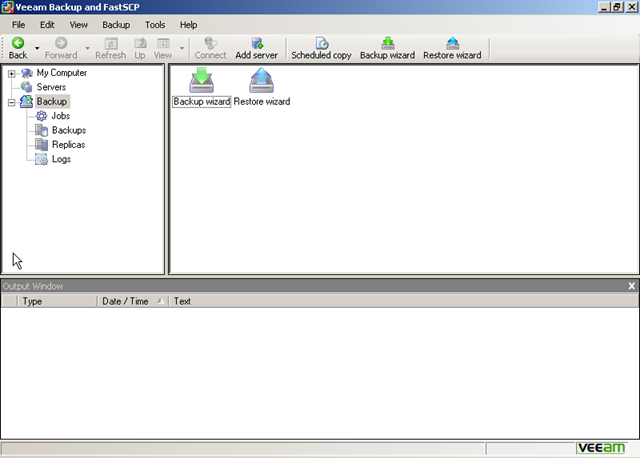
veeam_Backup_1

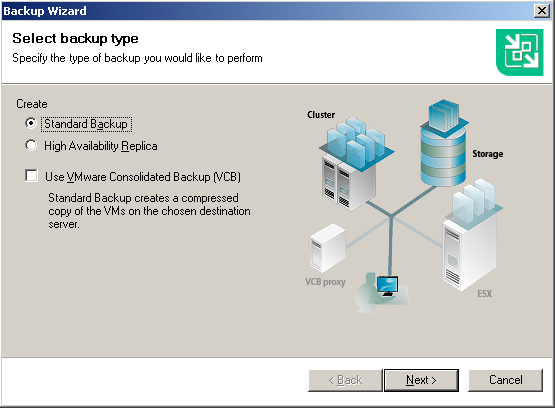
De backup wizard:

veeam_Backup_2

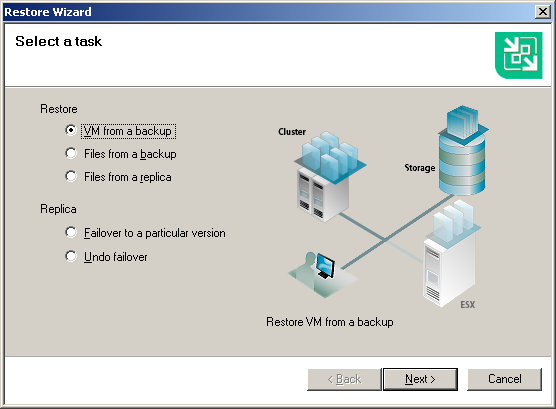
De Restore Wizard.

veeam_Backup_3

Meer info en een demo filmpje vind je hier: http://veeam.com/vmware-esx-backup.html

En nog een filmpje van Veeam @ VMworld Europe 2008

VMware: VirtualCenter 2.5 Passthrough Authentication


Voeg -passthroughAuth -s vchostname toe aan de Target regel.

vc25passthrough

Deze informatie komt van: http://www.vinternals.com/2008/02/virtualcenter-25-passthrough.html

At last! VMware have finally added passthrough auth support in VC 2.5, although it is currently classed as experimental. This is something I have been waiting / asking about for quite some time. And even better, it’s on by default! To use it, simply add -passthroughAuth -s vchostname to the end of the shortcut used to launch the VI 2.5 client.
By default it uses the Negotiate SSPI provider, however since they have fully implemented the interface you can change that behaviour to use Kerberos by adding the following within the <vpxd> node in the vpxd.cfg file on the VC server:
<sspiProtocol>Kerberos</sspiProtocol>

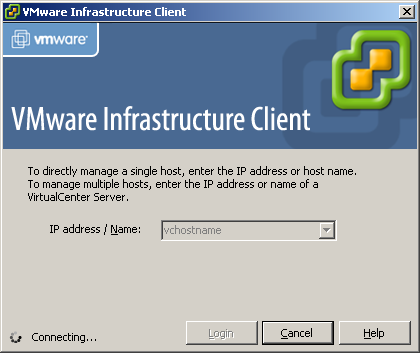
Daarna zie je het volgende scherm als je de VI client opstart:

vc25passthrough_2

Citrix: Workflow Studio


Citrix is bezig met het ontwikkelen van de Workflow Studio. Een download is nog niet beschikbaar maar deze word verwacht in de lente van 2008.

Wat is Workflow Studio zul je denken. Volgens een post op de Citrix site werkt het als volgt:

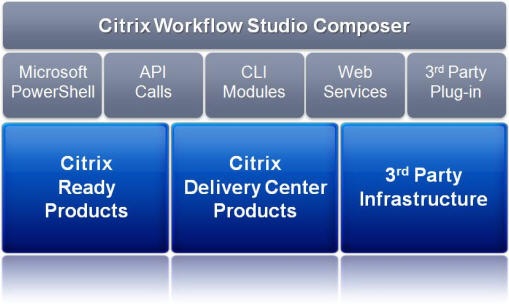
Citrix Workflow StudioTM is an all new platform for automating IT processes, orchestrating workflows across technology silos, and driving data center automation. The solution is built on standard Microsoft technologies including the .NET Framework, Windows Workflow Foundation and Windows PowerShell. It is through the use of Windows PowerShell that Workflow Studio achieves its simplicity and unparalleled power to drive efficiencies and increase effectiveness across functions managing IT infrastructures.

workflow_studio_composer

De volgende features zijn beschikbaar in  de Tech Preview:

This Tech Preview release will include the following features and capabilities:

  • Simple, graphical interface for workflow composition
  • Drag and drop functionality for preconfigured API calls eliminates need for background in scripting or software development
  • Self-documenting system for each task incoporated in workflows
  • Built-in conditional and dynamic workflow controls
  • Robust and searchable task libraries
  • Out of the box support for automating tasks for the following IT systems:
    • Citrix XenServer
    • Citrix XenApp
    • Citrix Provisioning Server
    • Citrix NetScaler
    • Active Directory
    • Group Policy
    • Windows PowerShell


Meer informatie en een paar demo filmpjes vind je hier: http://community.citrix.com/display/cdn/Citrix+Workflow+Studio

Citrix: Releases a XenDesktop Beta


Citrix heeft een beta vrijgegeven van XenDesktop.

Compared to Citrix XenDesktop Tech Preview kit, this Beta offers full feature integration across key components of the product:

  • Desktop Delivery Controller  – Connects office workers to their personalized desktops with the best performance, ease of use and rich desktop experience.
  • Virtual Desktop Infrastructure – Enterprise-class virtualization infrastructure that creates the foundation for delivering virtual desktops and offers advanced management features.
  • Virtual Desktop Provisioning – Stream a single desktop image to create many virtual desktops in the data center on demand, enabling simplified management and lower network storage costs.
  • XenDesktop Setup Tool – A simple wizard to enable IT to quickly create and deliver hundreds of virtual desktop.


Je kunt je hier registreren voor het downloaden van de Beta. De download is zo’n 1200 MB  groot. Ik hoop dat ik snel tijd heb om met dit product te kunnen testen.

Microsoft: Infrastructure Planning and Design


Overview

Infrastructure Planning and Design guides share a common structure, including:

  • Definition of the technical decision flow through the planning process.
  • Listing of decisions to be made and the commonly available options and considerations.
  • Relating the decisions and options to the business in terms of cost, complexity, and other characteristics.
  • Framing decisions in terms of additional questions to the business to ensure a comprehensive alignment with the appropriate business landscape.

These guides complement product documentation by focusing on infrastructure design options.
Each guide leads the reader through critical infrastructure design decisions, in the appropriate order, evaluating the available options for each decision against its impact on critical characteristics of the infrastructure. The IPD Series highlights when service and infrastructure goals should be validated with the organization and provides additional questions that should be asked of service stakeholders and decision makers.
IPD consists of the following downloadable packages:

  • Infrastructure Planning and Design Series Introduction
  • Selecting the Right Virtualization Technology
  • Microsoft SoftGrid Application Virtualization
  • Windows Server Virtualization (for Windows Server 2008 Hyper-V and Virtual Server 2005 R2 SP1)
  • New! Windows Deployment Services
  • New! Windows Server 2008 Active Directory Domain Services
  • New! Windows Server 2008 Terminal Services

The guides are available as individual downloads or as a single all-in-one package.
Send questions or feedback to us directly at SATfdbk@microsoft.com

 
System Requirements
  • Supported Operating Systems: Windows Server 2003; Windows Vista; Windows XP
  • These download files work with the following Office programs:
    • Microsoft Office Word 2007 (.docx)
    • Microsoft Office Word 2003 (.doc)
    • A Word viewer such as Word Viewer 2003.

Instructions

  1. To start the download, select a file from the list of Files in this Download on this page.
  2. Save the .zip file to your preferred location on your computer.

 
Additional Information

Solution Accelerators are free, scenario-based guides and automations designed to help IT professionals who are proactively planning, deploying, and operating IT systems using Microsoft products and technologies. Solution Accelerator scenarios focus on security and compliance, management and infrastructure, and communication and collaboration.
More Information about the Solution Accelerator Notifications Newsletter
Register to receive the Solution Accelerator Notifications newsletter so that you can stay informed about new Solution Accelerator releases and updates. The newsletter covers such areas of interest as:

  • Communication and Collaboration
  • Security, Data Protection, and Recovery
  • Deployment
  • Operations and Management

You may also receive invitations to participate in accelerator development via beta programs and customer surveys. Solution Accelerator Notifications is currently available in English only.


You can download the documents over here: http://www.microsoft.com/downloads/

How To: Manually Assigning a MAC Address to a VM


Ga Control PanelNetwork Connections Properties van je network connection. Daarna ga je naar het tabblad Advanced  NetworkAddress hier kun je een MAC address invoeren via een vaste waarde van bv. 123456789E12.

Je kunt een bestaand MAC address gebruiken van een fysieke netwerkkaart welke je niet meer gebruikt en toch weg doet! Je kunt ook een MAC address genereren via een tool generate_mac_addresses_for_vmware.

image

Je kunt het ook via een parameter in het vmx bestand doen. Hoe dit werkt lees je hier: http://www.vmware.com/support of http://www.vmware.com/support/

Jurgen bedankt voor de tip!!

Preview: Citrix Webinterface 5


Thomas Koetzing heeft een artikel geplaatst over Citrix Webinterface versie 5.


Microsoft has release Windows Server 2008 in February of 2008 and Citrix will follow with their release of Presentation Server 5.0 (Delaware) that is targeted for the new Windows server generation. With each new full release of Presentation Server, the product components are also updated to support the new version.
After Web Interface 4.0, 4.1, 4.2, 4.5, 4.6 and 4.7 Citrix will release version 5.0 together with the Delaware release of Presentation Server. The new Web Interface version has to run on Server 2008, which means Internet Information Server 7.0, but what else is new with WI 5.0? This article describes the details of the next release.

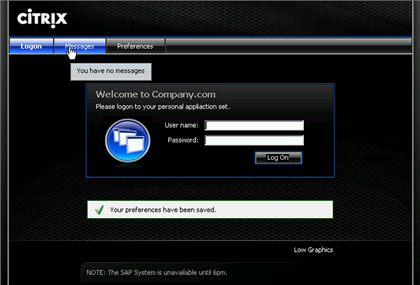
Hier onder zie je een screenshot van het nieuwe welcome screen.

WI5IMG12

En nog een printscreen van de application set.

WI5IMG03

Het complete artikel kun je hier lezen: http://www.thomaskoetzing.de

How To: Disable the Information bar for some processes.


De volgende bar kan opkomen als je een html file opent vanaf je lokale hardeschijf.

image

Dit kun je via de volgende registry file aanpassen:

Windows Registry Editor Version 5.00
[HKEY_LOCAL_MACHINESOFTWAREMicrosoftInternet ExplorerMainFeatureControlFEATURE_LOCALMACHINE_LOCKDOWN]
@=””
“explorer.exe”=dword:00000000
“msimn.exe”=dword:00000000
“iexplore.exe”=dword:00000000
“wmplayer.exe”=dword:00000000

Mocht je het bovenstaande verhaal weer willen terugdraaien, dan voer je de volgende key in:

Windows Registry Editor Version 5.00
[HKEY_LOCAL_MACHINESOFTWAREMicrosoftInternet ExplorerMainFeatureControlFEATURE_LOCALMACHINE_LOCKDOWN]
@=””
“explorer.exe”=dword:00000001
“msimn.exe”=dword:00000001
“iexplore.exe”=dword:00000001
“wmplayer.exe”=dword:00000001


Bron: http://forums.techguy.org/tech-tips-tricks/365594-disable-ie-information-bar.html