Linux: Ubuntu JeOS 7.10


JeOS is een linux versie die is geoptimaliseerd voor het gebruik binnen een VirtualMachine. Ik kwam volgende mailing tegen https://lists.ubuntu.com/archives/ubuntu-announce/2007-November/000106.html. Hierin staat het volgende:

The Ubuntu team is happy to announce the first release of Ubuntu JeOS,
Ubuntu JeOS 7.10.  Pronounced "juice", Ubuntu JeOS (Just Enough Operating
System) is an efficient variant of Ubuntu configured specifically for
virtual appliances.

ISVs looking to develop virtual appliances will have a compelling platform
in Ubuntu JeOS, an OS optimised for virtualisation that greatly reduces the
complexity and maintenance overhead normally associated with general purpose
operating systems.  Ubuntu JeOS Edition has been tuned to take advantage of
key performance technologies of the latest virtualisation products from
VMware. This combination of reduced size and optimized performance ensures
that Ubuntu JeOS Edition delivers a highly efficient use of server resources
in large virtual deployments.

You can read more about Ubuntu JeOS in the following press release:

  http://www.ubuntu.com/news/ubuntu-jeos

To Get Ubuntu JeOS 7.10
-----------------------

The JeOS 7.10 CD image for x86 systems can be found at:

  http://cdimage.ubuntu.com/jeos/releases/gutsy/release/

Currently JeOS is available as a 32-bit flavor only.

 

VMware: VirtualCenter Database Calculator


Bouke poste op het forum van http://www.vmug.nl/ de volgende url: http://www.vmware.com/support/vi3/doc/vc_db_calculator.xls

Deze Excel sheet stelt je in staat om de benodigde schijfruimte voor de VirtualCenter database te berekenen. Vooral in grootte omgevingen is dit een handige tool voor het plannen van de omgeving.

Tool: mRemote


De onderstaande tool gebruik ik voor het beheren van:

  1. Windows Servers
  2. Windows Clients
  3. ESX servers
  4. Linux Servers

Hieronder vind je een overzicht van de features:

mRemote is a multi-tab, multi-protocol remote connections mananger written in VB.NET and C# 2.0.

Features

  • Free and Open Source, released under the GPL
  • Multi-Tab interface to minimize window clutter
  • Multiple supported protocols
  • Easy to organize and maintain list of connections
  • Support for importing connections from Active Directory
  • Allows creating nested containers (folders) to categorize connections
  • “Quick Connect” feature to quickly open a connection without creating an entry
  • “Quick Search” feature to quickly find a connection while typing
  • Support for SCP/SFTP file transfers
  • Assign icons to connection to easily identify purpose
  • Screenshot manager allows to collect multiple screenshots and save them all together or copy them to the clipboard
  • View remote session info and log off sessions (RDP)
  • Portable (with the use of command line switches)
  • “Auto-Update” feature
  • Show currently selected tab name in window title
  • Show description tooltips when hoovering over connections
  • System tray icon with connection menu
  • Fullscreen (Kiosk) mode
  • Assign global credentials to use when no information is provided on connection basis
  • Up/Down (Ping) feature shows if the selected host answers to a ping

Currently these protocols are supported:

System Requirements

Download de tool hier: http://mremote.lostcharacters.net/wiki/Downloads.ashx

VMware: Virtual Machine is Already a Member of a Team Error.


Ik was bezig met het aanmaken van verschillende teams binnen VMware Workstation 6. Daarbij kopieerde ik een VM verschillende keren over de verschillende teams. De VM is mijn M0nowall Router die een statisch configuratie heeft. Nadat ik deze had gekopieerd wilde ik deze toevoegen aan een nieuw team.

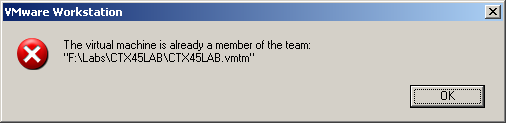
Dit lukte echter niet want ik kreeg de onderstaande error.

ws6teamerror

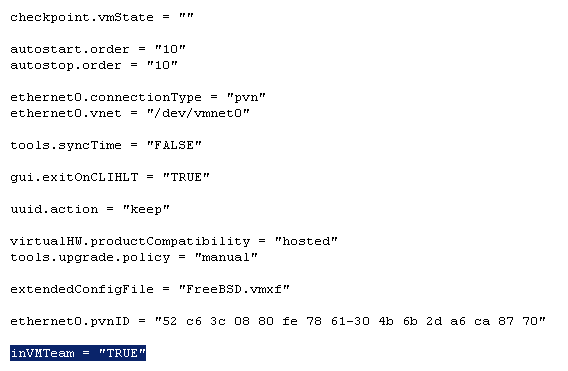
Dit kun je echter simpel oplossen. Open het VMX bestand van de gekopieerde VM en pas de waarde inVMTeam = “TRUE” aan naar “FALSE”.


ws6teamerror1

Nu kun je de VM wel toevoegen aan de andere teams.

Microsoft: Command-line reference


Het volgende staat er op de technet website van Microsoft:

Command-line reference A-Z

To find information about a command, on the A-Z menu, click the letter that the command starts with, and then click the command name.

In addition to the tools installed with the Windows Server 2003 family there are over 40 support tools that you can install directly from the product CD. You can use these tools to diagnose and resolve computer problems. For more information about these support tools and how to install them, see Install Windows Support Tools.

For more information about changes to the functionality of MS-DOS commands, new command-line tools, command shell functionality, configuring the command prompt, and automating command-line tasks, see Command-line reference.

You must run command-line tools at the prompt of the Cmd.exe command interpreter. To open Command Prompt, click Start, click Run, type cmd, and then click OK. To view help at the command line, at the command prompt, type:

CommandName /?

As a security best practice, consider using an account without administrative credentials to perform routine, nonadministrative tasks. To perform only specific tasks with an account with administrative credentials, you can use the Runas command.

Een overzicht van alle command-line opties binnen Windows Server 2003 vind je hier: http://technet2.microsoft.com/windowsserver/

VMware: VMTS Patchmanager (build 2878)


De VMTS Patchmanager is een leuk, gratis en veelzijdig product.

Met de volgende pluspunten:

  • Centrale plaats voor het downloaden van de ESX Patches.
  • VirtualCenter support.
  • Een console voor het patch proces.

Er zijn helaas ook minpunten:

  • Geen support voor patch rollups (patch1).
  • Geen upgrade support (esx 3.0.1 naar esx 3.0.2). Patrick wees me er op dat deze optie er wel in zit.

Donwload de tool hier: http://www.vmts.net/VMTSPatchManager.htm

Hier vind je de quickstart: http://www.vmts.net/VMTSPatchManagerQuickStart.htm

En als laatste de manual: http://www.vmts.net/VPMSampleManual.asp

In de rest van de post zie je hoe eenvoudig het is om met deze tool een esx server te updaten.

Continue reading “VMware: VMTS Patchmanager (build 2878)”

Citrix: Understanding the Access Suite Console 4.0


Citrix heeft een PDF geplubliceerd waarin de Access Suite Console nader word beschreven.

The Access Suite Console for Citrix Access Suite 4.0 is composed of snap-ins
and extensions for the Microsoft Management Console (MMC). This version of
the Access Suite Console can be used not only for Presentation Server, but also
for the License Server, Password Manager, Access Gateway Enterprise, and
Web Interface. Each suite product contains an .msi file that when installed
provides the appropriate driver extensions that are needed to snap in to the MMC
and manage the product. There is no separate login to the Access Suite
Console. The user account logged on locally is passed through with its delegated
or full Citrix Administrative rights.

De PDF kun je hier downloaden: CTX107395

Citrix: Client Drive Mappings and WebInterface


Mocht je via de webinterface werken dan kan het zijn dat je de Client Device Mappings uit wilt schakelen.

Dit kun je doen door de optie CDMAllowed=Off toe te voegen in de Default.ica. CDM staat voor Client Device Mappings. Het bestand default.ica kun je vinden in C:\Inetpub\wwwroot\Citrix\AccessPlatform\conf\.

[Application]
Launcher=WI
TransportDriver=TCP/IP
DoNotUseDefaultCSL=On
BrowserProtocol=HTTPonTCP
LocHttpBrowserAddress=!
WinStationDriver=ICA 3.0
ProxyTimeout=30000
AutologonAllowed=ON
CDMAllowed=Off

Mocht je het nu anders willen doen, dus bepaalde drives wel laten mappen maar bijvoorbeeld de C:\ en de D:\ van de client niet. Dan voeg je de volgende regels toe aan de Default.ica

[Application]
Launcher=WI
TransportDriver=TCP/IP
DoNotUseDefaultCSL=On
BrowserProtocol=HTTPonTCP
LocHttpBrowserAddress=!
WinStationDriver=ICA 3.0
ProxyTimeout=30000
AutologonAllowed=ON

CDMAllowed=On
DisableDrives=C,D

Nogmaals de bovenstaande configuratie zorgt er dus voor dat alle client drives worden gemapped, behalve de C: en de D: schijf.

Zie CTX107102 voor meer informatie.

Citrix: Discovery error "errors occurred when using <servername> in the discovery process"


Zoals altijd, een plaatje zegt meer dan duizend woorden:

In het artikel CTX112853 staat het antwoord vermeld. Deze foutmelding treed op wanneer network COM+ access niet is geïnstalleerd op de Citrix/Terminal Server. Dit is meestal het geval wanneer er geen IIS wordt geïnstalleerd op de Citrix/Terminal Server.

Dit kun je op drie manieren voor elkaar krijgen:

  1. Installeer network COM+ access  via Add/Remove Software – Windows Components – Application Server (vink deze niet aan maar highlight) Enable network COM+ access 
  2. Je kunt dit proces ook automatiseren. Zorg ervoor dat de I386 map van de Windows CD op een lokale drive staat bijvoorbeeld C:\I386. Vervolgens pas je de onderstaande tekst aan, sla je deze op als sourcepath.reg en importeer je deze

    Windows Registry Editor Version 5.00

  3. [HKEY_LOCAL_MACHINE\SOFTWARE\Microsoft\Windows\CurrentVersion\Setup]
    “SourcePath”=”C:\\”
    “ServicePackSourcePath”=”C:\\”
    Let op! zet in de Pathnaam geen i386 deze vind de setup vanzelf.

    Nadat je de bovenstaande actie hebt uitgevoerd maken het het bestand Complus.inf.

    in dit bestand komt de volgende inhoud te staan:
    [Components]
    complusnetwork = ON

    Complus.inf sla je op een schijf waar je makkelijk bij kunt.

    De laatste stap is het aanmaken van een batchfile genaamd Complus.cmd

    in dit bestand komt de volgende inhoud te staan:
    “%SystemRoot%\system32\sysocmgr.exe” /i:”%SystemRoot%\inf\sysoc.inf” /u:”driveletter:\Complus.inf”

    Sla het batchbestand op en voer deze uit. Het onderstaande scherm verschijnt heel kort en nadat deze is verdwenen is de network COM+ access geïnstalleerd.

    complus

  4. Als laatste kun je dit ook meenemen in je WINNT.SIF. Dit doe je als volgt:

    Zoek de [Components] op in je WINNT.SIF en voeg de volgende regel toe:
    complusnetwork = ON

    Nu word network COM+ access automatisch geïnstalleerd tijdens de Windows Setup.