VMware: Microsoft NLB and VMware ESX 3.x.x


Mocht je gaan werken met Microsoft NLB binnen een VMware ESX 3.x.x omgeving, dan is handig om de volgende twee artikelen te lezen:

Ik ben bezig met een test opstelling voor een Citrix Webinterface NLB opstelling. Zodra ik dit klaar heb zal ik mijn ervaringen posten.


Petje bedankt voor het posten in het vmug forum.

Citrix: Workflow Studio


Citrix is bezig met het ontwikkelen van de Workflow Studio. Een download is nog niet beschikbaar maar deze word verwacht in de lente van 2008.

Wat is Workflow Studio zul je denken. Volgens een post op de Citrix site werkt het als volgt:

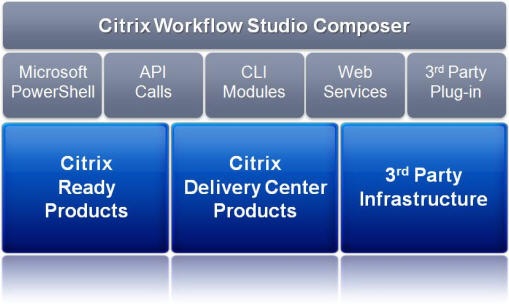
Citrix Workflow StudioTM is an all new platform for automating IT processes, orchestrating workflows across technology silos, and driving data center automation. The solution is built on standard Microsoft technologies including the .NET Framework, Windows Workflow Foundation and Windows PowerShell. It is through the use of Windows PowerShell that Workflow Studio achieves its simplicity and unparalleled power to drive efficiencies and increase effectiveness across functions managing IT infrastructures.

workflow_studio_composer

De volgende features zijn beschikbaar in  de Tech Preview:

This Tech Preview release will include the following features and capabilities:

  • Simple, graphical interface for workflow composition
  • Drag and drop functionality for preconfigured API calls eliminates need for background in scripting or software development
  • Self-documenting system for each task incoporated in workflows
  • Built-in conditional and dynamic workflow controls
  • Robust and searchable task libraries
  • Out of the box support for automating tasks for the following IT systems:
    • Citrix XenServer
    • Citrix XenApp
    • Citrix Provisioning Server
    • Citrix NetScaler
    • Active Directory
    • Group Policy
    • Windows PowerShell


Meer informatie en een paar demo filmpjes vind je hier: http://community.citrix.com/display/cdn/Citrix+Workflow+Studio

Citrix: Releases a XenDesktop Beta


Citrix heeft een beta vrijgegeven van XenDesktop.

Compared to Citrix XenDesktop Tech Preview kit, this Beta offers full feature integration across key components of the product:

  • Desktop Delivery Controller  – Connects office workers to their personalized desktops with the best performance, ease of use and rich desktop experience.
  • Virtual Desktop Infrastructure – Enterprise-class virtualization infrastructure that creates the foundation for delivering virtual desktops and offers advanced management features.
  • Virtual Desktop Provisioning – Stream a single desktop image to create many virtual desktops in the data center on demand, enabling simplified management and lower network storage costs.
  • XenDesktop Setup Tool – A simple wizard to enable IT to quickly create and deliver hundreds of virtual desktop.


Je kunt je hier registreren voor het downloaden van de Beta. De download is zo’n 1200 MB  groot. Ik hoop dat ik snel tijd heb om met dit product te kunnen testen.

Preview: Citrix Webinterface 5


Thomas Koetzing heeft een artikel geplaatst over Citrix Webinterface versie 5.


Microsoft has release Windows Server 2008 in February of 2008 and Citrix will follow with their release of Presentation Server 5.0 (Delaware) that is targeted for the new Windows server generation. With each new full release of Presentation Server, the product components are also updated to support the new version.
After Web Interface 4.0, 4.1, 4.2, 4.5, 4.6 and 4.7 Citrix will release version 5.0 together with the Delaware release of Presentation Server. The new Web Interface version has to run on Server 2008, which means Internet Information Server 7.0, but what else is new with WI 5.0? This article describes the details of the next release.

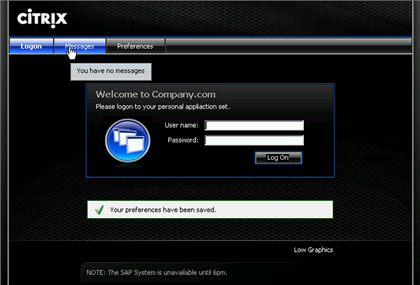
Hier onder zie je een screenshot van het nieuwe welcome screen.

WI5IMG12

En nog een printscreen van de application set.

WI5IMG03

Het complete artikel kun je hier lezen: http://www.thomaskoetzing.de

Citrix: BackupPolicy.vbs


In een artikel van Wilco van Bragt kwam ik het script BackupPolicy.vbs tegen. Dit artikel verwijst naar een post op brianmadden.com hier staat het script ook als download.

De volgende details over script zijn vrijgegeven:

The backup script is pretty straightforward. It allows you to parse two (optional) parameters:

  • Logging detail level
  • XML file name the policy information is written to

The restore script has some more parameters, all of which are optional. For example, you can:

  • Specify the logging detail
  • Whether or not to apply the policy filter
  • Whether or not to overwrite a policy if it already exists
  • The name of the XML file that you’re restoring (from the backup script)
  • The policy name (if you only want to restore a subset of the policies in the XML file)


Nogmaals de link naar de download: VB-Script-to-Backup–Restore-CPS-policies

Performance Monitoring and Context Switches


In deze post plaats ik een aantal links over performance monitoring en context switches.

Microsoft

Citrix

Overige sites

De volgende quote komt uit het document van de Intel site.

Counter (Parent Object)
Recommended Range

% CPU Time (System)
0-90% ( > 90% indicates potential processor bottleneck; may also indicate thread contention problem; investigate Context Switches/sec and System Calls/sec for potential thread issues)

% Privileged Time (System)
0-40% ( > 40% indicates excessive system activity; correlate with System Calls/sec)

Context Switches/sec (System)
0-10,000 ( > 10,000 may indicate too many threads contending for resources; correlate with System Calls/sec and threads counter in Windows Task Manager to identify process responsible)

File Control Operations/sec (System)
Ratio dependent (The combined rate of file system operations that are neither reads nor writes [file control/manipulation only, non-data related]. Inverse of File Data Operations/sec)

File Data Operations/sec (System)
Ratio dependent (Combined rate of all read/write operations for all logical drives. Inverse of File Control Operations/sec)

System Calls/sec (System)
0-20,000 ( > 20,000 indicates potentially excessive Windows system activity; correlate with Context Switches/sec and threads counter in Windows Task Manager to identify process responsible)

Interrupts/sec (System)
0-5000 (> 5000 indicates possible excessive hardware interrupts; justification is dependent on device activity)

Pages/sec (Memory)
0-200 ( > 200 warrants investigation into memory subsystem; define reads (pages in) versus writes (pages out); check for proper paging file and resident disk configuration; May indicate application memory allocation problems, heap management issues)

Average Disk Queue Length (Logical Disk)
0-2 ( > 2 indicates potential disk I/O bottleneck due to I/O subsystem request queue growing; correlate with Average Disk sec/Transfer)

Average Disk sec/Transfer (Logical Disk)
0-.020 ( > .020 seconds indicates excessive request transfer latency and potential disk I/O bottleneck; define reads/sec versus writes/sec; correlate with Average Disk Queue Length)

Bytes Total/sec (Network Interface)
Depends upon interface type (10baseT, 100baseT) A potential network I/O bottleneck exists when throughput approaches theoretical maximum for interface type. (For example, 10baseT theoretical maximum = 10 x 1,000,000 bits = 100 Mbits/sec divided by 8 = 12.5 Mbytes/sec)

Packets/sec (Network Interface)
Depends upon interface type (10baseT, 100baseT)

Script: Install Printer Drivers On TS/Citrix Servers


Aleks van http://www.virtualistic.nl/ heeft een script geschreven voor het installeren van Printer drivers op een Terminal / Citrix server. Ik was de gelukkige betá tester (zonder problemen) en alles werkte out of the box.

Hieronder een quote van de website van Aleks:

Prerequisites:
– You have to be able to install printdrivers (duh!)
– You have to be able to connect to your printerserver (test this through typing \\yourprintserver you should see your shared printers)
What is inside the zip file?
– The script of course!
– Addprinters.txt this is the input file for the script. Place your printers in this .txt file (eg: \\yourprintserver\printer1)
The default location of the addprinters.txt is C:\ You can change this but make sure you edit the script to reflect the new location.

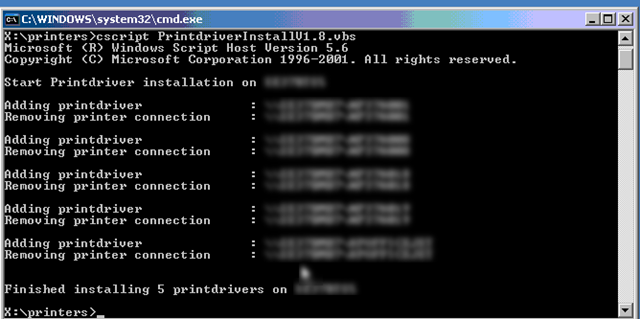
Zodra je het Addprinters.txt hebt gevuld, start je het script en dan verschijnt het onderstaande scherm.

PrinterDriver_Script

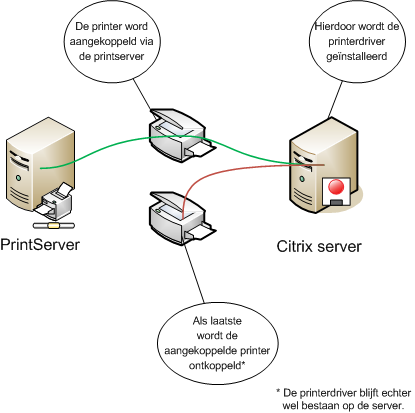
Nu ben je natuurlijk benieuwd wat het script gedaan heeft. Dat laat ik zien in de onderstaande tekening:

printerscript

Meer informatie en de download vindt je hier: http://www.virtualistic.nl/

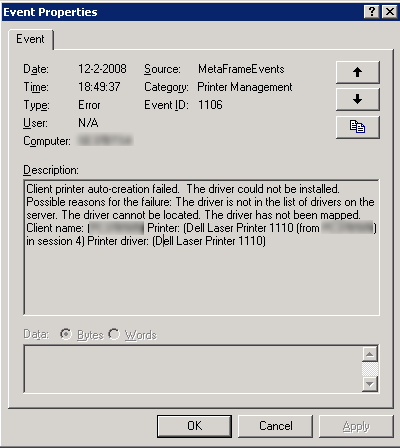
Citrix: EventID 1106


De volgende melding kun je tegenkomen in je application log op een Citrix Server.

eventid1106

Dit kun je oplossen door de volgende registry key te importeren:

Windows Registry Editor Version 5.00

[HKEY_LOCAL_MACHINE\SOFTWARE\Citrix\Print]
“DefaultPrnFlags”=dword:80000000

Deze oplossing geld alleen voor Presentation Server 4 en hoger.

Voor meer informatie zie: CTX488760

Citrix: Symantec Tamper Protection Alert & CPU Utilization Management Executables


De volgende symptomen kunnen optreden:

Symptoms

One or more “SYMANTEC TAMPER PROTECTION ALERT” error events are written by Symantec Antivirus to the Application log. These messages are usually paired with a “CPU Utilization Management cannot manage process <PID>” warning event written by CTXCPUUtilMgmt to the Application log.

An example Symantec Antivirus event is as follows:

Log: Application
Type: Error
Source: Symantec Antivirus
Event: 45
Description: SYMANTEC TAMPER PROTECTION ALERT
Target: C:\Program Files\Common Files\Symantec Shared\ccEvtMgr.exe
Event Info: Open Process
Action Taken: Blocked
Actor Process: C:\Program Files\Citrix\Server Resource Management\CPU
Utilization Management\bin\ctxcpusched.exe

An example CTXCPUUtilMgmt event is as follows:

Log: Application
Type: Warning
Source: CTXCPUUtilMgmt
Event ID: 1542
Description: CPU Utilization Management cannot manage process <PID>.
Windows system message: 0x5.

The two events are associated by the PID in the CTXCPUUtilMgmt event and the PID of the Target in the Symantec Antivirus event.

Zie CTX113486 voor meef informatie