
Petri heeft weer eens een leuk document gemaakt. Ditmaal over hoe je Windows Server 2008 kunt activeren terwijl je nog geen goede internet configuratie hebt.
Zie hier het artikel: http://www.petri.co.il/bypass-windows-server-2008-activation.htm
Petri heeft weer eens een leuk document gemaakt. Ditmaal over hoe je Windows Server 2008 kunt activeren terwijl je nog geen goede internet configuratie hebt.
Zie hier het artikel: http://www.petri.co.il/bypass-windows-server-2008-activation.htm
Na het opnieuw installeren van mijn Windows XP installatie verscheen na de reboot de volgende melding.

Zodra je security update KB925902 hebt geïnstalleerd kan de bovenstaande error optreden.
Install this update to resolve an issue where certain third-party applications may not start, and you receive an error message: “Illegal System DLL Relocation” after you install security update KB925902 (MS07-017). After you install this item, you may have to restart your computer.
De hotfix kun je hier downloaden: KB935448

De volgende symptomen kunnen optreden:
SYMPTOMS
On a computer that is running Microsoft Windows Server 2003, when you try to use Windows Server Update Services to download Windows update files that are larger than 700 megabytes (MB), the download operation does not succeed.
CAUSE
This problem occurs because the WinVerifyTrust function in Windows Server 2003 cannot verify the certificate validity of the Windows update files.
In het document KB888303 vind je meer informatie.

Bink melde vandaag op zijn site dat er weer een aantal fixes beschikbaar zijn voor Windows Vista. Hieronder vind je een lijst met fixes.
Update for Windows Vista for x64-based Systems (KB945149) 
Install this update to improve the graphics performance for multiple Graphics Processing Unit (GPU) scenarios on a system running Windows Vista.
Update for Windows Vista for x64-based Systems (KB945435)
Install this update to resolve an issue where delays are experienced while accessing a WebDAV share for the first time on a system running Windows Vista.
Update for Windows Vista for x64-based Systems (KB945145)
Install this update to resolve an issue where a user is prompted for Windows Live Passport credentials every time a document is accessed on a WebDAV site from a new workspace.
Update for Windows Vista for x64-based Systems (KB938660)
Install this update to resolve a performance issue on Windows Presentation Foundation (WPF)-based programs on a system running Windows Vista.
Update for Windows Vista (KB945149)
Install this update to improve the graphics performance for multiple Graphics Processing Unit (GPU) scenarios on a system running Windows Vista.
Update for Windows Vista (KB938660)
Install this update to resolve a performance issue on Windows Presentation Foundation (WPF)-based programs on a system running Windows Vista.
Update for Windows Vista (KB945435)
Install this update to resolve an issue where delays are experienced while accessing a WebDAV share for the first time on a system running Windows Vista.
Update for Windows Vista (KB944652)
Install this update to resolve an issue in administrative MMC snap-ins where icons display incorrectly on a Windows Vista-based computer with Windows Server 2003 Administration Tools Pack installed.
Update for Windows Vista (KB945145)
Install this update to resolve an issue where a user is prompted for Windows Live Passport credentials every time a document is accessed on a WebDAV site from a new workspace.

Ik kwam toevallig een blog tegen over Internet Explorer 7. Hier staan een aantal hele goede tips op.
Hier kun je de blog vinden: http://ie7triage.spaces.live.com/blog/

Microsoft heeft de SP2 versie van Windows Server 2003 SP2 Administration Tools pack vrijgegeven. Je kun hem hier downloaden:


Sinds de installatie van IE7 bleef het onderstaande scherm tussen de 10 a 20 seconden hangen .

Op de volgende pagina http://support.microsoft.com/kb/941158 vind je meer info over deze bug. Er is helaas nog geen vrije patch voor te verkrijgen, deze moet je bestellen. Meer informatie vind je hier: http://support.microsoft.com/contactus/?ws=support
De hotfix kun je via het volgende batchfile installeren.
Het script doet het volgende:
CLS
@ECHO OFF
ECHO.
ECHO installing KB941158
X:\apps\ie7\Patches\IE7-WindowsServer2003-KB941158-x86-ENU.exe /passive /norestart
ECHO.
ECHO Adding registry key
REG ADD “HKLM\SOFTWARE\Microsoft\Internet Explorer\Main\FeatureControl\FEATURE_PARSING_BRANDING_CMDLINE_FLAGS_KB941158” /v “*” /d “1” /t REG_DWORD /f
Shutdown -r -t 20
Via het commando IE7-WindowsServer2003-x86-enu.exe /? krijg je het onderstaande scherm:

Ik heb via het commando:
X:\apps\ie7\IE7-WindowsServer2003-x86-enu.exe /passive /update-no /norestart
Nu word Internet Explorer 7 keurig unattended geïnstalleerd.

Via silverlight.exe /? kun je de install commando’s opvragen.

Zoals je ziet is het commando: Silverlight.exe /q voldoende.

Voor het testen van het geheugen van een PC heeft microsoft de volgende tool vrij gegeven: Microsoft Windows Memory Diagnostic. Deze tool is nu nog in Beta, en als je het mij vraagt een beetje aan de laate kant. Ik test al sinds jaar en dat met het tooltje memtest86.
Je kunt mtinst.exe hier: http://oca.microsoft.com/en/windiag.asp downloaden.
Nadat je de tool gedownload hebt, start je deze op.
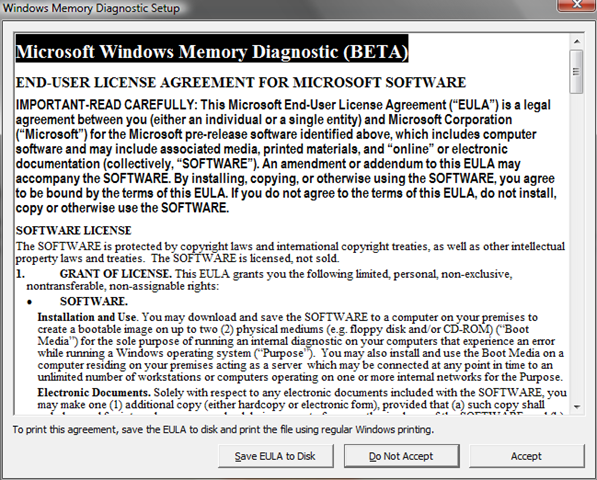
Je gaat akkoord met de Eula en het volgende scherm verschijnt. Ik heb gekozen voor optie 2 Save Cd Image to Disk… Dit omdat ik geen floppydrive meer heb.
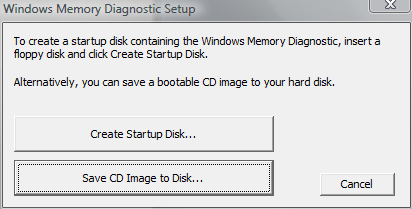
Brand nu de ISO en start daarna de pc op vanaf de CD-Rom. De memory diagnostic begint direct met testen.

Zoals je kunt zien in het onderstaande (ook bovenstaande) stukje tekst, dien je de test zelf af te sluiten. Doe je dit niet dan blijft hij de tests herhalen.

 ICT-Freak.nl