How To: Disable Automatic Drive Letter Assignment


Voordat je de VCB proxy aan het SAN gaat koppelen moet je eerst de volgende stappen uitvoeren om de automatic drive letter assignment uit te zetten. Doe je dit niet dan kun je hier tegen aanlopen:

vcb-proxy-forgot-to-disable-automount

Open een commandprompt:

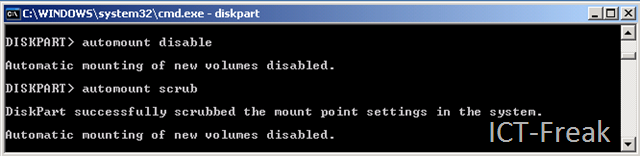
Start nu DISKPART.exe en voer de volgende twee commando’s uit:

automount disbable

automount scrub

image

Daarna doe je nog twee keer EXIT om Diskpart en het command prompt af te sluiten.

Na deze actie kun je met een gerust hart je HBA configureren.

Microsoft: Getting MS Hotfixes The Easy Way


image

Aleks Nikolić heeft dit al eerder gepost op zijn blog: http://www.virtualistic.nl en ik wil deze handige site nog een keer onder de aandacht brengen. Je kent het wel, je hebt een storing op je Windows 2003 server en na wat googlen kom je uit bij een KB artikel met een hotfix. Deze hotfix kun je alleen niet downloaden, deze moet je bestellen via de support site of helpdesk van Microsoft.

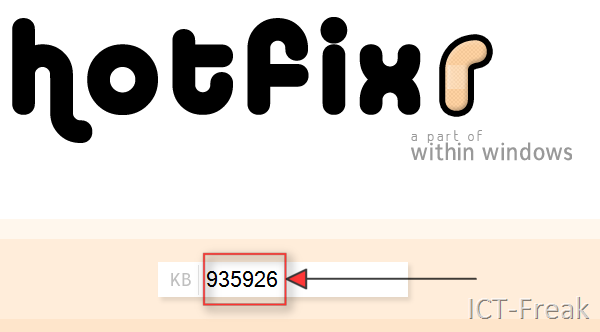
Via de website: http://www.hotfixr.com/ kun je de hotfix ook “bestellen”.  Kopieer of onthoud het Article ID:

image

Open daarna de website: http://www.hotfixr.com/ en vul het Article ID in:

image

Kies de taal die je wilt downloaden en vink deze aan.

image

Daarna nog even je e-mail adres twee keer invullen en een verificatiecode. En de hotfix wordt naar het e-mail adres opgestuurd.


Bron: http://www.virtualistic.nl/archives/165

Microsoft: Active Directory Design Considerations


image

Mark Wilson heeft een serie artikelen gemaakt over het ontwerpen van een Active Directory.

Bron: http://www.markwilson.co.uk/blog/

Windows: vsp1cln.exe


When you install Vista SP1, a backup of all replaced files is made. This is done so you can roll back to pre-
SP1 if you desire. SP1 has been out for some time now and many of you will no doubt be satisfied with using
it. In this guide, you will learn how to reclaim disk space taken up by the Vista SP1 install.

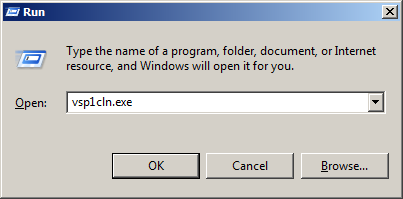
You can start vsp1cln.exe with the following command:

Start – Run – vsp1cln.exe

image

The vsp1cln.exe process is started.

Are you sure??

image

After running this tool, you cannot uninstall Vista SP1.

VI Toolkit: Set VMware Tools Upgrade Policy


Tijdens het googlen naar informatie over de VI Toolkit kwam ik het onderstaande script tegen.

Connect-VIServer <VirtualCenterServer>
#  NAME: set-VMautoUpdate.ps1
#  AUTHOR: angoletti1 / LucD
#  SOURCE:  http://communities.vmware.com/message/937094#937094

[Reflection.Assembly]::LoadWithPartialName("vmware.vim")

$vmConfigSpec = New-Object VMware.Vim.VirtualMachineConfigSpec
$vmConfigSpec.Tools = New-Object VMware.Vim.ToolsConfigInfo
$vmConfigSpec.Tools.ToolsUpgradePolicy = "UpgradeAtPowerCycle"

Get-VM | % { (Get-View $_.ID).ReconfigVM($vmConfigSpec)}


Via dit script kun je in één keer alle VM’s aanpassen.

Bron: http://www.blkmtn.org/the-value-of-digging-through-an-SDK

VI Toolkit: Create an Overview Of All cmdlets


Het volgende commando genereerd een html file met daarina een overzicht van alle VI cmdlets.

Get-Command -PSSnapin VMware.VimAutomation.Core | ConvertTo-Html –Property CommandType,Name,Definition -title "VIToolkit" > D:\vitoolkit_cmdlets.html

Voer deze code wel  uit als een oneliner!


Het volgende overzicht wordt gegenereerd:

image

Nu heb je in een oogopslag een overzicht van alle cmdlets.

How to: Save Space with VCB backups


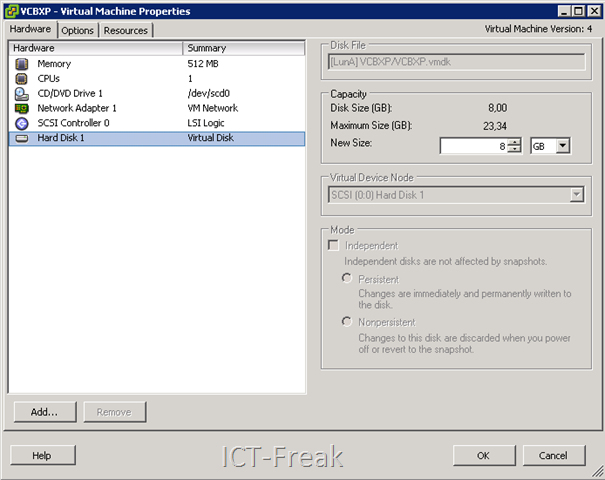
Ik heb de test gedraaid op een VM met de volgende configuratie. Deze VM was voorzien van Windows XP, VMware tools en een aantal standaard tools als Adobe Reader enz. zijn geïnstalleerd.image

Toen ik aan het internet aan het afstruinen was naar VCB informatie kwam ik de volgende post tegen op Duncan Epping van www.yellow-bricks.com zijn blog: vmware-consolidated-backup-and-deleted-files daar staat het volgende beschreven:

I re-wrote a vbs script, which was originally created by Doug Knox for defragmenting local disks to include zeroing out for every local disk in the server. The script uses the Sysinternals tool Sdelete, download it and copy it to c:\windows\system32\. It defragments the disk and than writes zero’s on all unused space.

Het gaat om het volgende script:

sdelfrag.vbs:

Set WshShell = WScript.CreateObject("WScript.Shell")
Dim fso, d, dc
Set fso = CreateObject("Scripting.FileSystemObject")
Set dc = fso.Drives
WshShell.RegWrite "HKCU\Software\Sysinternals\", 0, "REG_SZ"
WshShell.RegWrite "HKCU\Software\Sysinternals\SDelete\", 0, "REG_SZ"
WshShell.RegWrite "HKCU\Software\Sysinternals\SDelete\EulaAccepted", 1, "REG_DWORD"
For Each d in dc
If d.DriveType = 2 Then
Return = WshShell.Run("defrag " & d & " -f", 1, TRUE)'
Return = WshShell.Run("sdelete -c " & d, 1, TRUE)
End If
Next
Set WshShell = Nothing

Zodra je het script start wordt eerst de partitie gedefragmenteerd:

image

Daarja gaat SDelete er nog overheen.

image

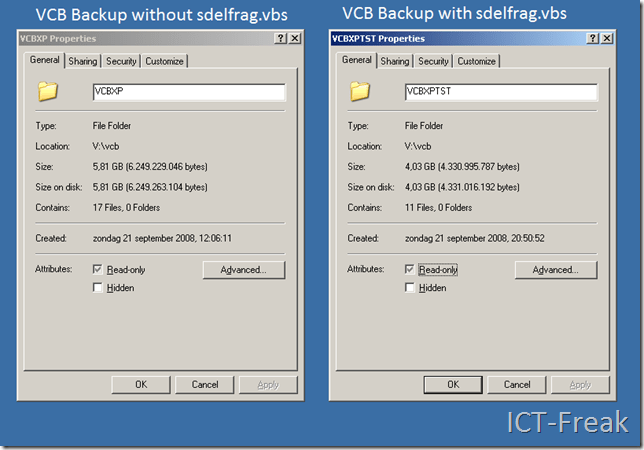
Hieronder zie je de resultaten van de VCB backup:

Het linkerplaatje is de backup zonder eerst het sdelfrag.vbs script te hebben uitgevoerd. Rechts zie je een VCB backup na het uitvoeren van het sdelfrag.vbs script.
image

Zoals je ziet scheelt het 1,8 GB aan schijfruimte en kopieer actie. Dit is nog maar een test met een kleine XP VM met een VMDK van 8GB.

Release: PowerGUI 1.5.2


image

De volgende zaken zijn verbeterd of toegevoegd.

Our key focus in this release has been on performance and stability improvements. Some highlights include:

  1. We added 3 new languages (Chinese, Greek, and Polish).
  2. [Admin console] The grid performance has been significantly improved so simple nodes like Process or Services take 1-2 seconds to load.
  3. [Admin console] You can now assign icons to any nodes/links/actions: in the properties dialog box simply click the Icon picture and browse to the ico file.
  4. [Admin console] Fixed a lot of the grid issues: handling of $null properties, multivalued properties, PSCustomObject properties, etc.
  5. [Admin console] Node deletes now have a confirm dialog box. ;)
  6. [Editor] Significantly improved highlighting performance for large scripts (1000-2000 lines of code).
  7. [Debugger] Fixed some compatibility issues with Microsoft’s current v2 builds.
  8. Multiple bugfixes for the issues reported by the online community.

As usual, autoupdate will be turned on in a week or so. So if you want the latest build now – go get it here!


Bron: http://dmitrysotnikov.wordpress.com/2008/09/18/powergui-152-rtms/