
De ESX Server Scripted Installer werkt niet standaard out of the box. Hoe je deze wizard kunt aanzetten lees je in de volgende post op http://www.xtravirt.com/.

De inhoud van de post van Xtravirt kun je ook vinden in de vi3_installation_guide.pdf
De ESX Server Scripted Installer werkt niet standaard out of the box. Hoe je deze wizard kunt aanzetten lees je in de volgende post op http://www.xtravirt.com/.
De inhoud van de post van Xtravirt kun je ook vinden in de vi3_installation_guide.pdf
Although much of the administration of servers running VMware ESX Server 3.0 will occur in the Windows-based Virtual Infrastructure client connected to a VirtualCenter server, there are times when it is quicker or easier to perform an administrative task directly on the ESX Server itself—either via the command-line interface (CLI) or via the VI client authenticating directly against the ESX Server. The problem with this is that, by default, administrators will have to use different credentials when connecting the VI client to ESX Server directly. In addition, these credentials must be managed separately from Active Directory, and separately on each individual ESX Server. As the number of ESX Servers in a farm grows, this can quickly become an administrative nightmare.
Read the complete article here: http://blog.scottlowe.org/

Introduction
Active Directory Explorer (AD Explorer) is an advanced Active Directory (AD) viewer and editor. You can use AD Explorer to easily navigate an AD database, define favorite locations, view object properties and attributes without having to open dialog boxes, edit permissions, view an object’s schema, and execute sophisticated searches that you can save and re-execute.
AD Explorer also includes the ability to save snapshots of an AD database for off-line viewing and comparisons. When you load a saved snapshot, you can navigate and explorer it as you would a live database. If you have two snapshots of an AD database you can use AD Explorer’s comparison functionality to see what objects, attributes and security permissions changed between them.
AD Explorer works on Windows 2000 and higher.

Download the tool here: http://www.microsoft.com/technet/sysinternals/
You should also take a look at AdRestore v1.1
Do you find detaching SAN cables or organising LUN masking a hassle each time you build or rebuild a VMware ESX Server? This paper shows you how to streamline the process by not loading HBA drivers during the initial installation process.
For any suggestions or corrections please contact Dinny at dinny.davies@googlemail.com
Download the whitepaper here: http://www.xtravirt.com/
Mocht je met deze whitepaper aan de slag gaan, lees dan heel erg goed. Dat bespaard je een hoop tijd 😉

Veeam Configurator is a Windows application that handles multiple ESX Servers simultaneously. It reports on and allows you to configure the following subsystems:
– Remote root access
– Time synchronization (NTP)
– Patch level (reporting only in this version)
In addition, it allows you to:
– Perform diagnostics
– Run a custom script
on multiple ESX Servers (e.g. all servers in a cluster).
Download de tool hier: http://www.veeam.com/
De mannen van Xtravirt hebben een Word template gemaakt genaamd VI3 Security Risk Assessment.
This MS Word document template is designed to:
· Provide detail of around security measures designed into each major component of VI3
· Provide a ‘best practice’ security framework for VI3 designs that can be repeated again and again
· Detail real world scenario’s that IT Security personnel can relate to their environment, including built-in countermeasures and additional configuration options.
· Significantly reduce the time and stress involved with gaining design approvals.
The idea is to take your own VI3 design and apply it to each of the major VI3 components in this template:
· ESX Server – Service Console
· ESX Server – Kernel
· ESX Server – Virtual Networking Layer
· Virtual Machines
· Virtual Storage
· VirtualCenter
Download de template hier: http://www.xtravirt.com/
In a default installation, VMware VirtualCenter 2.x runs on a single Windows-based server. In order to provide
high availability, you can use clustering software so the VirtualCenter server process is automatically restarted
on a standby server if the primary server fails.
This document describes the use of Microsoft Cluster Server (MSCS) to provide high availability for
VirtualCenter. This capability is available in VirtualCenter 2.x starting with VirtualCenter 2.0.1 Patch 2. You
can implement the clustering architecture described in this paper whether VirtualCenter runs on a physical
server or in a virtual machine, although in the latter case you must adhere to the further restrictions on
clustering virtual machines as documented in the Setup for Microsoft Cluster Service guide
Download de whitepaper hier: http://www.vmware.com/
Quote van de website van Xtravirt:
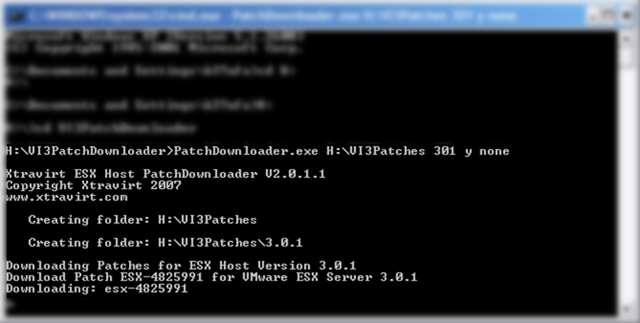
The latest follow up to the well received VI3 PatchDownloader tool is now a command line executable meaning that it can be scripted and scheduled as a routine task. Additional functionality means that it is now easier than ever to keep up to date with VMware® ESX patches.
Change Log:
2.0.1.1
– Fixed minor bug which meant the script did not exit cleanly after downloading the last of the 3.0.1 patches.
Wat ik zelf wel oké vindt, is dat alles nu alles silent draait. Dus geen popup’s meer.
De tool in actie:
Download de tool hier: http://www.xtravirt.com/

De mensen van het Performance Team van Microsoft hebben een leuk artikel geschreven over Group Policies.
Lees het artikel hier: http://blogs.technet.com/

Toen ik een back-up gemaakt met vmbk.pl (zie de volgende posts: backup Restore) wilde gaan restoren, liep ik tegen de volgende foutmelding aan:

Hier is helaas geen oplossing voor dus heb ik een workarround bedacht.
Download Veeam FastSCP hier. Upload daarna het VMDK bestand naar het VMFS volume. Maak daarna een nieuwe VM aan en koppel de VMDK aan. Nu zou de VM weer moeten werken en de restore tijd is vele malen korter.
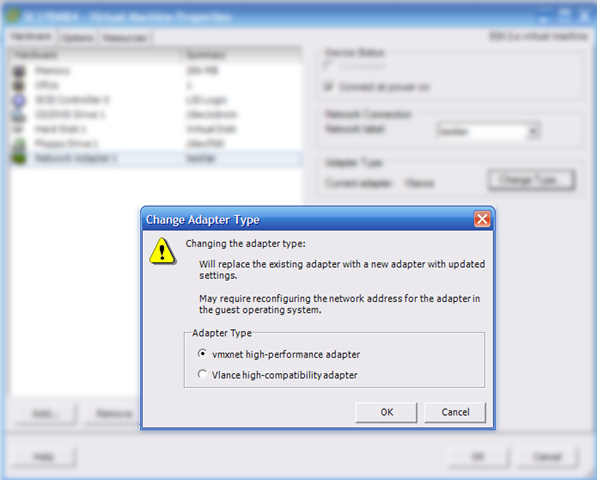
Vergeet na het aanmaken van de VM niet de netwerkkaart om te zetten naar VMXNET.
 ICT-Freak.nl