EDA 0.87 Patch 1 released


image

Brugh has released a patch for EDA 0.87.

This is how you apply the patch:

  • log in to the console
  • edit /var/www/eda/fs.php
  • change the ‘3000’ on line 32 to ‘1000000’
  • go to http://eda-ip-address/eda/fs.php
  • upload the file ‘eda-v0.87-1.tar.gz’
  • type ‘tar zxvf eda-v0.87-1.tar.gz -C /’ in the exec box (be exact with the slash but don’t type the quotes)


You can download the patch here: http://virtualappliances.eu/


Source: http://www.vmug.nl/modules.php?name=Forums&file=viewtopic&t=3937

List of VMware FT compatible CPUs


image

Gabrie  has created a nice post about CPU compatibility with the new feature FT in vSphere.

With VMware vSphere there is a new exiting function called VMware Fault Tolerant or VMware FT. With VMware FT you can protect a VM against failure by running this VM in lockstep with an exact copy on a different host. Every interrupt in the source VM is immediately replicated to the destination VM, which is “invisble” on the network. Should the host with the source VM fail, then the destination VM will become visible on the network and the users will not experience any downtime. Also a new destination VM is created on a different (third) host and will be kept “in lockstep”.

Now when selecting new servers or in my case a whitebox for my own testlab at home, one should pay attention to the CPU that is in the system, because not all new CPUs have this feature….

Read the rest of the article here: http://www.gabesvirtualworld.com/?p=456

VMware vSphere Health Check Report v1.0


image

@lamw (twitter account) has created and published the first vSphere Health Check Report script.  The script reports on the following:


  • New New licensing format/summary
  • New EVC Enabled information
  • New Cluster VM monitoring
  • New Cluster Host monitoring
  • New # of VMotions within a cluster
  • New Datastore uncommitted info
  • New CPU power management info
  • New VM info (FT, Record/Replay, Clean Poweroff)
  • New Host IPv6, FT, SSL Thumbprint
  • New Host Profiles
  • New vApp information
  • New Distributed vSwitch information
  • vCenter Build/Release
  • Active Sessions
  • ESX/ESXi Build/Release
  • Cluster(s) Name/Statistics (Hosts,CPU and MEM availabity, HA,DRS and DPM enabled, Resource Pools, Health)
  • ESX/ESXi Hardware configuration (NICs/HBAs)
  • ESX/ESXi Hardware Health Sensor via CIM
  • ESX/ESXi State
  • ESX/ESXi Configurations (for detailed information, use detail-hosts option)
  • ESX/ESXi Multipathing Info (only available in host or detail-hosts option)
  • ESX/ESXi Datastore summary
  • ESX/ESXi LUN summary
  • ESX/ESXi Portgroup summary
  • ESX/ESXi Hostd logs
  • CDP Summary
  • Recent Tasks
  • Virtual Machine summary
  • VM Storage summary
  • VM Network summary
  • VM w/Snapshots
  • VM w/Snapshot delta age
  • VM w/RDMs
  • VM w/NPIV enabled
  • VM w/connected CD-ROMs
  • VM w/connected Floppys

You can find more info here: http://communities.vmware.com/docs/DOC-9842

VMware: Troubleshooting ESX Server


image

While reading my rss feeds in Feedreader, I saw this article:  http://www.virtualinsanity.com/index.php/2009/04/21/troubleshooting-esx/

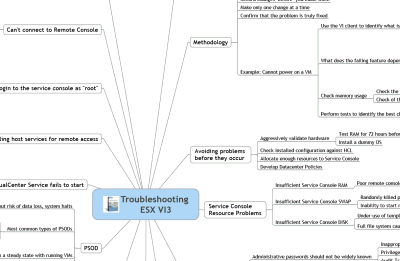
I was at the Louisville VMUG on Friday talking about Troubleshooting ESX.  In my preparation for the event, I was looking for a good PowerPoint presentation I could reuse and I stumbled across a sweet little gem of a document.  Dudley Smith, a VMware Technical Account Manager (TAM) out of Virginia, created a cool one page Mind Map for Troubleshooting ESX.  Does it address every potential issue you’ll come across?  No, of course not.  But it’s a heck of a good place to start.  One look at his Mind Map and I thought to myself, “that would be a great thing to have printed out and hanging over every VMware admin’s desk.
image
image

You can download the pdf’s here:

http://www.virtualinsanity.com/index.php/2009/04/21/troubleshooting-esx/

VMware: vSphere


image

Quote from: http://vmware.com/products/vsphere/

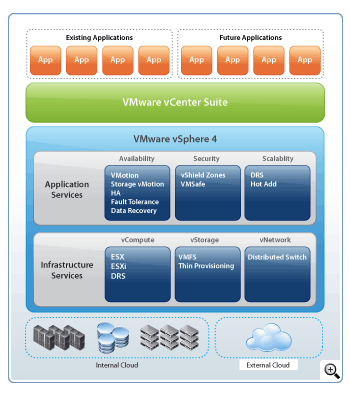
VMware vSphere is the next evolutionary step in IT computing; enabling customers to bring the power of cloud computing to their IT infrastructures. Building on the power of VMware® Infrastructure, VMware vSphere dramatically reduces capital and operating costs, and increases control over IT infrastructures while preserving the flexibility to choose any OS, application and hardware.

Build on a proven virtualization platform to provide the foundation for internal and external clouds, using federation and standards to bridge cloud infrastructures—creating a secure private cloud. Organizations of all sizes can achieve the full benefits of cloud computing, delivering the highest levels of application service agreements with the lowest total cost per application workload.

Available in several different editions, VMware vSphere delivers targeted benefits to small business and mid-size and enterprise business customers.

image

The new vSphere community is already live. Go check it here: http://communities.vmware.com/community/vmtn/vsphere

Before installing (if you have the software) be sure to check the Upgrade Center. You can find more info here:

ESX Server does not have persistent storage


image

From: http://www.vm-help.com/

In the last few updates VMware has changed which drivers get loaded for certain SATA controllers (in particular the ICH7 / ICH9 / ICH10 models). This has been done to fix a problem that prevented host CD-ROMs from being used within a VM. However, in some cases after upgrading a user might find the below error after rebooting for the first time after the firmware upgrade has been installed: The VMware ESX Server does not have persistent storage. As shown in the below image, the ICH9 controller is now recognized as an IDE controller after updating to Update 4 instead of a SATA controller as was the case with ESXi 3.5 Update 3. For another method to resolve, check out this thread.
image

Read the rest of the article here: http://www.vm-help.com/esx/esx3i/no_persistent_storage_after_upgrade.php

Source: http://www.techhead.co.uk/hp-ml110-g5-upgrading-to-vmware-esxesxi-u4-and-getting-error-the-vmware-esx-server-does-not-have-persistent-storage

Powershell: Get-SubFolderSize


image 

On every home directory will be a  folder called Files. I was curious how big these folders are. So this is why I created the following Powershell script:

function Get-Foldersize{
  param([string]$StartFolder,
        [string]$SubFolder)
  
  $Dirs = Get-ChildItem -path $StartFolder\* -Recurse -Include $SubFolder 
    
  foreach($Dir in $Dirs){
  $objFSO = New-Object -com  Scripting.FileSystemObject
  "$Dir = " + "{0:N2}" -f (($objFSO.GetFolder("$Dir").Size) / 1MB) + " MB" 
  }
}

Get-FolderSize C:\Users Files


The output of the script will look like this:

image

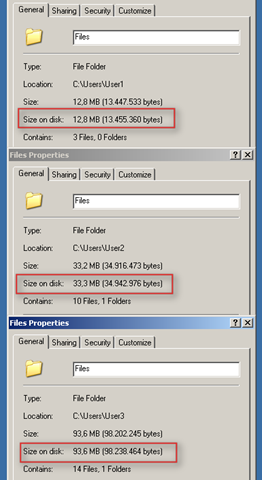
Here are some pictures (as hard evidence 😉 ) of the folder properties:

image

Source: http://www.microsoft.com/technet/scriptcenter/

Beta: Vizioncore Virtualization EcoShell


image

Vizioncore released the beta version of the Virtualization EcoShell.

The goal of the Vizioncore Virtualization EcoShell is to provide a freeware desktop application for novice and expert IT administrators leveraging Windows PowerShell scripts across their multi-platform virtual environments.   

Fostered and supported by The Virtualization EcoShell Initiative (VESI) – an online community-driven Web site sponsored by Vizioncore – the Virtualization EcoShell is enhanced by the participation of community members through the exchange of new ideas, value-add services and extendable scripts. To become a member of the VESI community, please visit VESI Registration.


One of the best features is based on a script from Alan Renouf (vdiagram) and it’s called Generate vDiagram.

image

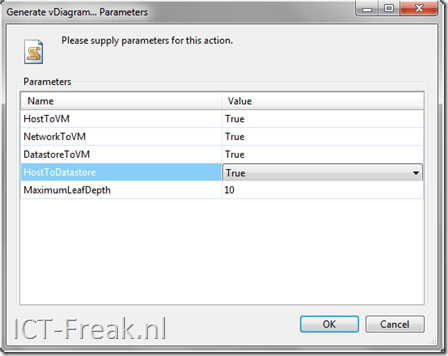
With this feature/script you can generate a Visio drawing of your VI environment. You can choose the following options:
image

If all the options are set to true, the script will generate three workspaces in Visio with three different vDiagrams. The diagram will look like this:

image

If you are managing a VI environment, this will be a must have tool. So take a look and get your download here: http://www.thevesi.org/downloads.jspa