PowerCLI: Host Networking Device info


In this post I will share a simple PowerCLI script which generates some Network Device information from your vSphere hosts. The information you’ll get is the vmHost name, device name, linkspeed and MAC address.

$vmHostNicInfo = @()
foreach($vmHost in (Get-VMHost | Sort Name)){
    foreach($nic in $vmhost.NetworkInfo.PhysicalNic){ 
        $Details = "" | Select vmHost, Device,Linkspeed,Mac

        $Details.vmHost = $vmhost.Name
        $Details.Device = $nic.Extensiondata.Device
        $Details.Linkspeed = ($nic.Extensiondata.Linkspeed).SpeedMB
        $Details.Mac = $nic.Extensiondata.Mac
    
        $vmHostNicInfo += $Details
    }
}
$vmHostNicInfo | Format-Table -AutoSize

The output will look like this:image

But what if you only want to see the devices with a link speed lower then 1000? Well that’s possible with the following end line:

$vmHostNicInfo | Where {$_.Linkspeed -lt "1000"} |  Format-Table -AutoSize

image

Or if you want to know which device/host belongs to a particular MAC address. You can use the following end line:

$vmHostNicInfo | Where {$_.Mac -eq "00:07:e9:1f:f9:bf"} |  Format-Table -AutoSize

image

So with a small script, you’re able to export valuable data.

Review: PHD Virtual Backup


Before I start with this post I first want to welcome a new sponsor: PHD Virtual.


In this post I will be doing a short review, sponsored by PHD, of the latest version of PHD backup. In this post I will show the following topics:

  1. install the PHD Virtual Backup Console and Plug-in
  2. Deploy OVF template of the PHD Virtual Backup Appliance
  3. Configure the PHD Virtual Backup Appliance
  4. Add VMs to a Backup job
  5. Restore a complete VM
  6. Restore individual Files
  7. Conclusion

So let’s start with the installation.

Continue reading “Review: PHD Virtual Backup”

Veeam Backup: RPC error The RPC server is unavailable. Code 1722


In one of my Veeam Backup jobs I had two Windows 2008 R2 VM’s with the Windows Firewall enabled. The backup job failed with the error: RPC error The RPC server is unavailable. Code 1722.

You can find the error in the job Statistics screen:

image

This error is the result of enabling Application-aware image processing (Microsoft VSS) and the Windows Firewall. RPC by default doesn’t like to work through a firewall. But Microsoft has a fix for this. KB article KB154596 explains how to change the RPC settings within the Windows Registry. You need to add the following settings:

Ports REG_MULTI_SZ

Specifies a set of IP port ranges consisting of either all the ports available from the Internet or all the ports not available from the Internet. Each string represents a single port or an inclusive set of ports. For example, a single port may be represented by 5984, and a set of ports may be represented by 5000-5100. If any entries are outside the range of 0 to 65535, or if any string cannot be interpreted, the RPC runtime treats the entire configuration as invalid.

PortsInternetAvailable REG_SZ Y or N (not case-sensitive)

If Y, the ports listed in the Ports key are all the Internet-available ports on that computer. If N, the ports listed in the Ports key are all those ports that are not Internet-available.

UseInternetPorts REG_SZ ) Y or N (not case-sensitive

Specifies the system default policy.

If Y, the processes using the default will be assigned ports from the set of Internet-available ports, as defined previously.

If N, the processes using the default will be assigned ports from the set of intranet-only ports.

Or you can copy the following *.REG file and execute this on the Windows 2008 R2 VM.

Windows Registry Editor Version 5.00

[HKEY_LOCAL_MACHINE\SOFTWARE\Microsoft\Rpc\Internet]
“Ports”=hex(7):35,00,30,00,30,00,30,00,2d,00,35,00,31,00,30,00,30,00,00,00,00,\
  00
“PortsInternetAvailable”=”Y”
“UseInternetPorts”=”Y”

The next step is to add a firewall rule:

image

After changing these settings you need to reboot the VM.

Now you are able to run the Veeam Backup job with the Firewall enabled on a Windows 2008 R2 VM.


Source Link
Micrsoft.com KB154596

Release: vSphere 4.1 Update 1


Like many others already mentioned today: vSphere 4.1 Update 1 has been RELEASED!

I selected a couple of fixes from the release notes that made our life as a vSphere admin a lot better :

  • vCenter Storage Monitoring plug-in might not get enabled if vSphere Client 4.1 is connected to vCenter Server 4.0
    If you use vSphere Client 4.1 to connect to vCenter Server 4.0, and you then enable the vCenter Storage Monitoring plug-in, the Plug-in Manager Window might display an error similar to the following:
    The plug-in failed to load on server(s) vmvc38 due to the following error:
    Could not load file or assembly 'VpxClientCommon, Version=4.1.0.0, Culture=neutral, PublicKeyToken=7c8-0a434483c7c50' or one of its dependencies. The system cannot find the file specified.

    This issue is resolved in this release.


  • Performance Overview data might not display after upgrading to vCenter Server 4.1
    Performance Overview data for the past day, week, and month might not be displayed after upgrading to vCenter Server 4.1.

    This issue is resolved in this release.

  • Performance data might be missing for certain intervals after upgrading to vCenter Server 4.1
    After upgrading to vCenter Server 4.1 or every time that vCenter Server restarts, multiple threads might invoke the same stored procedure to process statistics in temporary tables (VPX_TEMPTABLE[1,2,3]) at the same time causing certain operations to not complete. This might lead to failure in collection of statistics. The performance data in the performance overview charts might be missing for certain intervals.

    This issue is resolved in this release.

  • Replacing SSL certificates in vCenter Server with custom certificates generated using OpenSSL 1.0.0 or later causes Storage Monitoring Service to fail
    For this issue, the following error is recorded in the sms.log files:
    Error constructing private key

    This issue is resolved in this release.
  • Search functionality might not display results if you use vSphere Client 4.1 to access vCenter Server 4.0
    If you use vSphere Client 4.1 to connect to a vCenter Server 4.0 system that is using vCenter Linked Mode, and you then perform a search function, the search results might not appear and might seem that the search function does not complete.

    This issue is resolved in this release.

  • vCenter Server alarm actions are triggered repeatedly even after the state of the alarm reverts to normal
    Some vCenter Server event and state-based alarm actions are triggered repeatedly even after the alert status reverts to green (normal).

    This issue is resolved in this release.

Grab your copy of vCenter Server 4.1 Update 1 here: VMware


I made also a short list of fixes in ESX:

  • Some virtual machines stop responding during storage rescan operation when any LUN on the host is in an all-paths-down (APD) state
    During storage rescan operation, some virtual machines stop responding when any LUN on the host is in an all-paths-down (APD) state. For more information, see KB 1016626 at http://kb.vmware.com/kb/1016626. To work around the problem in the KB, manually set the advanced configuration option /VMFS3/FailVolumeOpenIfAPD to 1 before issuing the rescan and then reset it to 0 after the completion of the rescan operation. The issue is resolved in this release. You need not apply the workaround of setting and not setting the advanced configuration option while starting the rescan operation. Virtual machines on non-APD volumes will no longer fail during a rescan operation, even if some LUNs are in an all-paths-down state.
  • Creation of large .vmdk files on NFS might fail
    When you create a virtual disk (.vmdk file) with a large size, for example, more than 1TB, on NFS storage, the creation process might fail with an error: A general system error occurred: Failed to create disk: Error creating disk. This issue occurs when the NFS client does not wait for sufficient time for the NFS storage array to initialize the virtual disk after the RPC parameter of the NFS client times out. By default the timeout value is 10 seconds. This fix provides the configuration option to tune the RPC timeout parameter using the esxcfg-advcfg -s <Timeout> /NFS/SetAttrRPCTimeout command.
  • Updates for the WDDM driver
    In this release, the Windows Display Driver Model (WDDM) driver is updated to fix some infrequent issues where a Windows virtual machine fails and displays a blue screen.
  • Cannot take quiesced snapshots of Microsoft Windows Server 2008 R2 virtual machine running vCenter Server 4.1
    When creating a snapshot of a Microsoft Windows Server 2008 R2 virtual machine that has vCenter Server 4.1 installed, the snapshot operation might fail to complete. This issue occurs on Microsoft Windows Server 2008 R2 virtual machines when the ADAM database is installed.

    The issue is resolved in this release.

Grab your copy of ESX(i) 4.1 Update 1 here: VMware

View Agent is in an unreachable state after deploying a Win XP pool


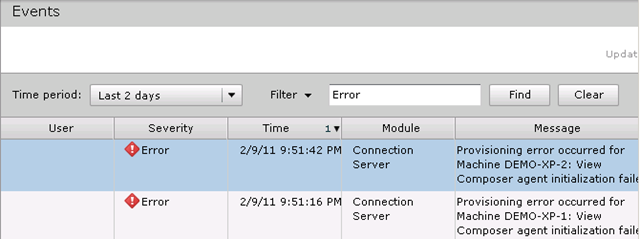
After the upgrade to VMware View 4.5, I wanted to test a Desktop pool with the new View Agent and Windows XP installed as Guest OS. But when the composer finished his job, it finished with a provisioning error:

image

So after a quick search I found out that this issue is documented on page 286 from view45_admin_guide.pdf:

Windows XP linked-clone desktops can fail to join the domain if your Active Directory runs on Windows Server 2008.

Problem
When linked-clone desktops are provisioned, the linked clones fail to join the domain. View Administrator displays View Composer provisioning error messages. For example:
5/17/10 3:11:50 PM PDT: View Composer agent initialization state error (18): Failed to join the
domain (waited 565 seconds)

Cause
This issue can occur if your Active Directory runs on Windows Server 2008. The Windows Server 2008 readonly domain controller (RODC) is not backward-compatible with Windows XP virtual machines.

Solution
1 Check the View Composer log for the following error message:
0x4f1: The system detected a possible attempt to compromise security. Please ensure that you
can contact the server that authenticated you. By default, the View Composer log file is generated in the Windows Temp directory: C:\Windows\Temp \vmware-viewcomposer-ga-new.log
2 On the parent virtual machine, apply the Windows Server 2008 RODC compatibility update for Windows XP. See Microsoft Support Article 944043 at the following location:
http://support.microsoft.com/kb/944043/en-us.
3 Take a snapshot of the updated parent virtual machine.
4 Recompose the linked-clone desktops from the updated parent virtual machine and snapshot.

You can also find the solution on kb.vmware.com:

This issue occurs when Windows XP desktops fail to join the Windows 2008 Active Directory domain.

To resolve this issue:

  1. Ensure that the Windows XP Master is updated with the latest Microsoft patches.
  2. Ensure that the Windows Server 2008 read-only domain controller (RODC) compatibility pack for Windows Server 2003 and Windows XP clients is installed in the master virtual machine.
    For more information and to download the patch, see the Microsoft Knowledge Base article 944043.
    Note: The preceding link was correct as of January 28, 2011. If you find the link is broken, provide feedback and a VMware employee will update the link.
    After applying the patch, create a new snapshot for use with linked clone pools or convert the virtual machine to a template for full clone or deployment using Sysprep.

After applying the latest Windows XP updates and the patch mentioned above. I was able to deploy the XP desktop pool again. So if you are deploying View desktop with Windows XP in a Windows 2008 domain. Install the patch mentioned in KB944043.

Note. I saw this issue only on desktops with the latest View 4.5 agent installed. The desktop pool with the View 4.0 agent did work as expected.

Sources:

Source Link
VMware http://kb.vmware.com/kb/1027775
VMware http://kb.vmware.com/kb/1030462
VMware http://kb.vmware.com/kb/1027087
Microsoft http://support.microsoft.com/kb/944043/en-us

PowerCLI: VMware Tools one-liners


In this post I’ll show you three PowerCLI one-liners to perform some operations with VMware Tools.

The first one-liner will return all Powered on VM’s with Windows selected as guest OS and perform a VMware Tools upgrade without a reboot at the end.

Get-VM | Where {$_.PowerState -eq "PoweredOn" -and $_.Guest.OSFullName -match "Win*"} | % {Update-Tools -VM $_ -NoReboot}

Sometimes if you want to perform a vMotion or when you try set a host in maintenance mode, the VM won’t vMotion away from the host. Most of the time this is caused by a mounted ISO from a locale datastore. In my environment this is not possible because I use a shared storage datastore to storage all the ISO files. But there is one ISO that’s mounted from a locale datastore, this is the VMware Tools ISO.  Sometimes the ISO isn’t automatically dismounted from the VM. This one-liner creates a list of VM’s where the VMware Tools ISO is mounted:

(Get-VM | Get-View | Where {$_.Runtime.ToolsInstallerMounted}) | % {$_.Name}

The last one-liner will dismount the VMware Tools if necessary:

(Get-VM | Get-View | Where {$_.Runtime.ToolsInstallerMounted}) | % {Dismount-Tools -VM $_.Name}

I think there will be a lot more possibilities to script with PowerCLI and VMware Tools. So if you have a question or an idea, please leave a comment below.

vCloud: Application initialization detailed status report: 9% complete


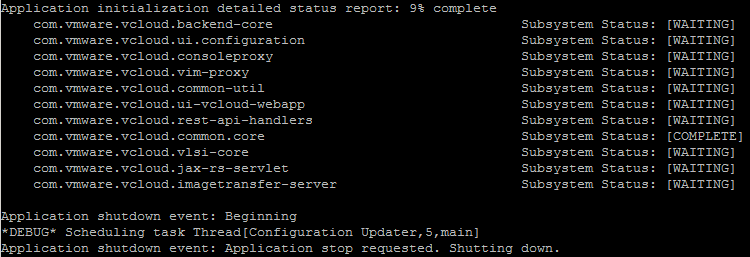
After installing vCloud Director in my lab, I couldn’t start the cell. So I looked in the log file: /opt/vmware/cloud-director/logs/cell.log and saw the following subsystem status report:

image

More info about the vCloud log files can be found in this blog post: http://www.virtual-blog.com written by David Hill.

Continue reading “vCloud: Application initialization detailed status report: 9% complete”

Rescan VMFS results in a deadlock of vCenter Server 4.x


When you’re using different types of storage in your vSphere environment, you might need to use different kind of alarms. So I thought to be smart and create a lot of folders and assign different alarms to these folders.  When the folders and alarms where ready, I moved the Datastores into the folders. Everything looks perfect so far. I was able to add different alarms for each type of Datastores. This scenario is also described by Jeremy Waldrop. The setup looks like this:

image

So far so good.

But… when I added a new Datastore and started a rescan on a cluster ……. vCenter freezes with a deadlock!

Continue reading “Rescan VMFS results in a deadlock of vCenter Server 4.x”

vCenter Update Manager PowerCLI: Error 1722 Windows Installer


Today I was building a new Windows 7 View Desktop in my home lab. PowerCLI and vCenter Update Manager cmdlets where of course the first things I wanted to install. But during the setup of vCenter Update Manager PowerCLI I received the following error:

image

I was trying to install VMware-UpdateManager-Pscli-4.0.0-233997.exe after downloading the new version: VMware-UpdateManager-Pscli-4.1.0-266648.exe I was able to install the vCenter Update Manager cmdlets again. So if you’re running Windows 7 and want to use the vCenter Update Manager PowerCLI cmdlets, just install the latest version and you don’t get the this error.


Source http://communities.vmware.com/thread/257870

PowerCLI: Update-VMHost Function


Since the release of the vCenter Update Manager PowerCLI cmdlets back in march last year. I was hoping to find some time to play with it. Now this weekend I had some spare time to finally play with these new cmdlets. So I downloaded the setup file from http://communities.vmware.com and installed it on my PC. Then I started to Google and searched for existing scripts. I a couple of good posts. One by @alanrenouf with a short introduction video and a post about staging the patches via the vCenter Update Manager PowerCLI cmdlets by Damian Karlson. But there are no copy-past-run scripts available to update a vSphere host. So I fired up PowerGUI script editor and started working on a function called Update-VMHost. This function performs the following steps during the update process of a vSphere host:

  • Look for a baseline and attach it if necessary.
  • Perform a scan of the host.
  • Check for compliancy.
  • If not compliant enter Maintenance mode.
  • Show missing patches
  • When the host is in Maintenance mode, start the remediation process.
  • After the reboot of the host, exit Maintenance mode.
  • That’s pretty much it. If you want to use this function, you can copy it from the end of this post and paste it inside the PowerCLI screen.

Continue reading “PowerCLI: Update-VMHost Function”