Storage vMotion only one hard disk to another datastore in vSphere


Sometimes it’s necessary to only migrate a single hard disk from a VM. This is the case when someone adds two 1 TB VMDK’s and fills them up completely. The maximum size of a VMFS datastore is 2TB minus 512 bytes. So in this case the datastore will be completely filled with no space left to keep the VM running. So if you want  to migrate just one hard disk to make sure the VMFS datastore will not fill up. You can use the vSphere client or PowerCLI to do perform this “advanced” Storage vMotion.

Note: if you want to reclaim your “wasted” storage back from your SAN, you have to recycle the whole datastore. So you have to migrate the other hard disks and configuration files as well.

vSphere Client

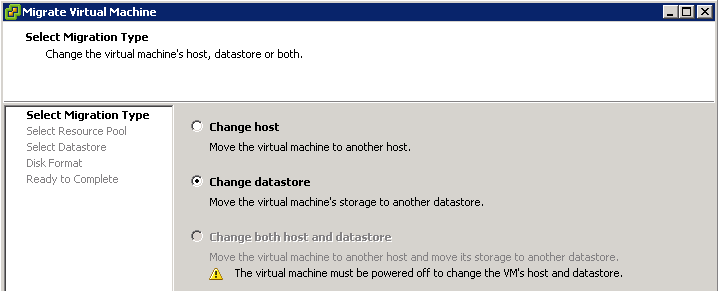
Start the Migrate Virtual Machine wizard and select datastore:

image

Continue reading “Storage vMotion only one hard disk to another datastore in vSphere”

PowerCLI: Host Networking Device info


In this post I will share a simple PowerCLI script which generates some Network Device information from your vSphere hosts. The information you’ll get is the vmHost name, device name, linkspeed and MAC address.

$vmHostNicInfo = @()
foreach($vmHost in (Get-VMHost | Sort Name)){
    foreach($nic in $vmhost.NetworkInfo.PhysicalNic){ 
        $Details = "" | Select vmHost, Device,Linkspeed,Mac

        $Details.vmHost = $vmhost.Name
        $Details.Device = $nic.Extensiondata.Device
        $Details.Linkspeed = ($nic.Extensiondata.Linkspeed).SpeedMB
        $Details.Mac = $nic.Extensiondata.Mac
    
        $vmHostNicInfo += $Details
    }
}
$vmHostNicInfo | Format-Table -AutoSize

The output will look like this:image
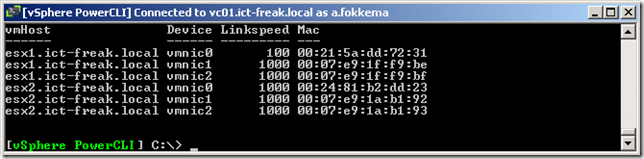
But what if you only want to see the devices with a link speed lower then 1000? Well that’s possible with the following end line:

$vmHostNicInfo | Where {$_.Linkspeed -lt "1000"} |  Format-Table -AutoSize

image

Or if you want to know which device/host belongs to a particular MAC address. You can use the following end line:

$vmHostNicInfo | Where {$_.Mac -eq "00:07:e9:1f:f9:bf"} |  Format-Table -AutoSize

image

So with a small script, you’re able to export valuable data.

PowerCLI: VMware Tools one-liners


In this post I’ll show you three PowerCLI one-liners to perform some operations with VMware Tools.

The first one-liner will return all Powered on VM’s with Windows selected as guest OS and perform a VMware Tools upgrade without a reboot at the end.

Get-VM | Where {$_.PowerState -eq "PoweredOn" -and $_.Guest.OSFullName -match "Win*"} | % {Update-Tools -VM $_ -NoReboot}

Sometimes if you want to perform a vMotion or when you try set a host in maintenance mode, the VM won’t vMotion away from the host. Most of the time this is caused by a mounted ISO from a locale datastore. In my environment this is not possible because I use a shared storage datastore to storage all the ISO files. But there is one ISO that’s mounted from a locale datastore, this is the VMware Tools ISO.  Sometimes the ISO isn’t automatically dismounted from the VM. This one-liner creates a list of VM’s where the VMware Tools ISO is mounted:

(Get-VM | Get-View | Where {$_.Runtime.ToolsInstallerMounted}) | % {$_.Name}

The last one-liner will dismount the VMware Tools if necessary:

(Get-VM | Get-View | Where {$_.Runtime.ToolsInstallerMounted}) | % {Dismount-Tools -VM $_.Name}

I think there will be a lot more possibilities to script with PowerCLI and VMware Tools. So if you have a question or an idea, please leave a comment below.

vCenter Update Manager PowerCLI: Error 1722 Windows Installer


Today I was building a new Windows 7 View Desktop in my home lab. PowerCLI and vCenter Update Manager cmdlets where of course the first things I wanted to install. But during the setup of vCenter Update Manager PowerCLI I received the following error:

image

I was trying to install VMware-UpdateManager-Pscli-4.0.0-233997.exe after downloading the new version: VMware-UpdateManager-Pscli-4.1.0-266648.exe I was able to install the vCenter Update Manager cmdlets again. So if you’re running Windows 7 and want to use the vCenter Update Manager PowerCLI cmdlets, just install the latest version and you don’t get the this error.


Source http://communities.vmware.com/thread/257870

PowerCLI: Update-VMHost Function


Since the release of the vCenter Update Manager PowerCLI cmdlets back in march last year. I was hoping to find some time to play with it. Now this weekend I had some spare time to finally play with these new cmdlets. So I downloaded the setup file from http://communities.vmware.com and installed it on my PC. Then I started to Google and searched for existing scripts. I a couple of good posts. One by @alanrenouf with a short introduction video and a post about staging the patches via the vCenter Update Manager PowerCLI cmdlets by Damian Karlson. But there are no copy-past-run scripts available to update a vSphere host. So I fired up PowerGUI script editor and started working on a function called Update-VMHost. This function performs the following steps during the update process of a vSphere host:

  • Look for a baseline and attach it if necessary.
  • Perform a scan of the host.
  • Check for compliancy.
  • If not compliant enter Maintenance mode.
  • Show missing patches
  • When the host is in Maintenance mode, start the remediation process.
  • After the reboot of the host, exit Maintenance mode.
  • That’s pretty much it. If you want to use this function, you can copy it from the end of this post and paste it inside the PowerCLI screen.

Continue reading “PowerCLI: Update-VMHost Function”

PowerCLI: Easy NFS datastore setup


It’s a new year so let’s start with a new PowerCLI post. This post is inspired by the blog post of @alanrenouf: PowerCLI easy vswitch portgroup setup. I love the whole idea of taking a good working config from a vSphere host and use it on a fresh installed vSphere host to make sure it’s compliant.  In this post I will show you how to perform the same trick with NFS datastores like Alan did with the vSwithes and Portgroups.

My home lab contains two HP ml110 g5 and a simple P4 box with some hard disks to add shared storage to the lab. It’s running Debian linux and is capable of presenting iSCSI targets, NFS and SAMBA shares .I use NFS as shared storage for my vSphere lab.

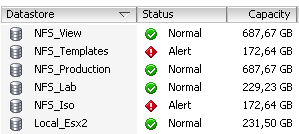
On esx2.ict-freak.local I use the following NFS datastores:

image

But I messed up the configuration of the other vSphere host in my lab called esx1.ict-freak.local. So I had to reset the network settings and lost all the NFS datastores:

image

So I needed to add the five NFS shares. This is a nice task for PowerCLI and the New-Datastore cmdlet:

Update: I had to remove the last / from the Path variable. If you do not remove the last / the script will mount the NFS share but with a new UUID. See Damian Karlson his post about this subject here.

Continue reading “PowerCLI: Easy NFS datastore setup”

Release: PowerCLI 4.1.1


Just noticed the new release of PowerCLI 4.1.1 on twitter:

image

There are a lot of new features:

  • Added support for the ESX CLI functionality through the Get-EsxCli cmdlet.
  • Added support for ESX Top statistics through the Get-EsxTop cmdlet.
  • Enhanced Get-VirtualSwitch, Get-VirtualPortGroup, Get-VMHost, Get-VM, New-NetworkAdapter, Set-NetworkAdapter, and Get-VMHostNetworkAdapter to add support for distributed switches and distributed switch port groups.
  • Added support for SCSI controllers through the New-ScsiController, Get-ScsiController, and Set-ScsiController cmdlets, and the new Controller parameter of New-HardDisk and Set-HardDisk.
  • Added support for querying and modifying vCenter Server alarms through the Get-AlarmDefinition, Set-AlarmDefinition, Get-AlarmAction, New-AlarmAction, Remove-AlarmAction, Get-AlarmActionTrigger, New-AlarmActionTrigger, and Remove-AlarmActionTrigger cmdlets.
  • Added the Get-AdvancedSetting, Set-AdvancedSetting, New-AdvancedSetting, and Remove-AdvancedSetting cmdlets for managing advanced vCenter Server settings and Cluster HA advanced options.
  • Added the Wait-Tools cmdlet that allows you to wait for VMware Tools of the specified virtual machines to load before proceeding.
  • Added support for querying disk and disk partition information of hosts through the Get-VMHostDisk and Get-VMHostDiskPartition cmdlets.
  • Added support for formatting host disk partitions through the Format-VMHostDiskPartition cmdlet.
  • Added support for querying the primary HA cluster nodes through the Get-HAPrimaryVMHost cmdlet.
  • Added support for zeroing out a virtual machine hard disk through a new ZeroOut parameter to Set-HardDisk cmdlet.

looking forward to test the new Get-EsxCli and the Get-EsxTop cmdlets.

The complete change log is available here.

You can download the new release from here: download link.

PowerCLI: RE: Disallowing Multiple VM Console Sessions


Frank Denneman posted today about disallowing multiple VM console session in a high-secure virtual infrastructure design: http://frankdenneman.nl/2010/11/disallowing-multiple-vm-console-sessions

The first thing popped up in my mind was why not automate this setting with PowerCLI. So I created a function called Set-MaxMKSConnections:

Function Set-MaxMKSConnections{
param(
    [parameter(Mandatory = $true)]
    [string[]]$vmName,
    $Sessions
)
    $vmConfigSpec = New-Object VMware.Vim.VirtualMachineConfigSpec

       $extra = New-Object VMware.Vim.optionvalue
    $extra.Key="RemoteDisplay.maxConnections"
    $extra.Value="$Sessions"
    $vmConfigSpec.extraconfig += $extra

        $vm = Get-VM $vmName | Get-View
        $vm.ReconfigVM($vmConfigSpec)
}

You can run this function by copying the code into the PowerCLI window. To run it on a single VM, you can use the following line:

Set-MaxMKSConnections -vmName Thinapp -Sessions 1

To run it on all your VM’s, you can use the following foreach loop:

$vms = Get-VM
foreach($vm in $vms){
    Set-MaxMKSConnections -vmName $vm -Sessions 1
}

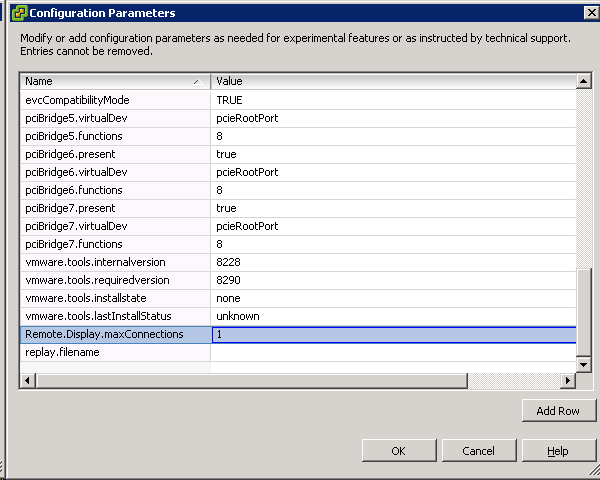
The configuration is changed even on Virtual Machines that are powered on (you need to restart the VM to activate the new setting):

image

If you want to raise the maxConnections value back to 2 or another value, you can change the –Sessions parameter with the correct value and run the script again.

Reconfigure DNS settings and add vSphere hosts to Windows DNS


I needed to change the DNS setup in our vSphere environment. Instead of doing this by hand on every host I decided to create a script. First I needed a script to add the A and PTR records to the Windows DNS servers. I remembered a post by the scripting guys so I took their function and added it to my script. The final step is to change de vSphere host DNS configuration. This one is easy with PowerCLI and a simle for loop.

Warning! If you are using vSphere 4.1 and the vSphere hosts are joined to a Windows domain. You are not able to change the DNS settings!

From the Hey Scripting Guy post I quote the following about the new-dnsrecord function:

I’ve written various scripts in the past to work with individual record types, and I’ve found that each class has slightly different syntax and requirements. This makes life awkward when you want to start automating this process, because you have to have a different script or function for each record type. I decided I wanted a universal script for creating records so that I could create multiple records at the same time from minimal information. The following script shows the function that I came up with to create A, PTR, MX, and CNAME records—these being the most common ones I have to deal with. We will be using the MicrosoftDNS_ResourceRecord class with varying inputs.

I have combined the new-dnsrecord function with some PowerCLI code to accomplish my goal of migrating the DNS settings of all the vSphere hosts and to add all the hosts to the DNS servers. I did this task by running the following script:

Continue reading “Reconfigure DNS settings and add vSphere hosts to Windows DNS”