Today I wanted to remove a test vSphere host from my Lab environment but the option Remove was grayed out.

I couldn’t find any other options in vCenter so I tried it with PowerCLI. I took a look at the vSphere PowerCLI Cmdlets Reference and searched for the remove-vmhost cmdled. This is what the Cmdlets Reference returned:
Removes the specified hosts from the inventory.
Syntax
Remove-VMHost [-VMHost] <VMHost[]> [-Server <VIServer[]>] [-WhatIf] [-Confirm] [<CommonParameters>]
Detailed Description
Removes the specified hosts from the inventory.
So with the following command:
Remove-VMHost esx3.ict-freak.local -Confirm:$false
you can remove the vSphere host from the vCenter server. The –Confirm:$false parameter disables the confirm question.
I didn’t use the –Confirm parameter so I got the Confirm question:
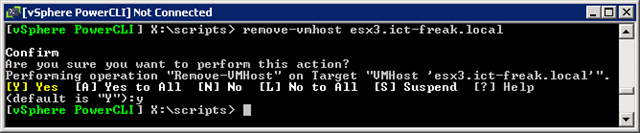
After running the command the vSphere host was removed from my vCenter server. So PowerCLI to the rescue (again) 😉

 ICT-Freak.nl
I have run into situations where even PowerCLI will “block” removal. I wrote an article on how to work around this on my blog and though it might be helpful to your readers as I ran across this article in my search for a solution.
http://www.noplanningrequired.com/2010/12/when-you-cant-remove-vsphere-host-from-cluster/
What if you’re on a Mac and do not have access to power-cli? is there another way to do this?