In this quick post I share a Veeam Communities post by rfn and some findings of myself to successfully move the VBRCatalog to a new location.
First, stop the Veeam Backup Services:

Move the VBRCatalog Direcotory to the new location. The next step is to change the Registry. Open Registry Editor and browse to HKEY_LOCAL_MACHINE\SOFTWARE\VeeaM\Veeam Backup Catalog. Open the CatalogPath key and change the path to the new location.
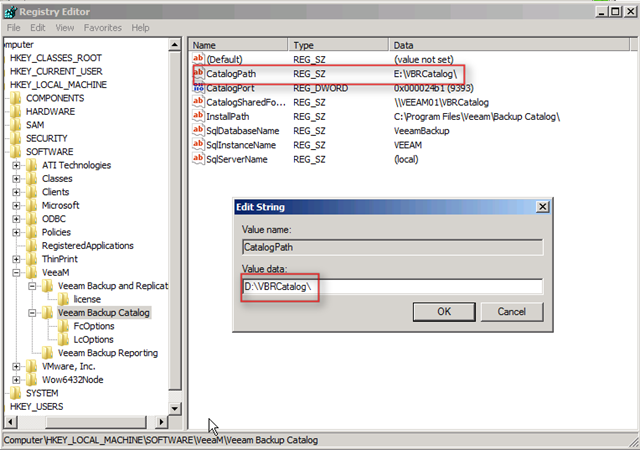
After changing this registry key just search through the registry for other E:\VBRCatalog keys. If you find other keys, just change them to the new location. If you don’t change them, you’re unable to upgrade to the later versions of Veeam Backup.
If you’re using the Search server, you have to reinstall the Search component to get things working again.
| Source | |
| Veeam Communities | http://www.veeam.com/forums/viewtopic.php?f=2&t=5593 |

 ICT-Freak.nl
Thank you for the quick fix!