Citrix: Script for logging off disconnected users


Ik kwam het volgende script tegen in een post van Joe Shonk op het forum van Brianmadden.com.

On Error Resume Next

Const wbemFlagReturnImmediately = &h10
Const wbemFlagForwardOnly = &h20
Const cActive = 0
Const cDisconnected = 4
Const strComputer = “.”

Set objWMIService = GetObject(“winmgmts:\\” & strComputer & “\root\Citrix”)
Set colItems = objWMIService.ExecQuery(“Select * from Metaframe_Session Where sessionstate = ” & cDisconnected)

For Each objItem In colItems
if (objItem.SessionID > 0) and (objItem.SessionID < 65530) then
objItem.Logoff
end if
Next

Set objWMIService = Nothing

Dit script zorgt er voor dat alle Sessions die nog op Disconnected staan, netjes worden afgesloten. Dit script is handig om te draaien voor dat een Citrix server opnieuw wordt opgestart.

Citrix: How to use WMI Providers


In deze post schrijf ik mijn eerste ervaring met WMI. De tool waar ik gebruik van maakte was ‘wbemtest.exe’. Deze start je als volgt op: Start – Run – wbemtest.exe

Het onderstaande scherm verschijnt.

image

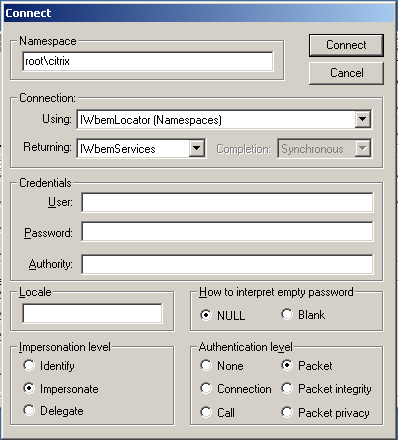
Druk op connect en vul bij de Namespace het volgende in: ‘root\citrix’ en druk op connect.

image

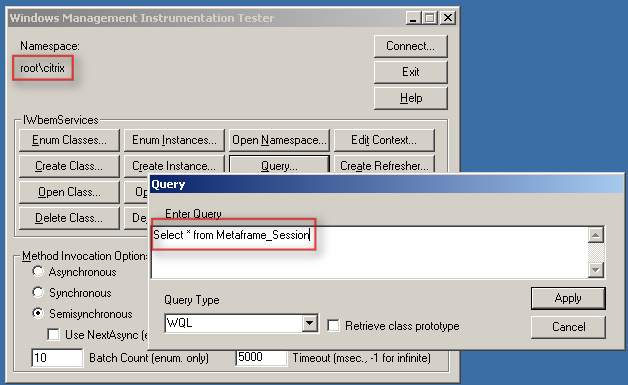
Nu kun je via ‘Query..’ een test uitvoeren. Bijvoorbeeld: ‘Select * from Metaframe_Session’.

image

De volgende output wordt gegenereerd. Dit zijn de active sessions op deze Terminal / Citrix server.

image

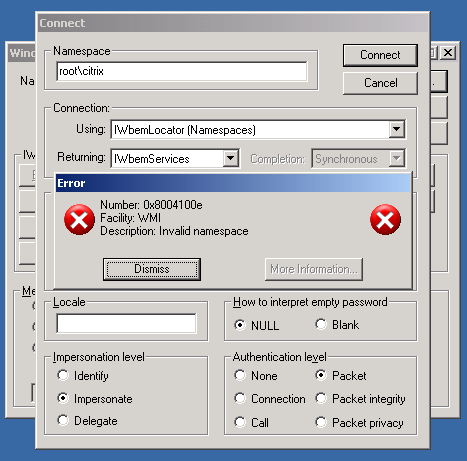
Het kan ook voorkomen dat je een foutmelding krijgt bij het connecten naar de ‘root\citrix’ Namespace.  Deze foutmelding treed op als je de WMI Providers niet hebt geïnstalleerd tijdens de installatie van Citrix Presentation Server (XenApp).

image

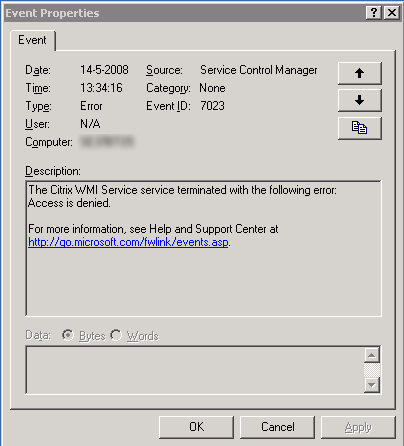
Dit kun je oplossen door in je service window de WMI Providers als nog te installeren. Dit kan alleen als er geen gebruikers ingelogt zijn.

image

Meer informatie vind je hier: CTX108365

Citrix: Username.Domain folders on the TSProfile Share


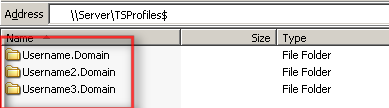
Het kan voorkomen dat je de onderstaande tsprofiles tegen komt op je TSProfile share. Meer informatie over hoe dit komt lees je in KB821929

UsernameDomain2

Ik vond een post van Robert Illing op het Citrix forum met de oplossing:

Apparently in SP1 they incorporated this hotfix – http://support.microsoft.com/?id=821929. If you look at the bottom if the hotfix it shows how windows looks at the terminal server roaming profiles.

We use \\server\username for our home drives and the \\server\username.domain caused us problems. The thing is windows will actually attempt \\server\username, but the user has to have full control on their profile. They also need to be the owner of the folder. If they are not the owner, windows will create a NEW profile for them using username.domain which created tons of profiles on our san.

There is a work around on the ownership problem. As we scripted our whole solution, and went about to go in and change ownership on thousands of profiles. If you create a GPO and go to Computer Configuration, Administrative Templates, System, User Profiles, then select “Do not check for user ownership of roaming profiles folder”. This will ignore the ownership of the profile.

So to clarify once you apply that GPO. You should be able to use \\server\username as long as the user has full control on their profile.

Op de policy met GPMC.msc en ga naar Computer Configuration – Administrative Templates – System –  User Profiles daarna enabale je de volgende optie Do not check for user ownership of roaming profiles folder

UsernameDomain

Citrix: Licensing error EventID 1028


Ik starte vandaag een oude VM op en wilde verbinding maken naar de Citrix omgeving. Dit lukte niet. Ik kreeg de onderstaande error.

License_Error

De volgende EventID werd in de eventlog weggeschreven op de terminal/citrix server.

eventid1028

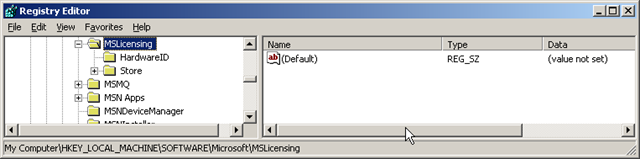
De oplossing voor dit probleem was het verwijderen van de MSLicensing key. Dit doe je via Regedit op de client en blader dan naar de key: HKLM\SOFTWARE\Microsoft en verwijder de key MSLicensing.

 License_Error_regedit

De oplossing kwam van Super Pippo op het Citrix forum: http://support.citrix.com/forums

Meer informatie over TSServer Licensing vind je in het volgende KB document: KB823313

Citrix: EventID 110


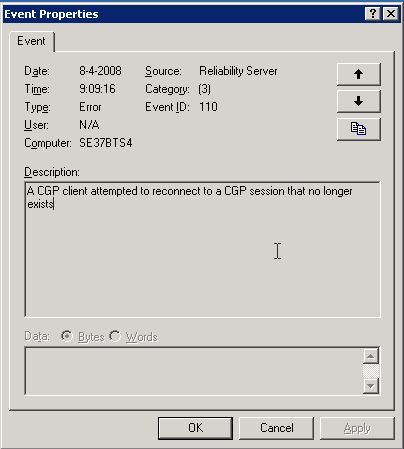
De volgende melding kun je terug vinden op je Citrix server. Deze melding treed op zodra je hotfix rollup pack 1 hebt geïnstalleerd.

image

Oplossing / Workarround

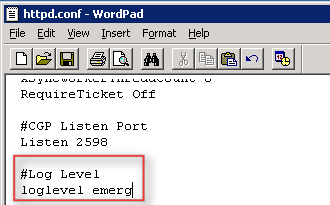
Open het bestand C:\Program Files\Citrix\XTE\conf\httpd.conf in Wordpad.

Voeg daarna de volgende text toe:

#Log Level

loglevel emerg

image 

Als laatste herstart je de XTE service. Dit kun je via Start – Run – Services.msc doen of via het commandprompt:

net stop “Citrix XTE Server” en net start “Citrix XTE Server”

Meer informatie over deze issue vind je hier: CTX114680

Citrix: Unofficial Dutch Language pack 1.5 for Webinterface 4.6


Aleks van www.virtualistic.nl heeft een update uitgebracht van zijn dutch languagepack voor de Citrix Webinterface 4.6.  Het gaat om versie 1.5 en het changelog ziet er als volgt uit:

De fixlist van versie 1.5 ziet er als volgt uit:
* toevoeging installatie.txt waar de installatiestappen in staan beschreven
* Aanpassing accessplatform_strings_nl.properties verwijdering niet langer gebruikte stukken tekst
* Aanpassing common_strings_nl.properties verwijdering niet langer gebruikte stukken tekst
* Aanpassing clientwizard_strings.properties sommige karakters in de tekst veroorzaakte script-errors in bepaalde gevallen.
* Aanpassing common_strings_nl.properties sommige buttons werden niet goed weergegeven
* Aanpassing downloadnative_firefox_2_winxp.txt dit bestand was niet meegenomen in de 1.0 vertaling
* Aanpassing downloadnative_ie_6_winxp_sv1.txt stukje tekst was niet meegenomen in de 1.0 vertaling
* Aanpassing mpssourceimpl_strings_nl.properties paar regels tekst waren niet meegenomen in de 1.0 vertaling
* Toevoeging default.htm om de NL-Look nog verder door te voeren


Je kunt de languagepack hier downloaden: www.virtualistic.nl

Citrix: Load Evaluator settings.


Op de blog http://digipulse.nl/ kwam ik de volgende Load Evaluator settings tegen:

When you create a custom load evaluator create one with with the following parameters.

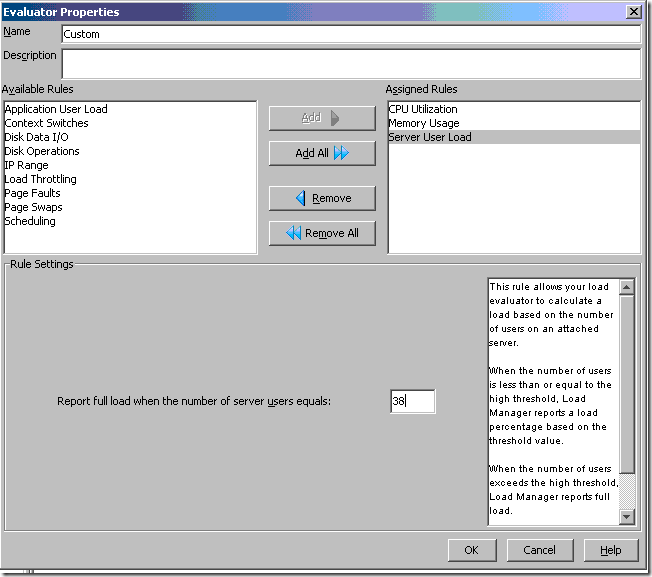
Users > Max users on Citrix server + 25% so if you would allow a max of 25 users it will be 32

CPU load > Low treshhold = 90% High treshold = 91%

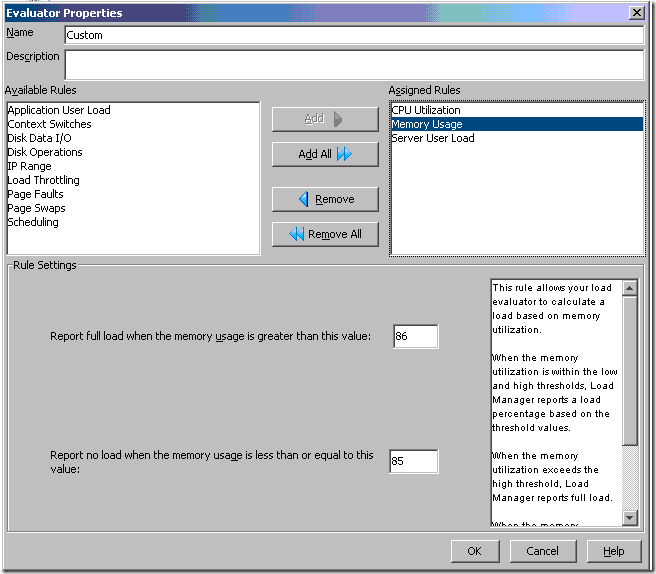
Memory load > Low treshold = 85% High treshold = 86%

When a server then peaks at a 10000 load it will automaticly redirect new users to another server and it will also leave some resources free for admins to manage the server.

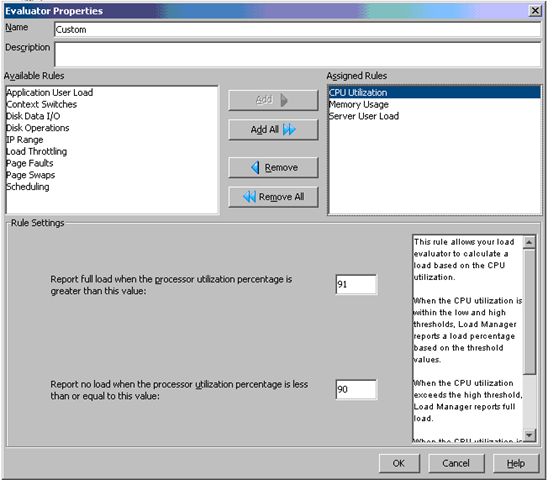
Maak een nieuwe Load Evaluator aan in het Citrix Management Console (het oude console). Geef deze bijvoorbeeld de naam “Custom”.

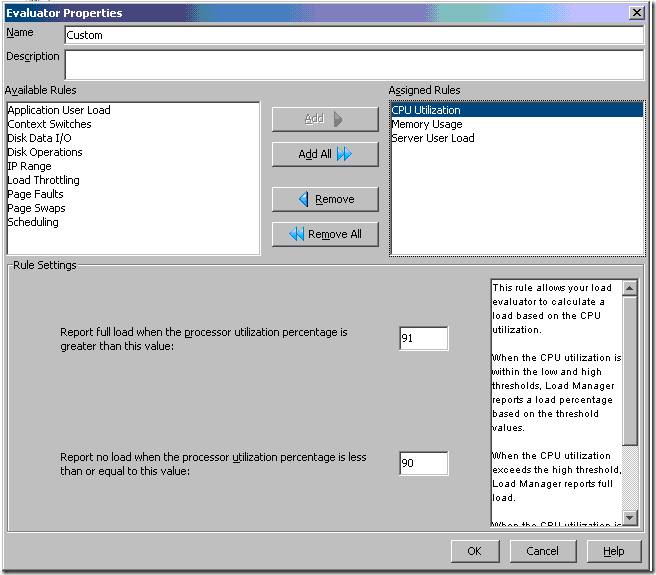
Voeg nu de CPU Utilization rule toe met de waarden High treshold 91% en Low treshold 90%.
image

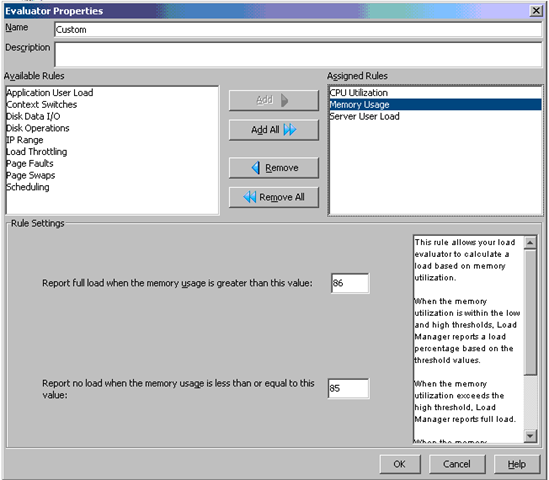
Daarna voeg je de rule Memory Usage toe. Hierbij geef je de volgende waarden op: High treshold 86% en Low treshold 85%.
image

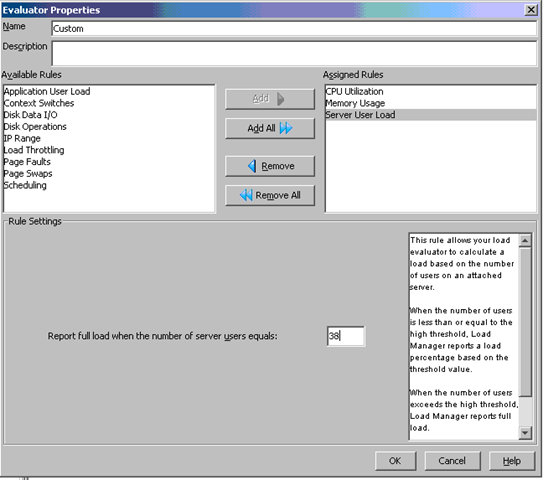
Als laatste voeg je de rule Server User Load toe. Voor deze waarde geld: maximum aantal gebruikers plus 25%. Ik wil maximaal 30 gebruikers op mijn terminal server kwijt. Dit is dus 30 * 0.25 = 7.5 afgerond 8. Zo kom ik dus op de waarde 38.
image

Wat rest is het activeren van deze load evaluator en het monitoren van deze evaluator.

bron: http://digipulse.nl/?p=53

Citrix: How Policies Impact Citrix PS Environments


There are numerous ways to apply a configuration or security setting onto a group of servers within a Presentation Server environment. Because policies are so unique, diverse and customizable, there is no single, correct method toward policy design. However, this document will give the key areas to consider when deciding on the appropriate approach to implementing a setting using a policy. This design consideration will look at the following types of policies and the common practices associated with them:

  • Citrix Presentation Server policies: These policies are defined within the management console on Presentation Server and only apply to connections using the Citrix ICA protocol but not the Microsoft RDP protocol. Presentation Server policies also allow for the configuration of Presentation Server-specific options like Session Printers and Progressive Display. The power of these policies is that they have the ability to be filtered based on users, location and even the method for launching the published applications. Many of these filters are only available within Presentation Server.

  • Active Director y policies: These policies are configured within Active Directory. They are applied to organizational units (folders), domains, sites, etc. within the Active Directory structure. A single Active Director y policy can consist of a computer policy and a user policy. A computer policy consists of settings that affect the physical computer and impact all users logging onto the computer while a user policy affects the user and is applied on all system s the user logs on to. Local server policies and custom policies are type s of Active Director y policies and are described as:

  • Local Server Policies and Settings: Local Server policies are similar to Active Directory policies, except they are managed on a server-by-server basis and configured locally on that specific server, where Active Directory policies are managed centrally and can impact hundreds or thousands of users or computers with a single application of a policy.

  • Custom Active Directory Policy Templates: Custom ADM templates, like the Citrix icaclient.adm template, are Active Directory or Local Server policies used to make configuration settings. They can be custom registry settings or simply standard policies re-organized as two examples. The concept of custom templates is supported, but depending on the author of the custom template, supportability by either Citrix or Microsoft might not be available. Organizations will have to verify the supportability of custom ADM templates. Also, any custom template used might already have settings configured, potentially causing issues with the environment. It is highly recommended to test custom policies in a test environment before implementing in production.

The following five areas are the basis f or the design decisions for an enterprise deployment of Presentation Server. These types of policies will be impacted by the following design areas:

  • Policy Type

  • Policy Integration

  • Policy Filters Policy Prioritization

  • Policy Precedence

Download hier de pdf: How_Policies_Impact_Presentation_Server_Environments_JS.pdf


Bron: http://www.dabcc.com/downloadfile.aspx?id=531