Office: Opening this will run the following SQL command


In Microsoft Word 2002, 2003 en Word 2007 kan het voorkomen dat je de onderstaande melding krijgt mocht je een bestand willen samenvoegen.

mswordsql_1

Mocht je het scherm te lang open laten staan dan verschijnt de onderstaande melding. Meer informatie over deze melding vind je in KB891986.

mswordsql_2

Mijn collega Ida kwam deze melding tegen en heeft gelijk de oplossing gezocht om deze uit te schakelen. Meer informatie vind je in KB825765.

De oplossing is redelijk eenvoudig:

kopieer de onderstaande tekst in wordpad en sla het bestand op als sqlwarning.reg. Dit is de oplossing voor Word 2003.

Windows Registry Editor Version 5.00

[HKEY_CURRENT_USER\Software\Microsoft\Office\11.0\Word\Options]
“SQLSecurityCheck”=dword:00000000

dubbelklik vervolgens op het registry bestand om het in te voeren.

Release: Office 2007 SP1


Office 2007

Microsoft heeft vandaag SP1 voor Office 2007 vrijgegeven. In het KB document KB936982 vind je meer informatie over deze release.

Download hier de verschillende versies:

  • De nederlandse versie vind je hier: SP1_NL
  • De engelse verise vind je hier: SP1_US 


Visio 2007

Download hier de verschillende versies:

  • De nederlandse versie vind je hier: SP1_NL
  • De engelse verise vind je hier: SP1_US 


Project 2007

Download hier de verschillende versies:

  • De nederlandse versie vind je hier: SP1_NL
  • De engelse verise vind je hier: SP1_US 


Sharepoint Designer 2007

Download hier de verschillende versies:

  • De nederlandse versie vind je hier: SP1_NL
  • De engelse verise vind je hier: SP1_US 


Office Compatibilitypack 2007

Download hier de verschillende versies:

  • De nederlandse versie vind je hier: SP1_NL
  • De engelse verise vind je hier: SP1_US 

Citrix: Presentations from the Citrix Solutions Conference


Hieronder vind je een lijst van de presentaties:

Application delivery and virtualization in a dynamic world – Rob van der Hoeven
The End User Experience – Brad Pedersen
Citrix Live Demo – Andreas van Wingerden
Application & Desktop Virtualization – Jon Coyle
Implementing Citrix Wanscaler – Oded Nahum
Presentation Server Overview – Thomas Zell
Windows Server 2008 sneak preview – Arlindo Alves
Enhancing Application Delivery with OS Streaming – Mark Yohai
Citrix Presentation Server Smartauditor – Joel Strocker
Deliver all your Webapplications: Netscaler– Denny Engels/ Jan Zoetemelk
Application Monitoring (Edgesight) – Tony Spring
Windows Server 2008 Terminal Services – Bernard Tritsch
Benefit from the new features (Enteo) – Stephan Glathe
Application Streaming – Barbara O’Grady
Upgrading from Secure Gateway – Jan Christoffels
Developing Dynamic Application Delivery Infrastructures – Simon Frost
HP Bladesystems – Geert Kuijken
Improve Application Delivery to your Branch Offices – Rob Krol
Defeating Web Application Attacks – Demetris Booth
Service Delivery Management – Bob Janssen (RES)
Security: what goes wrong… – Chris Mayers
The latest in Windows Application Delivery – Martijn Bosschaart
Online Collaboration – Simon Presswell

Bron: http://www.bjornbats.nl/index.php?option=com_content&task=view&id=328&Itemid=1

Unattended: Printerdrivers with MS Print Migrator 3.1


Download eerst de print migrator hier: http://www.microsoft.com/WindowsServer2003/techinfo/overview/printmigrator3.1.mspx

Printmig.exe /?

Microsoft (R) Windows (TM) Printer Migrator 3.1
Copyright (C) 1997-2002 Microsoft Corp. All rights reserved

usage: PRINTMIG [options] [server]
[-?] Display this message
[-b] Backup – followed by CAB file name
[-r] Restore – followed by CAB file name
[-l] Attempt to convert LPR Ports to SPM
[-i] Suppress warning popups. Info still written to log file.

If server is not specified then the local machine is implied.

Example command line to restore an existing config to a server:
printmig -r d:\print\ps1.cab \\prt-srvr1

Example command line to backup a server to the specified file:
printmig -b “\\filesrv\store\print server 2.cab” \\prt-srvr2

met het commando: printmig.exe -b cabnaam.cab backup je de lokale server.

printmigrator_1

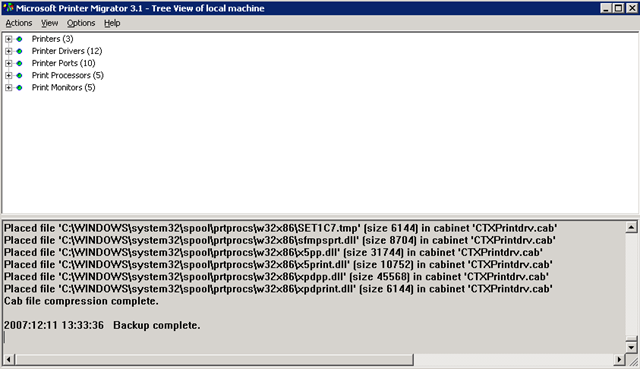
Vervolgens zie je het volgende scherm:

printmigrator_2

Mocht je de drivers unattended willen restoren dan gaan dat als volgt:

printmig.exe -r cabnaam.cab

Ik heb ook nog even een filmpje gemaakt van het restore proces:

VMware: VirtualCenter 2.0.x and SQL 2005


Na een verse installatie van Windows 2003 SP2, SQL 2005 SP2 en VC 202 patch1 krijg ik de onderstaande foutmelding zodra ik de VC service wil starten.

vc2service_error

Dit kun je oplossen door de volgende stappen uit te voeren:

If the VirtualCenter Server service installs but does not start and logs the following error, this is a symptom that the SQL Server 2005 SP1 database is not configured correctly:

Failed to init tableDef: Column VER_ID does not exist in table VPX_VERSION. Database version may be incompatible.

This condition can occur if VirtualCenter Server was installed using a database login mapped to a user other than dbo. When the VirtualCenter login is the owner of the database, the login automatically maps to the dbo user.
There are two ways to achieve the correct configuration:

  • Configure a fresh installation.
  • Repair a fresh installation that does not start.

To configure a fresh installation:

  1. Connect to your SQL Server 2005 server with SQL Server Management Studio.
  2. Create a database login (*vclogin*) for VirtualCenter Server to use.
  3. Create a new database (*VCDB*) and change the owner from <default> to vclogin.
  4. Observe that vclogin maps to the dbo database user for VCDB.
  5. Change the default database for vclogin from master to VCDB.
  6. Install VirtualCenter Server according to the product documentation.

To repair a fresh installation that does not start:
If the database has already been created and VirtualCenter Server has already been installed, it is possible to modify the owner of the database with a system stored procedure. In the steps below, substitute <vcuser> and <vclogin> with your appropriate account names.

  1. Connect to your SQL Server 2005 server with SQL Server Management Studio.
  2. Go to the db_owner schema properties and change the owner from <vcuser> to dbo.
  3. Delete the <vcuser> database user (not the <vclogin> database login that maps to it).
  4. Open a new query window for the VirtualCenter database.
  5. Execute this command:
    EXEC sp_changedbowner @loginame = ‘<vclogin>’, @map = ‘true’
  6. Start the VirtualCenter Server service.

Reference the VirtualCenter Server Release Notes at http://www.vmware.com/support/pubs/vi_pubs.html for details on supported databases and client driver versions. For information how to identify your SQL Server version and edition, reference the Microsoft Knowlege Base article 321185 at http://support.microsoft.com/kb/321185.

De bovenstaande tekst komt van het volgende document: http://kb.vmware.com

Bij mij was dit niet de oplossing. Ik heb er uiteindelijk voor gekozen om geen gebruik te maken van een SQL account maar van een Windows (AD) account welke rechten had op VC database. Daarna starte de VirtualCenter Service gewoon op.

How to: Enable / Disable Network Interfaces through a script


Via de volgende stappen kun je de netwerkkaart in of uitschakelen.

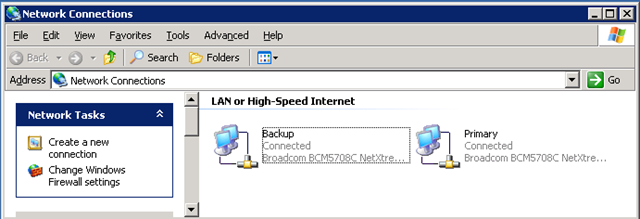
Open de Network Connections en kijk naar de namen van de netwerkkaarten.

netsh_1

Voer nu een van de volgende commando’s uit:

Enable: netsh interface set interface “Local Area Connection ” ENABLE (waar “Local Area Connection” is de naam van de NIC binnen Windows).

Disable: netsh interface set interface “Local Area Connection ” DISABLE (waar “Local Area Connection” is de naam van de NIC binnen Windows).

De kaart word in of uitgeschakeld:

netsh_2

Voor meer informatie over netsh kun je het volgende commando uitvoeren binnen CMD: netsh /? of via de volgende websites:

Exchange: Clean Install Exchange 2007 SP1 On Windows Server 2003 SP2


exchange2007

In deze post lees je hoe je een Default Exchange 2007 SP1 setup uitvoerd op een Windows 2003 SP2 server/domain.

requirements

  • Windows 2003 SP1 of hoger
  • Microsoft .Net 2.0 SP1
  • Windows Powershell 1.0
  • IIS 6.0 (Zonder de SMTP role)
  • Domain Functional Level op Windows 2000 Native of Windows Server 2003

Download Exchange 2007 SP1 (in deze download zit de RTM geslipstreamed) hier:

Continue reading “Exchange: Clean Install Exchange 2007 SP1 On Windows Server 2003 SP2”

Microsoft: Exchange 2007 SP1


exchange2007

De volgende lijst met fixes is door Microsoft vrijgegeven:

Anywhere Access

  • Integrated Exchange Unified Messaging functionality with Microsoft Office Communicator 2007 and Microsoft Office Communications Server 2007.
  • Outlook Web Access additions, including public folder access, S/MIME support, personal distribution lists, and mailbox rules editor.
  • Webready document viewer supports Microsoft Office 2007 documents in addition to Microsoft Office 2003 documents.
  • Extended language support in Outlook Web Access with Arabic and Korean spell checking.

Operational Efficiency

  • Support for Windows Server 2008 deployments, including benefits in flexible clustering, advanced networking, and simplified management.
  • Additional tools in the Exchange Management Console, including public folder management and configuration options for clustering and POP/IMAP access.
  • Improvements to the Exchange Management Shell syntax and import-export PST in the move-mailbox command.
  • Wider variety of web services for application development, including public folder access, delegate management, and folder level permissions.

Built-in Protection

  • Addition of Standby Continuous Replication (SCR) for site resilient high availability deployments.
  • Extended Exchange ActiveSync policies for mobile policy enforcement.
  • Information rights management pre-licensing by the Hub Transport role.
  • Secure Real Time Protocol (SRTP) support in the Unified Messaging role.
  • Support for IPv6 when using Windows Server 2008.


Het systeem moet voldoen aan de volgende voorwaarden:

System Requirements
  • Supported Operating Systems: Windows Server 2003 R2 (32-Bit x86); Windows Server 2003 R2 x64 editions; Windows Server 2003 Service Pack 2; Windows Server 2003 Service Pack 2 x64 Edition


Het servicepack kun je hier downloaden:

Virtualization: witch Hypervisor is your VM running At?


Dit kun je nagaan door naar het mac adres van de virtuele nic te kijken.

Via het volgende lijstje kun je zien welk mac-adres bij welke hypervisor hoort:

  • Microsoft: 00-03-FF
  • SWsoft: 00-18-51
  • Virtual Iron: 00-0F-4B
  • VMware: 00-0C-29 and 00-50-56
  • XenSource: 00-16-3E

Bron: http://www.techlog.nl/archive/2007/11/28/hey_vm_whats_your_hypervisor