Microsoft: Command-line reference


Het volgende staat er op de technet website van Microsoft:

Command-line reference A-Z

To find information about a command, on the A-Z menu, click the letter that the command starts with, and then click the command name.

In addition to the tools installed with the Windows Server 2003 family there are over 40 support tools that you can install directly from the product CD. You can use these tools to diagnose and resolve computer problems. For more information about these support tools and how to install them, see Install Windows Support Tools.

For more information about changes to the functionality of MS-DOS commands, new command-line tools, command shell functionality, configuring the command prompt, and automating command-line tasks, see Command-line reference.

You must run command-line tools at the prompt of the Cmd.exe command interpreter. To open Command Prompt, click Start, click Run, type cmd, and then click OK. To view help at the command line, at the command prompt, type:

CommandName /?

As a security best practice, consider using an account without administrative credentials to perform routine, nonadministrative tasks. To perform only specific tasks with an account with administrative credentials, you can use the Runas command.

Een overzicht van alle command-line opties binnen Windows Server 2003 vind je hier: http://technet2.microsoft.com/windowsserver/

Citrix: Discovery error "errors occurred when using <servername> in the discovery process"


Zoals altijd, een plaatje zegt meer dan duizend woorden:

In het artikel CTX112853 staat het antwoord vermeld. Deze foutmelding treed op wanneer network COM+ access niet is geïnstalleerd op de Citrix/Terminal Server. Dit is meestal het geval wanneer er geen IIS wordt geïnstalleerd op de Citrix/Terminal Server.

Dit kun je op drie manieren voor elkaar krijgen:

  1. Installeer network COM+ access  via Add/Remove Software – Windows Components – Application Server (vink deze niet aan maar highlight) Enable network COM+ access 
  2. Je kunt dit proces ook automatiseren. Zorg ervoor dat de I386 map van de Windows CD op een lokale drive staat bijvoorbeeld C:\I386. Vervolgens pas je de onderstaande tekst aan, sla je deze op als sourcepath.reg en importeer je deze

    Windows Registry Editor Version 5.00

  3. [HKEY_LOCAL_MACHINE\SOFTWARE\Microsoft\Windows\CurrentVersion\Setup]
    “SourcePath”=”C:\\”
    “ServicePackSourcePath”=”C:\\”
    Let op! zet in de Pathnaam geen i386 deze vind de setup vanzelf.

    Nadat je de bovenstaande actie hebt uitgevoerd maken het het bestand Complus.inf.

    in dit bestand komt de volgende inhoud te staan:
    [Components]
    complusnetwork = ON

    Complus.inf sla je op een schijf waar je makkelijk bij kunt.

    De laatste stap is het aanmaken van een batchfile genaamd Complus.cmd

    in dit bestand komt de volgende inhoud te staan:
    “%SystemRoot%\system32\sysocmgr.exe” /i:”%SystemRoot%\inf\sysoc.inf” /u:”driveletter:\Complus.inf”

    Sla het batchbestand op en voer deze uit. Het onderstaande scherm verschijnt heel kort en nadat deze is verdwenen is de network COM+ access geïnstalleerd.

    complus

  4. Als laatste kun je dit ook meenemen in je WINNT.SIF. Dit doe je als volgt:

    Zoek de [Components] op in je WINNT.SIF en voeg de volgende regel toe:
    complusnetwork = ON

    Nu word network COM+ access automatisch geïnstalleerd tijdens de Windows Setup.

Office: Microsoft Office Compatibility Pack for Word, Excel, and PowerPoint 2007 File Formats 3.0


In een eerdere post over How To Open Docx With Word 2000 vertelde ik al over de office compatibility pack. Deze is inmiddels aangekomen bij Versie 3.0. Meer informatie over de File conKB924074

Mocht je in word 2000 of 2002 gebruiken maken van een word 2007 document met daarin complexe scripts. Lees dan eerst KB925451

Download het pakket hier: www.microsoft.com

Voor de administrators onder ons is er nu ook een ADM file gemaakt waarmee je het e.e.a. kunt instellen. Deze ADM kun je hier downloaden: http://www.microsoft.com

Bron: http://bink.nu/

VMware: Virtualize SQL Server?


Op deze vraag heeft VMware een antwoord namelijk de volgende whitepaper: SQLServerWorkloads.pdf.

De bovenstaande whitepaper is een performance study van VMware en HP over hoe je een  SQL server wel of niet moet Virtualiseren.

Dit is de conclusie van de performance study:

The performance results we describe in this paper support the conclusion that running Microsoft SQL Server 2005 inside VMware virtual machines can provide an effective production-ready platform for running transaction-processing workloads.
Your IT organization can leverage the sizing data we present in this white paper to deploy Microsoft SQL Server successfully using VMware Infrastructure 3. By comparing effective workload throughput and resource utilization for your datacenter with the results presented in this paper, you can design and size your virtualized environment to meet your SLA targets.
The number of actual users and transactions you can support in a production environment will, of course, depend on the specific applications used and the intensity of user activity. The results of
Conclusions 12 VMware SQL Server Performance in a VMware Infrastructure 3 Environment
our tests clearly demonstrate that in a VMware Infrastructure 3 environment, the transaction throughput scales almost linearly even as the number of clients increases, for every configuration we tested. Our results show that the throughput rate of UP virtual machine is comparable for 32-bit and 64-bit environments. However, for SMP virtual machines, the throughput rate is slightly higher in a 64-bit environment compared to a 32-bit environment. Further, SMP virtual machines can service a higher number of users. One disadvantage of SMP virtual machines is that they have higher CPU costs per transaction than UP virtual machines. From a performance perspective, we recommend using SMP virtual machines rather than UP virtual machines for Microsoft SQL Server, and if possible, a 64-bit environment if your application stack supports it.

Internet Explorer: Default Search Engine


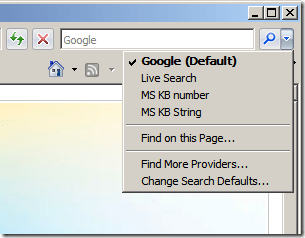
In deze post vind je een aantal registry tweaks voor de Internet Explorer Search Engine.
ie7kbsearchprovider


Google als default Search Engine

Kopieer de onderstaande tekst in notepad en sla deze op als ie7googlesearch.reg.

Windows Registry Editor Version 5.00

;Add Google as a Search Engine
[HKEY_CURRENT_USER\Software\Microsoft\Internet Explorer\SearchScopes\{A5816146-54D7-4DEF-B045-53B0E67878FD}]
“DisplayName”=”Google”

;Add Google as a Search Engine
[HKEY_CURRENT_USER\Software\Microsoft\Internet Explorer\SearchScopes\{A5816146-54D7-4DEF-B045-53B0E67878FD}]
“URL”=”
http://www.google.com/search?q={searchTerms}&rls=com.microsoft:{language}&ie={inputEncoding}&oe={outputEncoding}&startIndex={startIndex?}&startPage={startPage}”

;Add Google as a Search Engine
; Export your own Key here as it may be different
[HKEY_CURRENT_USER\Software\Microsoft\Windows\CurrentVersion\Internet Settings\Connections]
“SavedLegacySettings”=hex:3c,00,00,00,c1,00,00,00,01,00,00,00,00,00,00,00,00,00,00,00,00,00,00,00,04,00,00,00,00,00,
00,00,a0,7b,ae,ef,9e,48,c6,01,01,00,00,00,02,00,00,00,c0,a8,01,66,00,00,00,00,00,00,00,00,6f,00,6f,0
0,74,00,25,00,5c,00,54,00,45,00,4d,00,50,00,00,00,44,00,3b,00,2e,00,56,00,42,00,53,00,3b,00,2e,00,56
,00,42,00,45,00,3b,00,2e,00,4a,00,53,00,3b,00,2e,00,4a,00,53,00,45,00,3b,00,2e,00,57,00,53,00,46,00,
3b,00,2e,00,57,00,53,00,48,00,00,00,79,00,73,00,74,00,65,00,6d,00,33,00,32,00,5c,00,57,00,62,00,65,0
0,6d,00,00,00,00,00,00,00,00,00,00,00,00,00,00,00,

;Make Google DEfault Search Engine
[HKEY_CURRENT_USER\Software\Microsoft\Internet Explorer\SearchScopes]
“DefaultScope”=”{A5816146-54D7-4DEF-B045-53B0E67878FD}”

;Phishing Filter Automatic
[HKEY_CURRENT_USER\Software\Microsoft\Internet Explorer\PhishingFilter]
“Enabled”=dword:00000002

; Export your own Key here as it may be different
[HKEY_CURRENT_USER\Software\Microsoft\Windows\CurrentVersion\Internet Settings\Connections]
“SavedLegacySettings”=hex:3c,00,00,00,c4,00,00,00,01,00,00,00,00,00,00,00,00,00,00,00,00,00,00,00,04,00,00,00,00,00,
00,00,a0,7b,ae,ef,9e,48,c6,01,01,00,00,00,02,00,00,00,c0,a8,01,66,00,00,00,00,00,00,00,00,6f,00,6f,0
0,74,00,25,00,5c,00,54,00,45,00,4d,00,50,00,00,00,44,00,3b,00,2e,00,56,00,42,00,53,00,3b,00,2e,00,56
,00,42,00,45,00,3b,00,2e,00,4a,00,53,00,3b,00,2e,00,4a,00,53,00,45,00,3b,00,2e,00,57,00,53,00,46,00,
3b,00,2e,00,57,00,53,00,48,00,00,00,79,00,73,00,74,00,65,00,6d,00,33,00,32,00,5c,00,57,00,62,00,65,0
0,6d,00,00,00,00,00,00,00,00,00,00,00,00,00,00,00,

Importeer daarna de ie7googlesearch.reg en de default search is aangepast naar google.

Let op! dit is een current user setting. Dit dien je dus voor alle users via een script of iets dergelijks uit te voeren.

Search Engine voor het zoeken naar KB artikelen van MS

Kopieer de onderstaande tekst in notepad en sla deze op als ie7kbsearch.reg

Windows Registry Editor Version 5.00

; add search MS Knowledgebase by KB number (just type the number in the search box)
[HKEY_CURRENT_USER\Software\Microsoft\Internet Explorer\SearchScopes\MSKBnumber]
“DisplayName”=”MS KB number”
“URL”=”
http://support.microsoft.com/?kbid={SearchTerms}”

;add search MS knowledgebase by string (type the string in the search box)
[HKEY_CURRENT_USER\Software\Microsoft\Internet Explorer\SearchScopes\MSKBString]
“DisplayName”=”MS KB String”
“URL”=”http://support.microsoft.com/search/default.aspx?query={SearchTerms}”

Importeer daarna de  ie7kbsearch.reg en de KB search engine word aangemaakt.

Let op! dit is een current user setting. Dit dien je dus voor alle users via een script of iets dergelijks uit te voeren.

Microsoft: Application Virtualization 4.5 Beta


softgrid.jpg

Ruben Spruijt stuurde mij een e-mail over zijn nieuwste artikel over Microsoft Application Virtualization. Dit artikel heeft hij op http://www.brianmadden.com geplaatst en beschrijft de nieuwe features over de beta van Microsoft Application Virtualization 4.5.

Microsoft Application Virtualization is de nieuwe naam voor het product Softgrid wat Microsoft in 2006 overgenomen heeft van Softricity.

Microsoft hoopt in de zomer van 2008 dit product uit te brengen.

Het artikel vindt je hier: http://www.brianmadden.com/content/article/Microsoft-announces-Application-Virtualization-45

Meer informatie over het downloaden van de Beta vind je hier: http://blogs.technet.com/virtualworld/archive/2007/11/12/microsoft-application-virtualization-4-5-is-open-for-public-beta.aspx

Windows: Offline Defragmentation of The Active Directory database


Ik was vandaag genoodzaakt om een offline defragmentatie uit te voeren op een domain controller. Dit heb ik gedaan door het volgen KB232122.

In deze post laat ik jullie via screenshots zien hoe dit in zijn werk gaat.

Let Op! Doe deze tutorial alleen als je door een KB van Microsoft word gevraagd om dit te doen.

Continue reading “Windows: Offline Defragmentation of The Active Directory database”

Error Joining Domain: The Endpoint format is invalid.


Ik had een VM binnen VMware Workstation opgebouwd. Deze heb ik daarna via de VMware Converter overgezet naar mijn ESX omgeving met het vinkje: Install VMware Tools.

Door deze optie treed er een fout op binnen de VMWare Tools waardoor ik de volgende foutmelding kreeg bij het Joinen van het domein.

joindomain error

De oplossing vond ik op de blog van david hochstaetter. Het is vrij simpel. De VMWare Tools deïnstalleren. De VM opnieuw opstarten. Toevoegen aan het domein. Vervolgens de VM weer opnieuw opstarten. En als laatste installeer je de VMware Tools weer.