VMware vSphere Health Check Report v1.0


image

@lamw (twitter account) has created and published the first vSphere Health Check Report script.  The script reports on the following:


  • New New licensing format/summary
  • New EVC Enabled information
  • New Cluster VM monitoring
  • New Cluster Host monitoring
  • New # of VMotions within a cluster
  • New Datastore uncommitted info
  • New CPU power management info
  • New VM info (FT, Record/Replay, Clean Poweroff)
  • New Host IPv6, FT, SSL Thumbprint
  • New Host Profiles
  • New vApp information
  • New Distributed vSwitch information
  • vCenter Build/Release
  • Active Sessions
  • ESX/ESXi Build/Release
  • Cluster(s) Name/Statistics (Hosts,CPU and MEM availabity, HA,DRS and DPM enabled, Resource Pools, Health)
  • ESX/ESXi Hardware configuration (NICs/HBAs)
  • ESX/ESXi Hardware Health Sensor via CIM
  • ESX/ESXi State
  • ESX/ESXi Configurations (for detailed information, use detail-hosts option)
  • ESX/ESXi Multipathing Info (only available in host or detail-hosts option)
  • ESX/ESXi Datastore summary
  • ESX/ESXi LUN summary
  • ESX/ESXi Portgroup summary
  • ESX/ESXi Hostd logs
  • CDP Summary
  • Recent Tasks
  • Virtual Machine summary
  • VM Storage summary
  • VM Network summary
  • VM w/Snapshots
  • VM w/Snapshot delta age
  • VM w/RDMs
  • VM w/NPIV enabled
  • VM w/connected CD-ROMs
  • VM w/connected Floppys

You can find more info here: http://communities.vmware.com/docs/DOC-9842

VMware: Troubleshooting ESX Server


image

While reading my rss feeds in Feedreader, I saw this article:  http://www.virtualinsanity.com/index.php/2009/04/21/troubleshooting-esx/

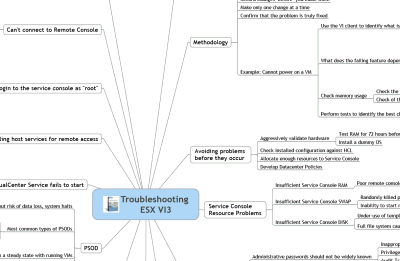
I was at the Louisville VMUG on Friday talking about Troubleshooting ESX.  In my preparation for the event, I was looking for a good PowerPoint presentation I could reuse and I stumbled across a sweet little gem of a document.  Dudley Smith, a VMware Technical Account Manager (TAM) out of Virginia, created a cool one page Mind Map for Troubleshooting ESX.  Does it address every potential issue you’ll come across?  No, of course not.  But it’s a heck of a good place to start.  One look at his Mind Map and I thought to myself, “that would be a great thing to have printed out and hanging over every VMware admin’s desk.
image
image

You can download the pdf’s here:

http://www.virtualinsanity.com/index.php/2009/04/21/troubleshooting-esx/

VMware: vSphere


image

Quote from: http://vmware.com/products/vsphere/

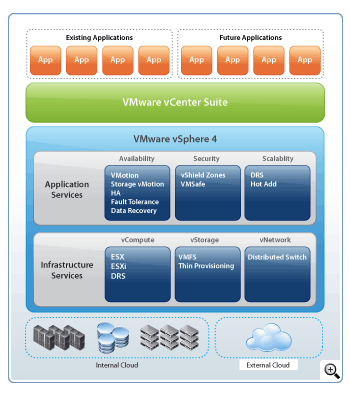
VMware vSphere is the next evolutionary step in IT computing; enabling customers to bring the power of cloud computing to their IT infrastructures. Building on the power of VMware® Infrastructure, VMware vSphere dramatically reduces capital and operating costs, and increases control over IT infrastructures while preserving the flexibility to choose any OS, application and hardware.

Build on a proven virtualization platform to provide the foundation for internal and external clouds, using federation and standards to bridge cloud infrastructures—creating a secure private cloud. Organizations of all sizes can achieve the full benefits of cloud computing, delivering the highest levels of application service agreements with the lowest total cost per application workload.

Available in several different editions, VMware vSphere delivers targeted benefits to small business and mid-size and enterprise business customers.

image

The new vSphere community is already live. Go check it here: http://communities.vmware.com/community/vmtn/vsphere

Before installing (if you have the software) be sure to check the Upgrade Center. You can find more info here:

ESX Server does not have persistent storage


image

From: http://www.vm-help.com/

In the last few updates VMware has changed which drivers get loaded for certain SATA controllers (in particular the ICH7 / ICH9 / ICH10 models). This has been done to fix a problem that prevented host CD-ROMs from being used within a VM. However, in some cases after upgrading a user might find the below error after rebooting for the first time after the firmware upgrade has been installed: The VMware ESX Server does not have persistent storage. As shown in the below image, the ICH9 controller is now recognized as an IDE controller after updating to Update 4 instead of a SATA controller as was the case with ESXi 3.5 Update 3. For another method to resolve, check out this thread.
image

Read the rest of the article here: http://www.vm-help.com/esx/esx3i/no_persistent_storage_after_upgrade.php

Source: http://www.techhead.co.uk/hp-ml110-g5-upgrading-to-vmware-esxesxi-u4-and-getting-error-the-vmware-esx-server-does-not-have-persistent-storage

VMware ESX/ESXi: no sound through RDP


image

Martin over at http://www.emware.nl/ has posted an article about getting sound through a RDP connection:

Working on vmware is great, but it gets even better when you have some sounds.
A straight out the box install gives you a error on the sound card.

  • The audio Service is not running
  • No audio Devices are installed

It took me some to figure out this problem, but at the end … it was really simple.

Let’s make it work !

Read the rest of the article here: http://www.emware.nl/articles/no-sound-in-esx-esxi-through-rdp.html

Update: Schedule a VI Toolkit script


image image

Luc Dekens, better known as LucD, posted a  comment on my previous post about scheduling a Powershell script with Scheduled Task in Windows. He pointed me to a fix for a know issue with the VI Toolkit 1.5. Rob Mokkink  has posted the following fix on the VMTN forums: http://communities.vmware.com<?xml version="1.0"?>

#FIX FOR TOOLKIT 1.5
$USER = $env:username
$APPPATH = "C:\Documents and Settings\" + $USER + "\Application Data"

#SET THE APPDATA ENVIRONMENT WHEN NEEDED
if ($env:appdata -eq $null -or $env:appdata -eq 0)
{
$env:appdata = $APPPATH
}


The following line(s) are no longer necessary to add in your script:

#FORCE TO LOAD VMWARE POWERSHELL PLUGIN

[Reflection.Assembly]::LoadWithPartialName(”vmware.vim”)

Thanks again Luc for sharing this solution.

VMware: Workstation 6.5.2. Released


image

I was looking at the VMware Download site and saw a new build of VMware Workstation.  You can find the release notes here: releasenotes_ws652.html

The following issues are resolved in Workstation 6.5.2:

Security Fixes

  • Windows-based host privilege escalation in hcmon.sys
    A vulnerability in an ioctl function in hcmon.sys might be used to escalate privileges on a Windows-based host. The Common Vulnerabilities and Exposures project has assigned the name CVE-2009-1146 to this issue.
    New releases of hosted products address a denial-of-service problem described in CVE-2008-3761, which can only be exploited by a privileged Windows account.
  • A remote denial-of-service vulnerability in authd for Windows-based hosts
    A vulnerability in vmware-authd.exe might cause a denial-of-service condition on Windows hosts. The Common Vulnerabilities and Exposures project has assigned the name CVE-2009-0177 to this issue.
  • A VMCI privilege escalation on Windows-based hosts or guests
    Virtual Machine Communication Interface (VMCI) is an infrastructure that provides fast and efficient communication between a virtual machine and the host operating system and between two or more virtual machines on the same host. A vulnerability in vmci.sys might allow privilege escalation on Windows-based machines. This might occur on Windows-based hosts or inside Windows-based guest operating systems. Current versions of ESX Server do not support the VMCI interface and hence they are not affected by this vulnerability. The Common Vulnerabilities and Exposures project has assigned the name CVE-2009-1147 to this issue.
  • VMnc codec heap overflow vulnerabilities
    The VMnc codec assists in record and replay sessions. Record and replay records the dynamic virtual machine state over a period of time. Two heap overflow vulnerabilities might allow a remote attacker to execute arbitrary code on VMware hosted products. For an attack to be successful, the user must visit a malicious Web page or open a malicious video file.
    The Common Vulnerabilities and Exposures project has assigned the names CVE-2009-0909 and CVE-2009-0910 to these issues.
Miscellaneous
  • Creating ACE package fails on Windows virtual machines
    Creating ACE package fails with the error Tools is out of date, on virtual machines running Windows NT, Windows 9x and Windows Millennium Edition. This issue is resolved in this release.
  • Unable to install the latest version of VIX API on Workstation 6.5.0
    On Workstation 6.5.0, you cannot install VMware VIX API 1.6.2 due to an issue with the MSI installer for VIX API. This issue is resolved in this release.
  • Unable to connect to PPTP VPN using VMware NAT on Microsoft Windows guest operating systems
    When you try to open a PPTP VPN connection by using VMware NAT with Microsoft XP Service Pack 2, the following error appears:
    Disconnected. 619 connect to the remote machine could not be established.
    The issue is found on Cisco 1841 VPN and other PPTP VPN connections, and is applicable to all supported versions of Microsoft Windows host machines. This issue is resolved in this release.
  • Workstation displays wrong message after installing the latest version of VMware Tools
    After installing the latest version of VMware Tools and rebooting the guest operating system, Workstation displays the following message on the status bar:
    Your version of VMware Tools is out of date.
    This issue is resolved in this release.
  • Novell SLES 11 Beta is displayed as not supported when installing VMware Tools
    Virtual machines running the Novell SUSE Linux Enterprise Server 11 Beta operating systems as guests display the following warning message while installing VMware Tools:
    WARNING: Cannot determine dependencies of kernel module 'vmxnet'.
    This issue is resolved in this release.
  • vsock fails to load using load-vmware on Linux kernel 2.6.26 and later
    If CONFIG_MODVERSIONS is defined, vsock does not load when you run load-vmware command as the Module.symvers is missing on Linux kernels 2.6.26 and later. This issue is resolved in this release.
  • In Workstation, Google Earth displays extra lines for the country borders
    In Workstation, Google Earth displays extra yellow lines to draw the country borders, when the Direct3D Acceleration option is enabled.
    This issue is resolved in this release.
  • Unable to invoke vi editor from VMware Tools on SLES11 guest operating system
    When you try to edit VMware Tools scripts from vmware-toolbox window on SUSE Linux Enterprise Server 11 (SLES11), the following error appears in the console:
    Cannot edit script because the vi editor was not found
    This issue is resolved in this release.
    To edit vmware-tools scripts:
    1. Launch VMware Tools and select the Scripts tab.
    2. Select Custom script option and click Edit.
  • Only the first attempt succeeds when mapping original and cloned virtual disk files to drive letters
    On Windows hosts, if you make a linked or full clone of a virtual machine and then try to map the virtual disk files of the original virtual machine as well as of the clone to drive letters on the host, only the first mapping succeeds. Because both disks have the same signature, you can map only one of the disks at a time. This issue is resolved in this release.

Download the new version here: http://www.vmware.com/download/ws/

VMware: Adding the Enhanced vmxnet vnic


The Enhanced vmxnet adapter was already available in ESX 3.5 (see KB1001805). The support for this adapter is a lot better since Update 4 is released. Now you can also add the Enhanced vmxnet adapter to a Windows Server 2003 VM, without the workaround mentioned in KB1007195.

image

Some info about the Enhanced vmxnet from KB1001805:

  • Enhanced vmxnet — The enhanced vmxnet adapter is based on the vmxnet adapter but provides some high-performance features commonly used on modern networks, such as jumbo frames. This virtual network adapter is the current state-of-the-art device in virtual network adapter performance, but it is available only for some guest operating systems on ESX Server 3.5. This network adapter will become available for additional guest operating systems in the future.
    Enhanced VMXNET is supported only for a limited set of guest operating systems:

    • 32/64-bit versions of Microsoft Windows 2003 (Enterprise and Datacenter Editions). You can use enhanced vmxnet adapters with other versions of the Microsoft Windows 2003 operating system, but a workaround is required to enable the option in the VI Client. See http://kb.vmware.com/kb/1007195. Since Update 4, you can add the Enhanced vmxnet via the VIC.
    • 32/64-bit versions Red Hat Enterprise Linux 5.0
    • 32/64-bit versions SUSE Linux Enterprise Server 10
    • 64-bit versions Red Hat Enterprise Linux 4.0
  • And a warning:

    Migrating virtual machines that use enhanced vmxnet. Enhanced vmxnet is new with ESX Server 3.5. Virtual machines configured to have enhanced vmxnet adapters cannot migrate to older ESX Server hosts, even though virtual machines can usually migrate freely between ESX Server 3.0 and ESX Server 3.0.1.

    If you must migrate a virtual machine between newer and older hosts,don’t choose enhanced vmxnet but instead one of the older adapter types. Flexible or e1000 are offered whenever enhanced vmxnet is offered.

    VMware: ESX(i) 3.5 u4 released


    image

    VMware ESX 3.5 Update 4 has been released. You can find the download and release notes here:

    What’s New:


    Not all combinations of VirtualCenter and ESX Server versions are supported and not all of these highlighted features are available unless you are using VirtualCenter 2.5 Update 4 with ESX Server 3.5 Update 4. See the ESX Server, VirtualCenter, and VMware Infrastructure Client Compatibility Matrixes for more information on compatibility.

    1. This version of ESX Server requires a VMware Tools upgrade.

    The following information provides highlights of some of the enhancements available in this release of VMware ESX Server:

    Expanded Support for Enhanced vmxnet Adapter This version of ESX Server includes an updated version of the VMXNET driver (VMXNET enhanced) for the following guest operating systems:

    • Microsoft Windows Server 2003, Standard Edition (32-bit)
    • Microsoft Windows Server 2003, Standard Edition (64-bit)
    • Microsoft Windows Server 2003, Web Edition
    • Microsoft Windows Small Business Server 2003
    • Microsoft Windows XP Professional (32-bit)

    The new VMXNET version improves virtual machine networking performance and requires VMware tools upgrade.

    Enablement of Intel Xeon Processor 5500 Series — Support for the Xeon processor 5500 series has been added. Support includes Enhanced VMotion capabilities. For additional information on previous processor families supported by Enhanced VMotion, see Enhanced VMotion Compatibility (EVC) processor support (KB 1003212).

    QLogic Fibre Channel Adapter Driver Update — The driver and firmware for the QLogic fibre channel adapters have been updated to version 7.08-vm66 and 4.04.06 respectively. This release provides interoperability fixes for QLogic Management Tools for FC Adapters and enhanced NPIV support.

    Emulex Fibre Channel Adapter Driver Update The driver for Emulex Fibre Channel Adapters has been upgraded to version 7.4.0.40. This release provides support for the HBAnyware 4.0 Emulex management suite.

    LSI megaraid_sas and mptscsi Storage Controller Driver Update — The drivers for LSI megaraid_sas and mptscsi storage controllers have been updated to version 3.19vmw and 2.6.48.18 vmw respectively. The upgrade improves performance and enhance event handling capabilities for these two drivers.

    Newly Supported Guest Operating Systems — Support for the following guest operating systems has been added specifically for this release:

    For more complete information about supported guests included in this release, see the Guest Operating System Installation Guide: http://www.vmware.com/pdf/GuestOS_guide.pdf.

    • SUSE Linux Enterprise Server 11 (32-bit and 64-bit).
    • SUSE Linux Enterprise Desktop 11 (32-bit and 64-bit).
    • Ubuntu 8.10 Desktop Edition and Server Edition (32-bit and 64-bit).
    • Windows Preinstallation Environment 2.0 (32-bit and 64-bit).

    Furthermore, pre-built kernel modules (PBMs) were added in this release for the following guests:

    • Ubuntu 8.10
    • Ubuntu 8.04.2

    Newly Supported Management Agents — Refer to VMware ESX Server Supported Hardware Lifecycle Management Agents for the most up-to-date information on supported management agents.

    Newly Supported I/O Devices — in-box support for the following on-board processors, IO devices, and storage subsystems:

      SAS Controllers and SATA Controllers:

    The following are newly supported SATA Controllers.

    • PMC 8011 (for SAS and SATA drives)
    • Intel ICH9
    • Intel ICH10
    • CERC 6/I SATA/SAS Integrated RAID Controller (for SAS and SATA drivers)
    • HP Smart Array P700m Controller

      Notes:

      1. Some limitations apply in terms of support for SATA controllers. For more information, see SATA Controller Support in ESX 3.5 (KB 1008673).
      2. Storing VMFS datastores on native SATA drives is not supported.

    Network Cards: The following are newly supported network interface cards:

    • HP NC375i Integrated Quad Port Multifunction Gigabit Server Adapter
    • HP NC362i Integrated Dual port Gigabit Server Adapter
    • Intel 82598EB 10 Gigabit AT Network Connection
    • HP NC360m Dual 1 Gigabit/NC364m Quad 1 Gigabit
    • Intel Gigabit CT Desktop Adapter
    • Intel 82574L Gigabit Network Connection
    • Intel 10 Gigabit XF SR Dual Port Server Adapter
    • Intel 10 Gigabit XF SR Server Adapter
    • Intel 10 Gigabit XF LR Server Adapter
    • Intel 10 Gigabit CX4 Dual Port Server Adapter
    • Intel 10 Gigabit AF DA Dual Port Server Adapter
    • Intel 10 Gigabit AT Server Adapter
    • Intel 82598EB 10 Gigabit AT CX4 Network Connection
    • NetXtreme BCM5722 Gigabit Ethernet
    • NetXtreme BCM5755 Gigabit Ethernet
    • NetXtreme BCM5755M Gigabit Ethernet
    • NetXtreme BCM5756 Gigabit Ethernet

    Expanded Support: The E1000 Intel network interface card (NIC) is now available for NetWare 5 and NetWare 6 guest operating systems.

    Onboard Management Processors:

    • IBM system management processor (iBMC)

    Storage Arrays:

    • SUN StorageTek 2530 SAS Array
    • Sun Storage 6580 Array
    • Sun Storage 6780 Array