VMware: SRM in a Box


image

Tomas ten Dam heeft een blogpost gemaakt over een SRM in a Box setup met VMware Workstation, ESX, vCenter en Netapp. Deze blogpost vind je hier: http://tendam.wordpress.com/2008/11/09/srm-in-a-box-configured/

Joep Piscaer heeft ook een blogpost gemaakt over SRM in a Box alleen dan niet met een NetApp storage appliance maar een Lefthand VSA storage appliance. Ook is deze post meer een “How To” met een uitgebreide uitleg over deze setup. Je kunt de post hier vinden: http://www.virtuallifestyle.nl/2008/11/vmware-site-recovery-manager-with-lefthand-vsa/

VMware: ESX35(i) Update 3 released


I guess you all got the e-mail from VMware, but for those who didn’t get the e-mail ESX 3.5 U3 is final.

This new release of ESX/ESXi 3.5 comes with the following enhancements:

  • Increase number of vCPUs per Core Limit (from 8 to 20)
  • New supported servers, NICs and storage IO controllers
  • New supported Guest Operating Systems

… and many more improvements and bug fixes.


Download the iso’s  here: http://www.vmware.com/download/vi/

More info about this release can be found on Duncan’s Blog: http://www.yellow-bricks.com/2008/11/07/vmware-esx-35-update-3/

VMware: VUM Perfomance Whitepaper


VMware Update Manager (VUM) provides a patch management framework for VMware Virtual Infrastructure. IT administrators can use it to patch VMware ESX, Windows, and certain versions of Linux virtual machines.  As data centers get bigger, performance implications become more important for patch management. This study covers the following topics:

  • Benchmarking Methodology
  • VUM Server Host Deployment
  • Latency Overview
  • Resource Consumption Matrix
  • Guest Operating System Tuning
  • Network Latencies
  • On-Access Virus Scanning

Download de whitepaper hier: http://www.vmware.com/pdf/vum_1.0_performance.pdf

VMUG: Mijn agenda voor de DUTCH VMUG 2008


Uit de agenda voor de VMUG heb ik de volgende sessies gehaald die ik wil gaan volgen:

Tijd Sessie
8:30-9:30 Ontvangst, registratie en koffie
9:30-9:50 Openening van het VMUG Event 2008
Viktor van den Berg – VMUG
Welkom bij het VMware User Group Event 2008. Viktor van den Berg brengt je op de hoogte van de activiteiten van de VMUG in het afgelopen jaar, en blikt vooruit naar 2009.
9:50-10:30 Keynote (VMware)
10:50-11:35 ESX Server en Virtual Center Server Best Practices 
Willem van Engeland, VMware
11:40-12:25 VMUG Sessie: Beheer VMware m.b.v. Powershell!
Eric Sloof – VMUG / ntpro.nl
13:30-14:15 Virtualisatie en Storage
Frederik Vos – XTG
14:20-15:05 Virtual Center Database – There is more than meets the eye
Bouke Groenescheij – VMUG/Jume
15:20-16:05 VMware – 3rd Party Utilities for VMware, an Overview
Richard Gharsthagen – VMware
16:10-16:30 VMUG Event 2008: Afsluiting
Viktor van den Berg
16:30-17:20 VMUG Borrel

Script: Set-VMVideoAccLevel


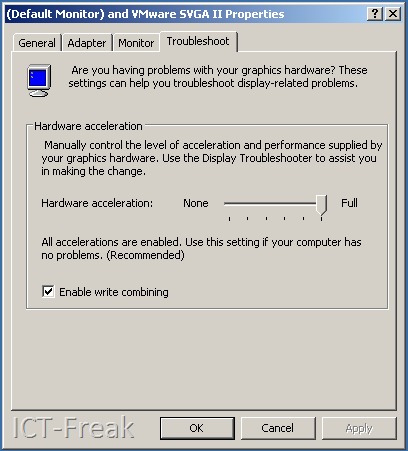
Hugo Peeters van www.peetersonline.nl heeft een powershell script gemaakt voor het instellen van de video hardware acceleration level. Zoals je weet staat dit bij een standaard installatie van Windows Server 2003 (en ook andere versies) standaard op none.

image

Via het script van Hugo kun je in een keer deze setting aanpassen op alle VM’s (Windows 2003 servers en deze moeten wel aan staan). Zie de onderstaande quote van Hugo:

I have created a simple, fire-and-forget script that sets the Hardware Video Acceleration Level for all your (Windows Server 2003 and Powered On) VM’s to Full. This way you can always enjoy smooth mouse movements when working in the console!

Het script kun je hier downloaden: http://www.peetersonline.nl/index.php/vmware/setting-video-hardware-acceleration-level/

VMware: vCenter Administrator Portal


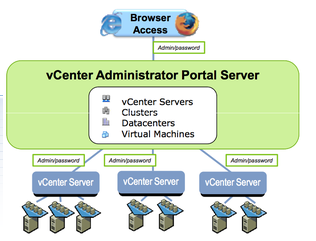
Duncan posted a news item about the vCenter Administrator Portal Server over here: http://www.yellow-bricks.com/ and here http://blogs.vmware.com/.

image


What can you expect at this moment:

  • Single sign-on to multiple vCenter Servers
  • Monitor events and alarms across multiple vCenter Servers
  • Search and track inventory across multiple vCenter Servers
  • Launch VI Client in context to manage vCenter Servers
  • Search for virtual machines across multiple vCenter Servers
  • Launch virtual machine consoles
  • Utilizes permissions setup in vCenter Servers
  • Unified view for: vCenter Servers, Datacenters, Clusters, Hosts, Virtual Machines
  • Access summary view of inventory objects, rolled up across vCenter Servers, for comparison and monitoring purposes


You can download your copy here: http://communities.vmware.com/community/beta/vcadminportal

VMware: VMRUN for Workstation 6.5, Server 1.x and Server 2.0


Ik kwam VMRUN tegen in een post op de site: http://itknowledgeexchange.techtarget.com/virtualization-pro/ hier stond ook een link naar het volgende document: http://www.vmware.com/pdf/vix160_vmrun_command.pdf.

Hieronder laat ik even wat opties zien:

Power on a virtual machine with VMware Workstation on a Windows host:
vmrun start "drive:\path to vmx\vm.vmx"

Power on a virtual machine with VMware Server 2.0:
vmrun -T server -h https://10.0.1.8/sdk -u root -p <pass> start "[storage1] WinXP/WinXP.vmx"

Run CMD within the VM with VMware Workstation on a Windows host:
vmrun -T ws -gu <user> -gp <pass> runProgramInGuest WinXP\WinXP.vmx -activeWindow cmd.exe

List processes in a Linux guest, and kill the process numbered 8192:
vmrun -T ws -gu <user> -gp <pass> listProcessesInGuest Ubuntu/Ubuntu.vmx
vmrun -T ws -gu <user> -gp <pass> killProcessesInGuest Ubuntu/Ubuntu.vmx 8192

List processes in a Linux guest, and kill the process numbered 8192:

vmrun -T ws -gu <user> -gp <pass> listProcessesInGuest Ubuntu/Ubuntu.vmx
vmrun -T ws -gu <user> -gp <pass> killProcessesInGuest Ubuntu/Ubuntu.vmx 8192

Best wel een krachtige tool. Toch had ik liever gezien dat VMware ook voor Workstation en Server een powershell omgeving had gemaakt. Misschien komt dit in de toekomst nog.

Bron: http://itknowledgeexchange.techtarget.com/virtualization-pro/starting-a-vmware-server-virtual-machine-with-vmrun/