Considerations when hosting AD DC in virtual environments


KB888794:  Considerations when hosting Active Directory domain controller in virtual hosting environments


In het bovenstaande KB artikel tref je ook nog de volgende artikelen aan:

KB875495: How to detect and recover from a USN rollback in Windows Server 2003.

KB885875: How to detect and recover from a USN rollback in Windows 2000 Server.

KB897615: Support policy for Microsoft software running in non-Microsoft hardware virtualization software

Microsoft: Windows XP Service pack 3


Ik kwam een post tegen op http://www.msminded.nl waarop de release dates staan van Windows XP SP3.

Hier een quote van de post:

14 april 2008: Support is beschikbaar voor de RTM versie van Service Pack 3 voor Windows XP

21 april 2008: Original Equipment Manufacturers, Volume License, Connect, MSDN en TechNet subscribers

29 april 2008: Microsoft Update, Windows Update, Download Center

10 juni 2008: Automatic Updates


Update: Service Pack 3 kun je nu officieel downloaden vanaf hier: http://download.windowsupdate.com/

Ik ging vandaag even kijken en ik kon inderdaad Service Pack 3 downloaden. Ik heb deze gelijk geïnstalleerd. Dit ging als volgt:

Windows_XP_SP3_1

Even opnieuw opstarten.

Windows_XP_SP3_2

En voila Service Pack 3 staat geïnstalleerd.

Windows_XP_SP3_3

Voor de releasenotes kun je hier terecht: http://download.microsoft.com/download/c/d/8/cd8cc719-7d5a-40d3-a802-e4057aa8c631/relnotes.htm

Citrix: Username.Domain folders on the TSProfile Share


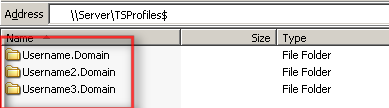
Het kan voorkomen dat je de onderstaande tsprofiles tegen komt op je TSProfile share. Meer informatie over hoe dit komt lees je in KB821929
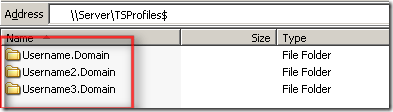
UsernameDomain2

Ik vond een post van Robert Illing op het Citrix forum met de oplossing:

Apparently in SP1 they incorporated this hotfix – http://support.microsoft.com/?id=821929. If you look at the bottom if the hotfix it shows how windows looks at the terminal server roaming profiles.

We use \\server\username for our home drives and the \\server\username.domain caused us problems. The thing is windows will actually attempt \\server\username, but the user has to have full control on their profile. They also need to be the owner of the folder. If they are not the owner, windows will create a NEW profile for them using username.domain which created tons of profiles on our san.

There is a work around on the ownership problem. As we scripted our whole solution, and went about to go in and change ownership on thousands of profiles. If you create a GPO and go to Computer Configuration, Administrative Templates, System, User Profiles, then select “Do not check for user ownership of roaming profiles folder”. This will ignore the ownership of the profile.

So to clarify once you apply that GPO. You should be able to use \\server\username as long as the user has full control on their profile.

Op de policy met GPMC.msc en ga naar Computer Configuration – Administrative Templates – System –  User Profiles daarna enabale je de volgende optie Do not check for user ownership of roaming profiles folder

UsernameDomain

Citrix: Licensing error EventID 1028


Ik starte vandaag een oude VM op en wilde verbinding maken naar de Citrix omgeving. Dit lukte niet. Ik kreeg de onderstaande error.

License_Error

De volgende EventID werd in de eventlog weggeschreven op de terminal/citrix server.

eventid1028

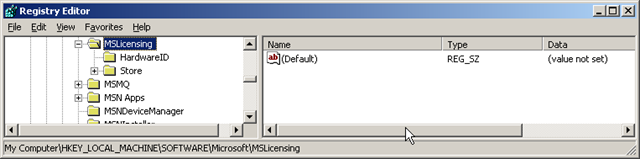
De oplossing voor dit probleem was het verwijderen van de MSLicensing key. Dit doe je via Regedit op de client en blader dan naar de key: HKLM\SOFTWARE\Microsoft en verwijder de key MSLicensing.

 License_Error_regedit

De oplossing kwam van Super Pippo op het Citrix forum: http://support.citrix.com/forums

Meer informatie over TSServer Licensing vind je in het volgende KB document: KB823313

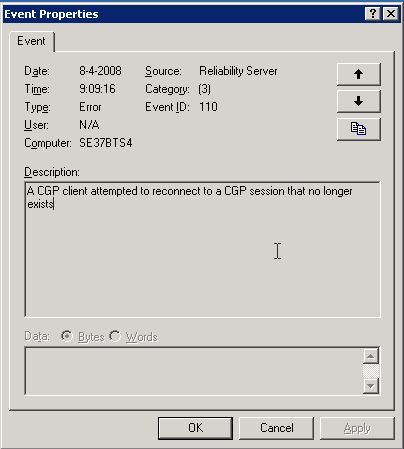
Citrix: EventID 110


De volgende melding kun je terug vinden op je Citrix server. Deze melding treed op zodra je hotfix rollup pack 1 hebt geïnstalleerd.

image

Oplossing / Workarround

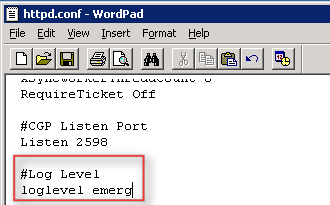
Open het bestand C:\Program Files\Citrix\XTE\conf\httpd.conf in Wordpad.

Voeg daarna de volgende text toe:

#Log Level

loglevel emerg

image 

Als laatste herstart je de XTE service. Dit kun je via Start – Run – Services.msc doen of via het commandprompt:

net stop “Citrix XTE Server” en net start “Citrix XTE Server”

Meer informatie over deze issue vind je hier: CTX114680

Tool: Server Core Configurator


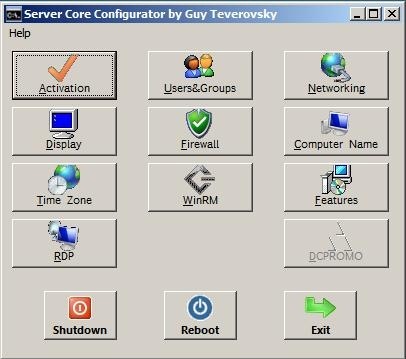
Ik kwam de tool Server Core Configurator erg handig als je te lui bent om de commando’s uit te voeren.

Hieronder zie je het hoofdscherm

main

Features:

  • Product Activation
  • Configuration of display resolution
  • Clock and time zone configuration
  • Remote Desktop configuration
  • Management of local user accounts (creation, deletion, group membership, passwords)
  • Firewall configuration
  • WinRM configuration
  • IP configuration
  • Computer name and domain/workgroup membership
  • Installation of Server Core features/roles


Download de tool hier: http://blogs.microsoft.co.il/blogs/guyt/

Windows: Network Shell (Netsh) Technical Reference


The Windows Server® 2008 Network Shell (Netsh) Technical Reference provides a comprehensive command reference for networking technologies such as Dynamic Host Configuration Protocol (DHCP), Network Policy Server (NPS), Network Access Protection (NAP), and Routing and Remote Access Services (RRAS), among many other technologies for which there are netsh commands. Netsh commands offer an alternative to configuring network technologies using the Windows interface. You can run netsh commands in batch files and scripts, and you can run them from the netsh prompt by manually typing commands. You can use netsh commands to configure both local and remote computers.

Je kunt het hier downloaden: http://www.microsoft.com/downloads/


Bron: http://blogs.technet.com/seanearp/archive/2008/03/14/network-shell-netsh-technical-reference-released.aspx

Microsoft: Infrastructure Planning and Design


Overview

Infrastructure Planning and Design guides share a common structure, including:

  • Definition of the technical decision flow through the planning process.
  • Listing of decisions to be made and the commonly available options and considerations.
  • Relating the decisions and options to the business in terms of cost, complexity, and other characteristics.
  • Framing decisions in terms of additional questions to the business to ensure a comprehensive alignment with the appropriate business landscape.

These guides complement product documentation by focusing on infrastructure design options.
Each guide leads the reader through critical infrastructure design decisions, in the appropriate order, evaluating the available options for each decision against its impact on critical characteristics of the infrastructure. The IPD Series highlights when service and infrastructure goals should be validated with the organization and provides additional questions that should be asked of service stakeholders and decision makers.
IPD consists of the following downloadable packages:

  • Infrastructure Planning and Design Series Introduction
  • Selecting the Right Virtualization Technology
  • Microsoft SoftGrid Application Virtualization
  • Windows Server Virtualization (for Windows Server 2008 Hyper-V and Virtual Server 2005 R2 SP1)
  • New! Windows Deployment Services
  • New! Windows Server 2008 Active Directory Domain Services
  • New! Windows Server 2008 Terminal Services

The guides are available as individual downloads or as a single all-in-one package.
Send questions or feedback to us directly at SATfdbk@microsoft.com

 
System Requirements
  • Supported Operating Systems: Windows Server 2003; Windows Vista; Windows XP
  • These download files work with the following Office programs:
    • Microsoft Office Word 2007 (.docx)
    • Microsoft Office Word 2003 (.doc)
    • A Word viewer such as Word Viewer 2003.

Instructions

  1. To start the download, select a file from the list of Files in this Download on this page.
  2. Save the .zip file to your preferred location on your computer.

 
Additional Information

Solution Accelerators are free, scenario-based guides and automations designed to help IT professionals who are proactively planning, deploying, and operating IT systems using Microsoft products and technologies. Solution Accelerator scenarios focus on security and compliance, management and infrastructure, and communication and collaboration.
More Information about the Solution Accelerator Notifications Newsletter
Register to receive the Solution Accelerator Notifications newsletter so that you can stay informed about new Solution Accelerator releases and updates. The newsletter covers such areas of interest as:

  • Communication and Collaboration
  • Security, Data Protection, and Recovery
  • Deployment
  • Operations and Management

You may also receive invitations to participate in accelerator development via beta programs and customer surveys. Solution Accelerator Notifications is currently available in English only.


You can download the documents over here: http://www.microsoft.com/downloads/