VMware: New Whitepapers


VMware heeft wat leesvoer uitgegeven voor het weekend.

Virtual Machine Failure Monitoring

VMware® High Availability (VMware HA) monitors your virtual infrastructure for ESX Server host failures and restarts virtual machines that are interrupted by those failures on alternate hosts. Starting with ESX Server 3.5, VMware HA can also detect and handle the failures of individual virtual machines and respond appropriately based on your specifications.
With this additional functionality, called Virtual Machine Failure Monitoring, VMware HA deals with both host operating system and guest operating system failures.

Download de whitepaper hier: vi3_35_25_vmha.pdf


Firewall Configurations for Backup Clients on ESX Server 3

This document provides information about how to configure connections between different backup software products and VMware® ESX Server 3 hosts. The document explains how to open predefined firewall ports for supported backup products and how to open specific ports from a command line. If the backup product you use requires additional configuration changes to work with ESX Server 3, the document describes any specific steps you need to perform.

Download de whitepaper hier: vi3_35_25_vcb_firewalls.pdf


Round-Robin Load Balancing

VMware® ESX Server 3.5 and ESX Server 3i version 3.5 enhance ESX Server native multipathing by providing experimental support for round‐robin load balancing. This technical note explains how round‐robin load balancing works and how to set it.

Download de whitepaper hier: vi3_35_25_roundrobin.pdf


Configuring and Troubleshooting N-Port ID Virtualization

N‐Port ID Virtualization (NPIV) is an ANSI T11 standard that describes how a single Fibre Channel HBA port can register with the fabric using several worldwide port names (WWPNs). This allows a fabric‐attached N‐port to claim multiple fabric addresses. Each address appears as a unique entity on the Fibre Channel fabric.
The primary source of information on configuring NPIV in a VMware Infrastructure 3 environment is the Fibre Channel SAN Configuration Guide, available on the VMware Web site.
This technical note provides additional details about certain specific NPIV configurations and information on diagnostic techniques that may be helpful as you configure NPIV. It also includes information to help you understand error messages that may appear as you are working with NPIV in a VMware Infrastructure environment.

Download de whitepaper hier: vi3_35_25_npiv_config.pdf


Enabling NetFlow on Virtual Switches

NetFlow is a general networking tool with multiple uses, including network monitoring and profiling, billing, intrusion detection and prevention, networking forensics, and SOX compliance. NetFlow sends aggregated networking flow data to a third‐party collector (an appliance or server). The collector and analyzer report on various information such as the current top flows consuming the most bandwidth in a particular virtual switch, which IP addresses are behaving irregularly, and the number of bytes a particular virtual machine has sent and received in the past 24 hours.

Download de whitepaper hier: vi3_35_25_netflow.pdf


VMware OVF Tool

The Open Virtual Machine Format (OVF) is a virtual machine distribution format that supports sharing virtual machines between products and organizations. The format facilitates the use of virtual appliances, which are preconfigured virtual machines that package applications with the operating system they require. Because OVF runs on multiple platforms, a virtual appliance is ready to run without significant additional configuration.

Download de whitepaper hier: ovf_tool.pdf

VMware: Lots of VMware ESX 3.5 & VC 2.5 links


Eric Siebert heeft het weer voor elkaar. Een super lijst met handige links over ESX 3.5 en VC 2.5

Compatibility & Version Info:
VI3 Key Features & Benefits Summary by Version – http://www.vmware.com/files/pdf/key_features_35.pdf
VMware Infrastructure Compatibility Matrixes – http://vmware.com/pdf//vi3_35/esx_3/r35/vi3_35_25_compat_matrix.pdf
Details of What’s New and Improved In VI3 Version 3.5 – http://www.vmware.com/support/vi3/doc/whatsnew_esx35_vc25.html

Must Read:
RTFM Upgrade guide for ESX 3.5 and VirtualCenter 2.5 – http://www.rtfm-ed.eu/docs/vmwdocs/Appendix_C_What‘s_New_and_Different_in_Vi3-5.pdf

Release Notes/Install, Upgrade and Patch Guide:
ESX Server 3.5 and VirtualCenter 2.5 Release Notes – http://www.vmware.com/support/vi3/doc/vi3_esx35_vc25_rel_notes.html
ESX Server 3 Installation Guide – http://vmware.com/pdf/vi3_35/esx_3/r35/vi3_35_25_installation_guide.pdf
Upgrade Guide – http://vmware.com/pdf/vi3_35/esx_3/r35/vi3_35_25_upgrade_guide.pdf
ESX Server 3 Patch Management Guide – http://vmware.com/pdf/vi3_35/esx_3/r35/vi3_35_25_esxupdate.pdf

Additional documentation:
Configuration Maximums for VMware Infrastructure 3 – http://vmware.com/pdf/vi3_35/esx_3/r35/vi3_35_25_config_max.pdf
Quick Start Guide – http://vmware.com/pdf/vi3_35/esx_3/r35/vi3_35_25_quickstart.pdf
Basic System Administration – http://vmware.com/pdf/vi3_35/esx_3/r35/vi3_35_25_admin_guide.pdf
Virtual Infrastructure Web Access Administrator’s Guide – http://vmware.com/pdf/vi3_35/esx_3/r35/vi3_35_25_web_access.pdf
ESX Server 3 Configuration Guide – http://vmware.com/pdf/vi3_35/esx_3/r35/vi3_35_25_3_server_config.pdf
Resource Management Guide – http://vmware.com/pdf/vi3_35/esx_3/r35/vi3_35_25_resource_mgmt.pdf
Fibre Channel SAN Configuration Guide – http://vmware.com/pdf/vi3_35/esx_3/r35/vi3_35_25_san_cfg.pdf
iSCSI SAN Configuration Guide – http://vmware.com/pdf/vi3_35/esx_3/r35/vi3_35_25_iscsi_san_cfg.pdf
Virtual Machine Backup Guide – http://vmware.com/pdf/vi3_35/esx_3/r35/vi3_35_25_vm_backup.pdf
VMware Infrastructure 3 Primer – http://vmware.com/pdf/vi3_35/esx_3/r35/vi3_35_25_prim.pdf

Additional downloads:
Remote CLI Download – http://www.vmware.com/download/download.do?downloadGroup=VI-RCLI
License Server for ESX 3.5 – http://download3.vmware.com/software/vi/VMware-licenseserver-64192.exe
CPU Compatibility Tool for ESX 3.5 – http://download3.vmware.com/software/vi/CPU_Compatibility-64557.zip

Converter:
VMware Converter Enterprise for VirtualCenter 2.5 Admin Guide – http://vmware.com/pdf/vi3_vec_10_admin_guide.pdf
VMware Converter Enterprise for VirtualCenter 2.5 Release Notes – http://vmware.com/support/vi3/doc/vi3_vec_10_rel_notes.html

Update Manager:
VMware Update Manager Release Notes – http://vmware.com/support/vi3/doc/vi3_vum_10_rel_notes.html
VMware Update Manager Admin Guide – http://www.vmware.com/pdf/vi3_vum_10_admin_guide.pdf
VMware Update Manager Sizing Estimator – http://vmware.com/support/vi3/doc/vi3_vum_10_sizing_estimator.xls

Latest Hardware Compatibility Guides:
Systems – http://vmware.com/pdf/vi3_systems_guide.pdf
I/O – http://vmware.com/pdf/vi3_io_guide.pdf
Storage/SAN – http://vmware.com/pdf/vi3_san_guide.pdf
Backup Software – http://vmware.com/pdf/vi3_backup_guide.pdf

Blog & News Articles:
VMware ESX 3.5 goes live with key new features – http://searchservervirtualization.techtarget.com/originalContent/0,289142,sid94_gci1285629,00.html
What’s new in ESX 3.5 & VC 2.5? –
http://virtualgabe.wordpress.com/2007/12/08/what%e2%80%99s-new-in-esx-35-vc-25-part-2/
http://virtualgabe.wordpress.com/2007/12/08/what%e2%80%99s-new-in-esx-35-vc-25-part-3/
http://virtualgabe.wordpress.com/2007/12/08/what%e2%80%99s-new-in-esx-35-vc-25-part-4/
VMware VI Client 2.5 does not support 64-bit workstations – http://www.dabcc.com/article.aspx?id=6674

Relevant KB Articles:
Licensing:
Updates to your VMware VI3 Starter Licenses – http://kb.vmware.com/kb/1003299
Changes in licensing for VI3 Standard Edition When upgrading to VI 3.5 – http://kb.vmware.com/kb/1003301
Understanding VI 3.5 Licensing: Server and Host-based Licensing Models – http://kb.vmware.com/kb/1003295

ESX 3.5:
Installing ESX Server throws an “Anaconda Error” in the Partitioning Options screen – http://kb.vmware.com/kb/1003217
VMFS Partition cannot be created for “Typical” ESX Server Installation if Prior installation is detected – http://kb.vmware.com/kb/1003309
IBM System x3850 M2 and System x3950 M2 Servers fail to connect to 100Mbps Networks – http://kb.vmware.com/kb/1003226
Installing the Tivoli Storage Manager Client on the Service Console results in an error – http://kb.vmware.com/kb/1003142
Virtual Machine on a RDM Shared Storage becomes invalid after migration from ESX Server 2.5.x to ESX Server 3.5 or 3i – http://kb.vmware.com/kb/1003092
Vmotion is disabled after ESX Server upgrade – http://kb.vmware.com/kb/1003060
Certain Special Characters cause software iSCSI Initiator CHAP Configuration corruption – http://kb.vmware.com/kb/1003095
Connection to ESX Server host through VI Client is lost if you attempt to delete several VM’s at once from the Datastore Browser – http://kb.vmware.com/kb/1003250
Storage Devices connected to McData FC Switch through Qlogic adapters occasionally do not re-appear after reboot – http://kb.vmware.com/kb/1003250
Snapshot operations submitted directly to an ESX Server Host during Storage vMotion corrupts Virtual Machine data – http://kb.vmware.com/kb/1003114
Storage vMotion on a VM with I/O intensive workload may result incorrectly in a timeout error – http://kb.vmware.com/kb/1003276
Upgrading to ESX Server 3.5 when the Root Parition is nearly full might cause Incomplete System Configuration – http://kb.vmware.com/kb/1003311
Restarting Hostd (mgmt-vmware) on ESX Server hosts restarts Hosted Virtual Machines where VM Auto Startup/Shutdown is enabled – http://kb.vmware.com/kb/1003312
ESX Server becomes temporarily unresponsive under a Heavy I/O load – http://kb.vmware.com/kb/1003039
Consolidation of Large or Deeply Nested Snapshots using VirtualCenter, SDK or VCB might take longer on ESX Server 3.5 than on ESX Server 3.0.x – http://kb.vmware.com/kb/1003308

Consolidated Backup 1.1:
Upgrading Consolidated Backup version 1.0.x to 1.1 causes the installer to hang – http://kb.vmware.com/kb/1003045
Consolidated Backup cannot create Quiesced Snapshots of VM’s running Windows Vista – http://kb.vmware.com/kb/1003074
VCB 1.1 Command Line utility connection to port 902 causes an error message – http://kb.vmware.com/kb/1003088

VC 2.5:
When you install SQL Server Express on a System where SQL Native Client is present the installation might fail with error – http://kb.vmware.com/kb/1003076
VirtualCenter Server Fails to Start after your replace Default SSL Ceritifcates with Custom Certificates – http://kb.vmware.com/kb/1003070
Error Message During Installation: error 1603: error installing Windows installer engine – http://kb.vmware.com/kb/1003036
Administrative Credentials are Required for Oracle and SQL Database when Installing or Upgrading VirtualCenter – http://kb.vmware.com/kb/1003052
Client-side CD-ROM or Floppy can become disconnected – http://kb.vmware.com/kb/1003118
VirtualCenter Server does not detect changes in Host IP Address unless SSL Certificate Verification has been enabled – http://kb.vmware.com/kb/1003066
Permission problem if host had been in lockdown mode – http://kb.vmware.com/kb/1003117
Virtual Machines might lose Network Connectivity when moved to a different Port Group – http://kb.vmware.com/kb/1003061
Powering on Virtual Machines with multiple PCI Devices might fail – http://kb.vmware.com/kb/1003048
Incorrect Device Paths for LUNs displayed in Storage Summary – http://kb.vmware.com/kb/1003064
VirtualCenter Consolidation service Usernames and Passwords must use only ASCII characters – http://kb.vmware.com/kb/1003096
VI Client installation fails on Windows Vista Business Edition with enabled Anti-virus software – http://kb.vmware.com/kb/1003079
VirtualCenter Server might crash in a cluster with Manual or Partially Automatic DRS and Automatic DPM – http://kb.vmware.com/kb/1003027
Deleting Snapshots of VM’s with Heavy disk I/O might cause host to be Disconnected from VirtualCenter – http://kb.vmware.com/kb/1003024
Paravirtualization option is not Disabled for Unsupported Operating Systems – http://kb.vmware.com/kb/1003008
VirtualCenter Server installation fails or results in an error if your system does not have MDAC 2.8 SP1 or later installed – http://kb.vmware.com/kb/1003160
Installing Update Manager with Unified Installer might faile if Disparate Databases are used – http://kb.vmware.com/kb/1003277
Some Alarms may disappear after upgrading to VirtualCenter 2.5 – http://kb.vmware.com/selfservicekb/1003072
VirtualCenter Database upgrade fails with an exception when a Password that contains Apostrophes or Double Quotes is used – http://kb.vmware.com/kb/1003049
The VirtualCenter Server might Crash when using an older ODBC driver with Oracle 9i – http://kb.vmware.com/kb/1003049
Guest Operating System Standby feature removed in VirtualCenter Server 2.5 – http://kb.vmware.com/kb/1002414
Cannot specify Destination Folder on Non-default Datacenter when Cloning Virtual Machines – http://kb.vmware.com/kb/1003075
VirtualCenter Service will not start on a machine with non-Ascii characters in it’s Machine Name – http://kb.vmware.com/kb/1003075
vMotion from ESX Server 3.5 hosts to ESX Server 3.0.x hosts causes the console sessions of the migrated VM’s to become blank – http://kb.vmware.com/kb/1003038
Automatic VMware Tools upgrade does not upgrade to the latest version on VM’s with Insufficient space in the Root parition – http://kb.vmware.com/kb/1003051

Bron: http://communities.vmware.com/thread/117185?tstart=0

RTFM Guide: “What’s New & Different in Vi3.5″


Well, I’ve done it again. I’ve been on the Vi3.5 Beta Programme for sometime. I’ve written two guides – one of which is available today – on ESX3i and Vi-3.5. It’s the Vi-3.5 Guide that I am releasing today. It covers all the new features in this release, and also runs through lots of the minor enhancement that collectively amount to a major improvement from the initial Vi3.0.0 release

Dowload de guide hier: http://www.rtfm-ed.co.uk/?p=469

VMware: Announces VI 3.5


Hieronder een quote van de press release:

Virtualization platform enhancements help deliver new levels of performance, scalability and compatibility for running the most demanding workloads in virtual machines:

  • Expanded storage and networking choices such as support for SATA local storage, 10 Gig Ethernet, and Infiniband expand storage and networking choices for virtual infrastructure
  • Support for TCP Segment Offload and Jumbo frames reduce the CPU overhead associated with processing network I/O
  • Support for hardware nested page tables such as in processor assists for memory virtualization
  • Support for paravirtualized Linux guest operating systems enables higher levels of performance through virtualization-aware operating systems
  • Support for virtual machines with 64GB of RAM and physical machines with up to 128GB of memory

New virtual infrastructure capabilities help deliver increased infrastructure availability and resilience:

  • VMware Storage VMotion enables live migration of virtual machine disks from one data storage system to another with no disruption or downtime. VMware VMotion has become an indispensable tool for many infrastructure administrators to dynamically balance their server workloads and eliminate planned downtime for server maintenance. Storage VMotion extends VMotion to storage resources of a virtual machine, namely virtual disks. Using Storage VMotion, administrators can dynamically balance the storage workload and address performance bottlenecks by migrating virtual machine disks to the best available storage resource. Administrators can minimize service disruption previously incurred for upgrading storage arrays and free storage administrators to improve and manage the storage infrastructure without having to co-ordinate extensively with application and server owners.
  • VMware Update Manager automates patch and update management for VMware ESX Server hosts and virtual machines. Update Manager addresses one of the most significant pain points for every IT department: tracking patch levels and manually applying the latest security/bug fixes. Patching of offline virtual machines enforces higher levels of patch standards compliance than physical environments. Integration with VMware Distributed Resource Scheduler (DRS) enables zero-downtime VMware ESX Server host patching capabilities.

New virtual infrastructure management solutions help deliver increased automation for streamlined managed of IT environments.

  • VMware Distributed Power Management is an experimental feature that reduces power consumption in the data center through intelligent workload balancing. Working in conjunction with VMware DRS, Distributed Power Management is designed to automatically power off servers not currently needed in order to meet service levels, and automatically power on servers as demand for compute resources increases.
  • VMware Guided Consolidation, a feature of VMware VirtualCenter enables companies to get started with server consolidation in a step-by-step tutorial fashion. A wizard discovers physical servers, identifies consolidation candidates, converts them to virtual machines, and leveraging intelligently places them onto the best VMware ESX Server or VMware Server hosts. Guided Consolidation helps to make the consolidation process quick and easy for users with little knowledge of virtualization.

Availability, Packaging and Pricing
The new release of VMware Infrastructure will be available later in 2007.  Updated packaging and pricing for VMware Infrastructure will go into effect concurrent with the general availability later in 2007. VMware Infrastructure will be available for purchase in the following editions:

  • VMware ESX Server 3i, providing single server partitioning, will be delivered embedded as firmware in server systems or as a standalone purchase for hard-drive installation. If purchased standalone for hard-drive installation, ESX Server 3i list price will be $495 per 2 processors.
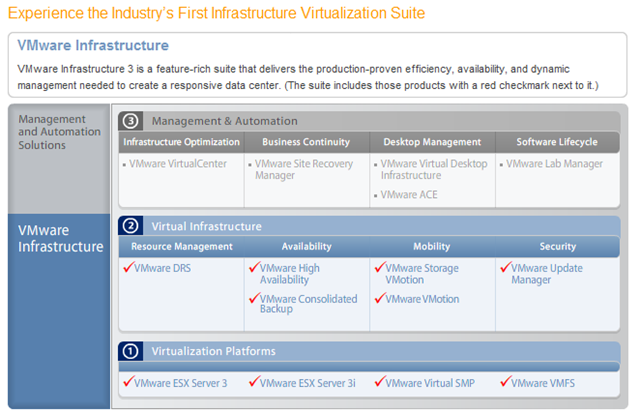
  • VMware Infrastructure 3 Foundation (previously called “Starter”) will include VMware  ESX Server, VMware ESX Server 3i, VMware Consolidated Backup and the new VMware Update Manager. Unlike the previous VMware Infrastructure 3 Starter, VMware Infrastructure 3 Foundation will have no restrictions on shared storage connectivity, memory utilization or number of CPUs of the physical server. VMware Infrastructure Foundation list price will be $995 per 2 processors.
  • VMware Infrastructure 3 Standard is designed to bring higher levels of resiliency to IT environments at greater value. In addition to the capabilities of VMware Infrastructure 3 Foundation, VMware Infrastructure 3 Standard will include VMware HA which provides automated restart of virtual machines affected by hardware failure.  VMware Infrastructure 3 Standard list price will be $2995 per 2 processors.
  • VMware Infrastructure 3 Enterprise contains the entire array of virtual infrastructure capabilities for resource management, workload mobility, and high availability. In addition to the capabilities in VMware Infrastructure 3 Standard, it also includes VMware VMotion, VMware Storage VMotion, and VMware DRS with Distributed Power Management (DPR). VMware Infrastructure 3 Enterprise list price will be $5750 per 2 processors.
  • VMware VMotion, Storage VMotion and DRS with DPM will also be available for standalone purchase with VMware Infrastructure 3 Foundation and Standard.
  • Existing VMware Infrastructure customers with valid support and subscription contracts will receive the new products and features included in each edition at no additional cost.

Lees de rest van het artikel hier: http://www.vmware.com/company/news/releases/esx_35.html