Microsoft: Set Google as default search provider in Internet Explorer 7


Dit kun je doen door het onderstaande registry bestand te importeren.

Windows Registry Editor Version 5.00

[HKEY_CURRENT_USER\Software\Microsoft\Internet Explorer\SearchScopes]
“DefaultScope”=”{06652DC2-D1BD-4BD1-BACA-EC681D3E6E33}”
“Version”=dword:00000001

[HKEY_CURRENT_USER\Software\Microsoft\Internet Explorer\SearchScopes\{06652DC2-D1BD-4BD1-BACA-EC681D3E6E33}]
“DisplayName”=”Google”
“URL”=”
http://www.google.com/search?hl=en&q={searchTerms}&meta=”

[HKEY_CURRENT_USER\Software\Microsoft\Internet Explorer\SearchURL]
@=
http://www.google.com/keyword/%s

Je kunt een ook een custom ADM maken om dit via een GPO door te voeren. Hoe dit werkt lees je in KB918238

Microsoft: Server 2008 Server Manager to support WSUS 3.0 SP1


An update for Windows Server 2008 Server Manager (KB940518) has been released to integrate Windows Server Update Services 3.0 Service Pack 1 (WSUS 3.0 SP1). This update to Server Manager enables full integration of WSUS 3.0 SP1 into Server Manager, allowing installation, configuration, and management of WSUS 3.0 SP1 using the Server Manager console and wizards.

image

How to determine whether the service pack is installed

Look for Update for Windows (KB940518) in the View installed updates item or in the Programs and Features item in Control Panel. If Update for Windows (KB940518) does not appear, the update is not installed.


Installation instructions

To avoid restarting the computer, verify that the Initial Configuration Tasks, Server Manager, and the Servermanagercmd.exe process are not running during the installation process. You must also log on to the computer as an administrator to install this update.


1. On a computer that is running Windows Server 2008, download the update package from the Microsoft Web site that is listed in the “Update information” section.

2. Double-click the download package to start the Setup wizard. Follow the instructions in the wizard to complete the installation.

3. Use one of the following methods to open Server Manager:

• Click Start, right-click Computer, and then click Manage.

• Click Start, point to Administrative Tools, and then click Server Manager.

• Click the Quick Launch bar, and then click Server Manager.

Note If WSUS 3.0 SP1 is already installed on your computer, you do not have to complete the remaining steps.

4. On the Server Manager home page, click Add Roles in the Roles Summary section.

5. On the Select Roles page of the Add Roles Wizard, click to select Windows Server Update   Services from the list of available roles.

6. Follow the instructions in the Add Roles Wizard to complete installation.

More information and download locations can be found here: http://support.microsoft.com/kb/940518

Bron: http://windows2008security.com/windows-server-security/update-for-windows-server-2008-server-manager-to-support-windows/
Microsoft: Empty Device Manager In Windows XP


After upgrading to servicepack 3 in Windows XP you might get the following symptoms:

After you install Windows XP Service Pack 3 (SP3), Device Manager may not show any devices and Network Connections may not show any network connections.

This problem may occur when an antivirus application is running during the installation of Windows XP SP3.

Microsoft has created a small utility you can download here: http://www.microsoft.com/

More information about this problem can be found in KB953979

Scalable Networking Pack Rollup Released


De rollup package vind je hier: KB950224

Meer informatie over SNP vind je hier: http://www.microsoft.com/technet/network/snp/faq.mspx

Verder kwam ik de volgende quote tegen:

As more companies deploy Windows 2008 and Vista, it is crucial, or in my opinion, critical that this hotfix be applied to all Windows 2003 servers that may communicate with these operating systems. One of the main reasons is a new feature called TCP auto-tuning which makes use of RSS to expand and shrink the sizes of your TCP window to increase/decrease throughput based on current network load. This feature greatly increases throughput on your network, but if there is an underlying problem with the network card driver or any of these features between disparate systems, you may experience slower than normal network performance. The good news is that the Chimney feature is disabled by default in Vista/Windows 2008.

Bron: http://blogs.technet.com/mikelag/archive/2008/08/28/scalable-networking-pack-rollup-released.aspx

Microsoft: New licensing Flexibility


Microsoft heeft eindelijk de licentie voorwaarden aangepast voor het haar software m.b.t. virtualisatie.

New Licensing Flexibility

Microsoft is updating its software licensing terms for 41 server applications, including Microsoft SQL Server 2008 Enterprise edition, Microsoft Exchange Server 2007 Service Pack 1 Standard and Enterprise editions, Microsoft Dynamics CRM 4.0 Enterprise and Professional editions, Microsoft Office SharePoint Server 2007, and Microsoft System Center products. With the new terms, the company is waiving its previous 90-day reassignment rule, allowing customers to reassign licenses from one server to another within a server farm as frequently as needed. For many customers, the change will reduce the number of licenses they need to support their IT systems, increase agility, and simplify the tracking of application instances or processors because customers now can count licenses by server farm instead of by server.


Expanded Technical Support

Microsoft has updated its technical support policy for 31 server applications so that customers can receive technical support when deploying those applications on Windows Server 2008 Hyper-V, Microsoft Hyper-V Server or any other third-party validated virtualization platform. Now customers can get the same level of product support in a virtualized environment that they are accustomed to with nonvirtual environments. More information is available at http://support.microsoft.com.

To enable this support policy, Microsoft launched the Server Virtualization Validation Program in June 2008. The program is open to any software vendor to test and validate its virtualization software to run Windows Server 2008 and previous versions of Windows Server. To date, Cisco Systems Inc., Citrix Systems Inc., Novell Inc., Sun Microsystems Inc. and Virtual Iron Software Inc. are participating in the program.

“Technical support of virtualized images is an industrywide challenge,” said Roger Levy, senior vice president and general manager of open platform solutions at Novell. “Novell and Microsoft continue to collaborate to optimize bidirectional virtualization between Windows Server and SUSE Linux Enterprise with Xen. Microsoft’s Server Virtualization Validation Program provides customers with additional peace of mind when they run Windows as a guest in a validated environment such as SUSE Linux Enterprise.”


Lees het hele artikel hier: http://www.microsoft.com/presspass/press/2008/aug08/08-19EasyPathPR.mspx

LDAP Query


In mijn omgeving werken we nu nog met twee verschillende loginscripts. Ik wilde graag weten welke gebruikers die nog enabled waren het oude loginscript aangekoppeld hadden. Dit kun je doen door de volgende LDAP query uit te voeren in Active Directory Users and Computers.


De onderstaande query geeft alle users weer met het loginscript login.bat en de accountstatus op enabled

(objectCategory=person)(objectClass=user)(!(userAccountControl:1.2.840.113556.1.4.803:=2)(scriptPath=login.bat))


De volgende LDAP query doet bijna hetzelfde als de bovenstaande alleen geeft deze de personen terug met de accountstatus op disabled

(objectCategory=Person)(objectClass=User)(userAccountControl:1.2.840.113556.1.4.803:=2)(scriptPath=login.bat)


Een LDAP query ziet er dan als volgt uit:

image

Geholpen door het volgende KB artikel: KB827754

Full backups of virtual machines and Windows VSS


Tim Jacobs heeft op zijn blog een super artikel geschreven over Full backups of virtual machines and Windows VSS.

One of the new features that is appearing in backup products that take backups of an entire virtual machine, as opposed to using an agent inside the guest operating system, is the ability to cooperate with Windows VSS (Volume Snapshot Service) inside the guest. For example, the recently released version of VMWare’s Consolidated Backup 1.5, now supports VSS quiescing for Windows 2003, Windows Vista, Windows 2008; vizioncore’s vRanger Pro backup utility has been supporting VSS for Windows 2003 for some versions already.
Several opinions exist on whether this is in fact a useful feature or not; for example, not so long ago the developers of esXpress talked about not including VSS quiescing into their product at that time because it adds additional complexity and does not offer any significant benefits in their opinion (see here). This discussion is still alive as you can see for example here, and the big question is indeed: can you rely on live backups of database virtual machines?

Lees de rest van het artikel hier: http://timjacobs.blogspot.com/2008/07/full-backups-of-virtual-machines-and.html

Whitepaper: VMware and VSS: Application Backup and Recovery


Veeam schrijft het volgende:

More and more organizations are choosing VMware Infrastructure to virtualize their mission‐critical applications (Active Directory, Exchange, SharePoint, SQL Server) to create a flexible, easily administered virtual infrastructure.
Virtual machines (VMs) and any applications they contain must be protected against failure. Typically, in the virtual world, this is done by performing an image‐level backup of the whole machine (for instance, using VMware Consolidated Backup). This method results in what is known as a crash‐consistent image. Restoring a crash‐consistent image is essentially equivalent to rebooting a server after a hard reset. For operating systems, this has not been an issue, since they can easily handle this type of activity. For database applications as well as for applications featuring replication, however, such a restore will often result in lost data, data corruption, or application failure.
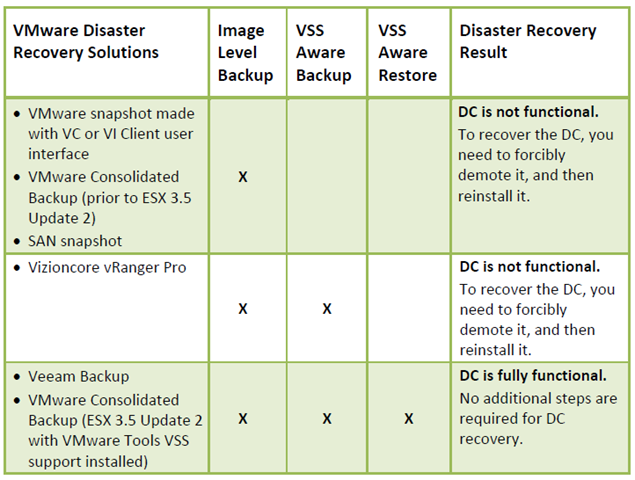
To illustrate this concept, let’s review the consequences of using different VM disaster recovery methods for one of the most common mission‐critical applications: a Microsoft Active Directory domain controller (DC). Depending on the solution used, the following results will be achieved:

image

Download de PDF hier: VMwareandVSS-ApplicationBackupandRecovery.pdf