Citrix: EventID 110


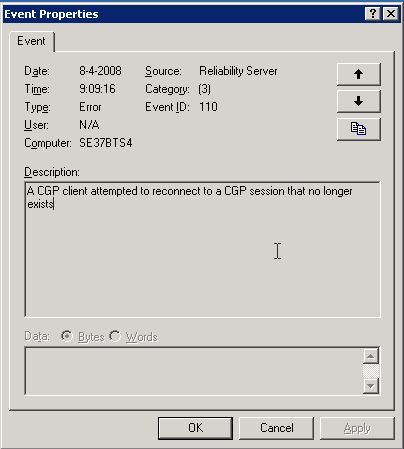
De volgende melding kun je terug vinden op je Citrix server. Deze melding treed op zodra je hotfix rollup pack 1 hebt geïnstalleerd.
image

Oplossing / Workarround

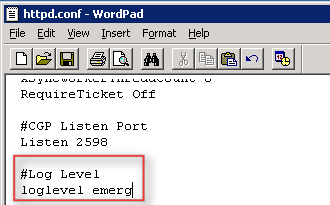
Open het bestand C:\Program Files\Citrix\XTE\conf\httpd.conf in Wordpad.

Voeg daarna de volgende text toe:

#Log Level

loglevel emerg
image 

Als laatste herstart je de XTE service. Dit kun je via Start – Run – Services.msc doen of via het commandprompt:

net stop “Citrix XTE Server” en net start “Citrix XTE Server”

Meer informatie over deze issue vind je hier: CTX114680
Citrix: How Policies Impact Citrix PS Environments


There are numerous ways to apply a configuration or security setting onto a group of servers within a Presentation Server environment. Because policies are so unique, diverse and customizable, there is no single, correct method toward policy design. However, this document will give the key areas to consider when deciding on the appropriate approach to implementing a setting using a policy. This design consideration will look at the following types of policies and the common practices associated with them:

  • Citrix Presentation Server policies: These policies are defined within the management console on Presentation Server and only apply to connections using the Citrix ICA protocol but not the Microsoft RDP protocol. Presentation Server policies also allow for the configuration of Presentation Server-specific options like Session Printers and Progressive Display. The power of these policies is that they have the ability to be filtered based on users, location and even the method for launching the published applications. Many of these filters are only available within Presentation Server.

  • Active Director y policies: These policies are configured within Active Directory. They are applied to organizational units (folders), domains, sites, etc. within the Active Directory structure. A single Active Director y policy can consist of a computer policy and a user policy. A computer policy consists of settings that affect the physical computer and impact all users logging onto the computer while a user policy affects the user and is applied on all system s the user logs on to. Local server policies and custom policies are type s of Active Director y policies and are described as:

  • Local Server Policies and Settings: Local Server policies are similar to Active Directory policies, except they are managed on a server-by-server basis and configured locally on that specific server, where Active Directory policies are managed centrally and can impact hundreds or thousands of users or computers with a single application of a policy.

  • Custom Active Directory Policy Templates: Custom ADM templates, like the Citrix icaclient.adm template, are Active Directory or Local Server policies used to make configuration settings. They can be custom registry settings or simply standard policies re-organized as two examples. The concept of custom templates is supported, but depending on the author of the custom template, supportability by either Citrix or Microsoft might not be available. Organizations will have to verify the supportability of custom ADM templates. Also, any custom template used might already have settings configured, potentially causing issues with the environment. It is highly recommended to test custom policies in a test environment before implementing in production.

The following five areas are the basis f or the design decisions for an enterprise deployment of Presentation Server. These types of policies will be impacted by the following design areas:

  • Policy Type

  • Policy Integration

  • Policy Filters Policy Prioritization

  • Policy Precedence

Download hier de pdf: How_Policies_Impact_Presentation_Server_Environments_JS.pdf


Bron: http://www.dabcc.com/downloadfile.aspx?id=531

Script: Install Printer Drivers On TS/Citrix Servers


Aleks van http://www.virtualistic.nl/ heeft een script geschreven voor het installeren van Printer drivers op een Terminal / Citrix server. Ik was de gelukkige betá tester (zonder problemen) en alles werkte out of the box.

Hieronder een quote van de website van Aleks:

Prerequisites:
– You have to be able to install printdrivers (duh!)
– You have to be able to connect to your printerserver (test this through typing \\yourprintserver you should see your shared printers)
What is inside the zip file?
– The script of course!
– Addprinters.txt this is the input file for the script. Place your printers in this .txt file (eg: \\yourprintserver\printer1)
The default location of the addprinters.txt is C:\ You can change this but make sure you edit the script to reflect the new location.

Zodra je het Addprinters.txt hebt gevuld, start je het script en dan verschijnt het onderstaande scherm.

PrinterDriver_Script

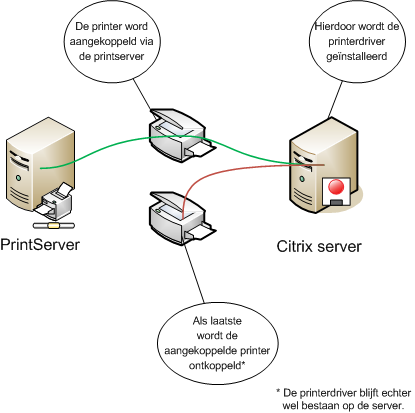
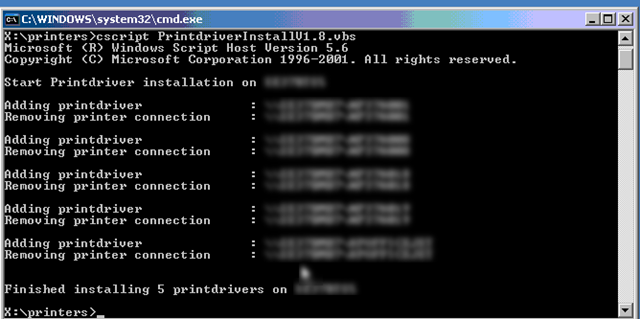
Nu ben je natuurlijk benieuwd wat het script gedaan heeft. Dat laat ik zien in de onderstaande tekening:

printerscript

Meer informatie en de download vindt je hier: http://www.virtualistic.nl/

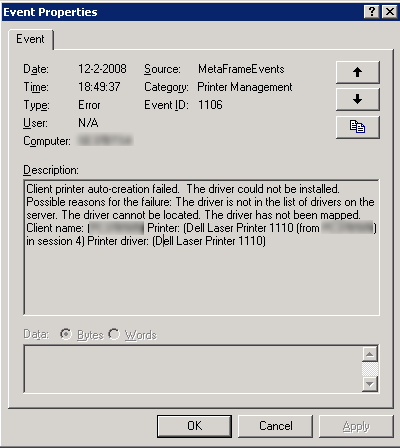
Citrix: EventID 1106


De volgende melding kun je tegenkomen in je application log op een Citrix Server.

eventid1106

Dit kun je oplossen door de volgende registry key te importeren:

Windows Registry Editor Version 5.00

[HKEY_LOCAL_MACHINE\SOFTWARE\Citrix\Print]
“DefaultPrnFlags”=dword:80000000

Deze oplossing geld alleen voor Presentation Server 4 en hoger.

Voor meer informatie zie: CTX488760

Citrix: Symantec Tamper Protection Alert & CPU Utilization Management Executables


De volgende symptomen kunnen optreden:

Symptoms

One or more “SYMANTEC TAMPER PROTECTION ALERT” error events are written by Symantec Antivirus to the Application log. These messages are usually paired with a “CPU Utilization Management cannot manage process <PID>” warning event written by CTXCPUUtilMgmt to the Application log.

An example Symantec Antivirus event is as follows:

Log: Application
Type: Error
Source: Symantec Antivirus
Event: 45
Description: SYMANTEC TAMPER PROTECTION ALERT
Target: C:\Program Files\Common Files\Symantec Shared\ccEvtMgr.exe
Event Info: Open Process
Action Taken: Blocked
Actor Process: C:\Program Files\Citrix\Server Resource Management\CPU
Utilization Management\bin\ctxcpusched.exe

An example CTXCPUUtilMgmt event is as follows:

Log: Application
Type: Warning
Source: CTXCPUUtilMgmt
Event ID: 1542
Description: CPU Utilization Management cannot manage process <PID>.
Windows system message: 0x5.

The two events are associated by the PID in the CTXCPUUtilMgmt event and the PID of the Target in the Symantec Antivirus event.

Zie CTX113486 voor meef informatie

How To: Disable the Presentation Server Console Splash Screen


Voor een aantal beheersdoeleinden moet je helaas nog steeds gebruik maken van het oude maar o zo bekende Presentation Server Console. Wat mij altijd irriteerde was het trage opstarten. Ik kwam er achter dat je via een simpele tweak afscheid kan nemen van het onderstaande splash screen. Wat volgens mij wel aardig wat opstarttijd scheelt.

CPSCS_Splashscreen

Open de properties van het Presentation Server Console en ga naar het tabblad Shortcut. voeg nu -nologo toe aan de Target.

CPSCS_Splashscreen_1

Sluit dit scherm af door alles te bevestigen met OK.

Nu start het console gelijk op met het onderstaande scherm.

CPSCS_Splashscreen_2

Bron: CTX101937

Citrix: a 20-second delay occurs when you log on to the domain from a client computer that has Internet Explorer 7 installed


Sinds de installatie  van IE7 bleef het onderstaande scherm tussen de 10 a 20 seconden hangen .

Internet_Explorer_Branding_Policy 

Op de volgende pagina http://support.microsoft.com/kb/941158 vind je meer info over deze bug. Er is helaas nog geen vrije patch voor te verkrijgen, deze moet je bestellen. Meer informatie vind je hier: http://support.microsoft.com/contactus/?ws=support

De hotfix kun je via het volgende batchfile installeren.

Het script doet het volgende:

  • Installeerd KB941158 unattended
  • Voegt de volgende registry key toe.

CLS
@ECHO OFF

ECHO.
ECHO installing KB941158
X:\apps\ie7\Patches\IE7-WindowsServer2003-KB941158-x86-ENU.exe /passive /norestart

ECHO.
ECHO Adding registry key
REG ADD “HKLM\SOFTWARE\Microsoft\Internet Explorer\Main\FeatureControl\FEATURE_PARSING_BRANDING_CMDLINE_FLAGS_KB941158” /v “*”  /d “1” /t REG_DWORD /f 

Shutdown -r -t 20

Citrix: CSEIT 2007 Presentations and Webcasts


Zoals Doug Brown al melde op de website http://www.dabcc.com/article.aspx?id=6878 zijn de volgende video’s vrij gegeven door Citrix.

Presentation Server 4.5 for Windows Server 2003 videos:

Citrix: Presentations from the Citrix Solutions Conference


Hieronder vind je een lijst van de presentaties:

Application delivery and virtualization in a dynamic world – Rob van der Hoeven
The End User Experience – Brad Pedersen
Citrix Live Demo – Andreas van Wingerden
Application & Desktop Virtualization – Jon Coyle
Implementing Citrix Wanscaler – Oded Nahum
Presentation Server Overview – Thomas Zell
Windows Server 2008 sneak preview – Arlindo Alves
Enhancing Application Delivery with OS Streaming – Mark Yohai
Citrix Presentation Server Smartauditor – Joel Strocker
Deliver all your Webapplications: Netscaler– Denny Engels/ Jan Zoetemelk
Application Monitoring (Edgesight) – Tony Spring
Windows Server 2008 Terminal Services – Bernard Tritsch
Benefit from the new features (Enteo) – Stephan Glathe
Application Streaming – Barbara O’Grady
Upgrading from Secure Gateway – Jan Christoffels
Developing Dynamic Application Delivery Infrastructures – Simon Frost
HP Bladesystems – Geert Kuijken
Improve Application Delivery to your Branch Offices – Rob Krol
Defeating Web Application Attacks – Demetris Booth
Service Delivery Management – Bob Janssen (RES)
Security: what goes wrong… – Chris Mayers
The latest in Windows Application Delivery – Martijn Bosschaart
Online Collaboration – Simon Presswell

Bron: http://www.bjornbats.nl/index.php?option=com_content&task=view&id=328&Itemid=1

Citrix: SMA Service and the My Knowledge Feature


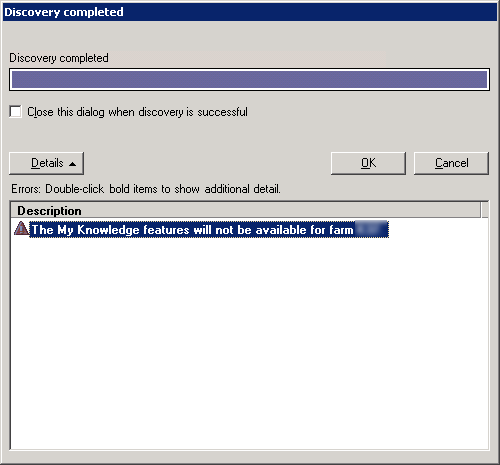
Toen ik de Access Management Console van Citrix opende kreeg ik na de Discovery de onderstaande foutmelding.

MyKnowledge

Dit komt omdat de Citrix SMA Service niet gestart was. Toen ik deze wilde starten kwam er weer een foutmelding:

Could not start the Citrix SMA Service service on Local Computer. Error 1053: The service did not respond to the start or control request in a timely fashion.

SMA_Service

Ik heb hier nog geen sluitende oplossing voor gevonden maar ik heb wel een workarround.

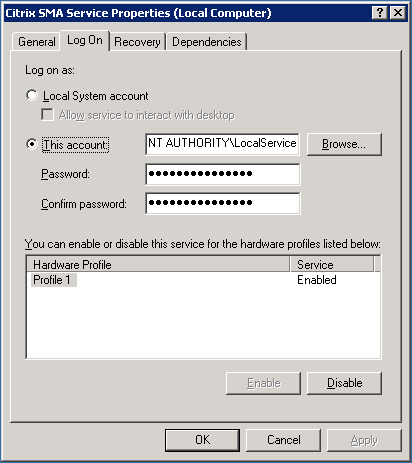
Standaard word de SMA Service gestart met het account: NT AUTHORITY\LocalService.

Citrix_SMA_Service

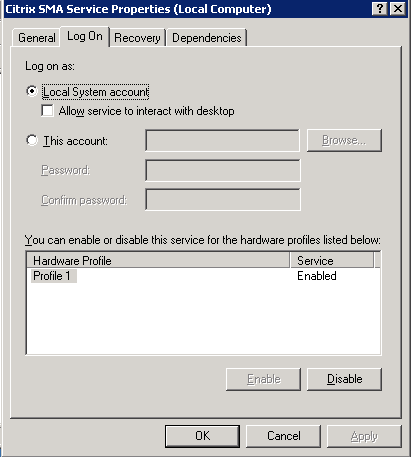
Als je het account aanpast naar het Local System account, dan start de SMA Service weer gewoon op.

Citrix_SMA_Service_1

Als éé’n van jullie deze error kent en de oplossing hier voor weet, hoor ik dat natuurlijk graag 😉