
Last week I posted a script to add Notes to a VM. After posting this script there was a little discussion on Twitter with @vmdoug, @gabvirtualworld if the Notes field is the right field to add this kind of information. So @vmdoug introduced me to the world of Custom Fields.
So I changed my CSV file and added the Field entry. This Field entry will be de name of your custom field. In my case I called it Description.
| VMName,Field,Note DC01,Description,Domain Controller VC01,Description,vCenter Server |
The following one-liner will fix this for you:
Import-Csv "D:\*.csv" | % { Get-VM $_.VMName |
Set-CustomField -Name $_.Field -Value $_.Note -Confirm:$false }
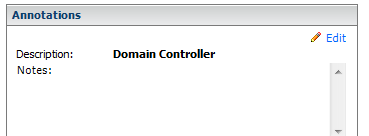
After running the script you will see the Description field with a new entry:
This one-liner will run very slow on a Large environment. So if you have large environment you should definitely check out LucD post on Alan Renouf’s Blog: http://www.virtu-al.net


















 ICT-Freak.nl